AI Music
AI Watermark Remover for Music: The Only Tool Built for Suno & Udio
You made a track with AI. It sounds great. You upload it to a distributor and — rejected. Or worse, it goes live, then just vanishes two weeks later. No email, no explanation. Gone.
That is not bad luck, and it is not your song being “too AI-sounding.” It is a detection problem, and it has a specific fix. We dug into how music watermarking actually works, watched a creator run 50 AI tracks through a three-month distribution test, and pulled apart every tool that claims to solve it. Here is what an AI watermark remover for music really does, why almost every “remover” you find is secretly a detector, and the one tool we recommend for the job.
The short version
Generators stamp exported audio with inaudible markers — SynthID, C2PA credentials, spectral fingerprints — and distributors scan for them. Flagged tracks earn nothing.
You do not need a detector (which only scores the problem). You need a remover that strips the markers and re-masters to spec. In the music space, Undetectr is the first and only watermark remover built specifically for audio — and it is the tool we recommend.
Why your AI tracks keep getting flagged
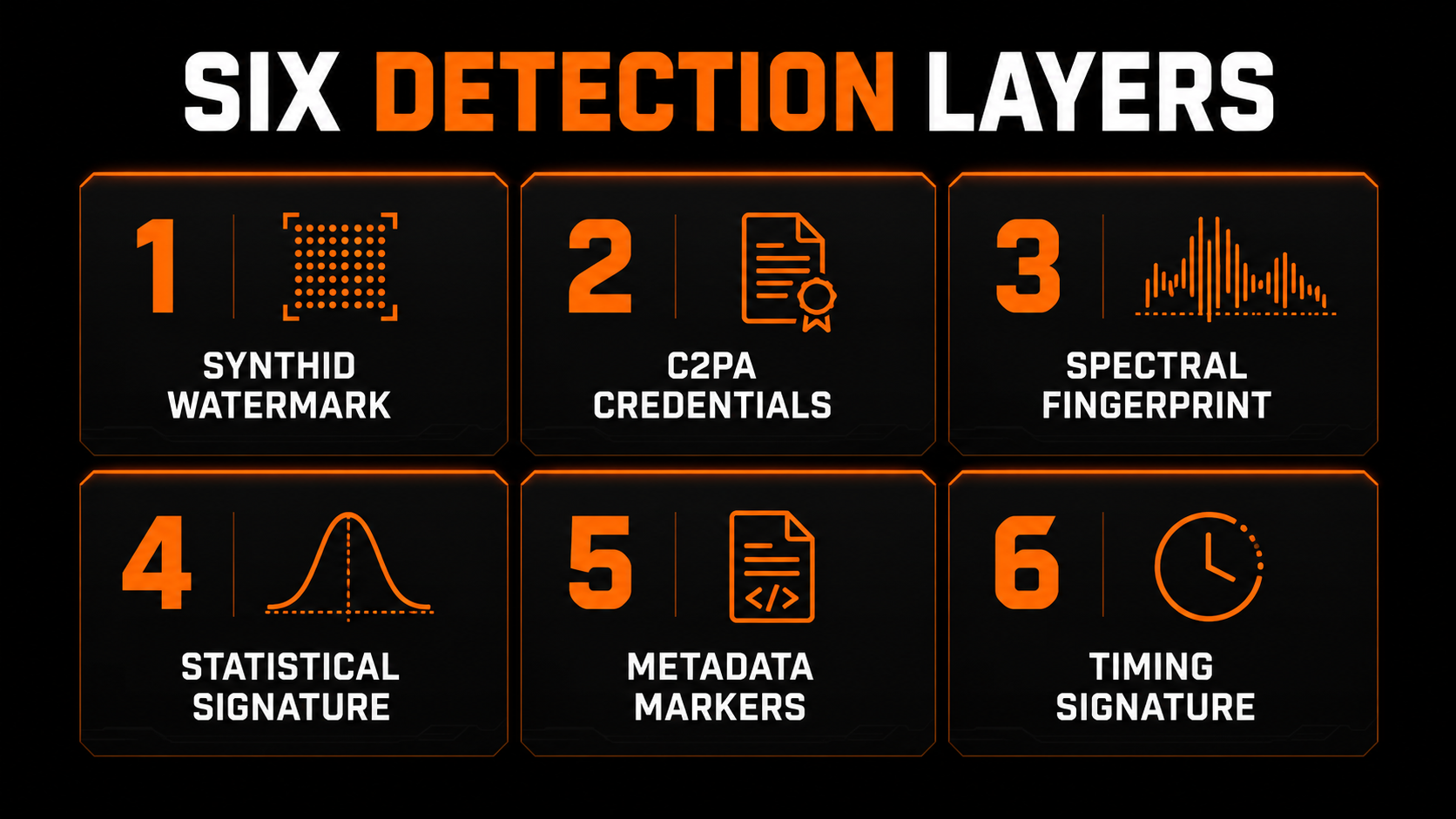
Tracks out of Suno and Udio sound genuinely good now. The problem is not the music you hear — it is the baggage you cannot. Every time you export from a big generator, the file leaves with invisible tags attached: Google’s SynthID watermark, C2PA content credentials, and spectral fingerprints woven into the signal itself.
To your ears, the track is totally fine. To a distributor’s automated scanner, it lights up like a flare. And every distributor scans now. On top of the watermark, raw generator exports usually ship with off-spec loudness that reads as “low effort,” plus the risk that your output overlaps too closely with something already released. Any one of those three is enough to get a track pulled.
The short explainer below lays out the whole detection problem — worth seven minutes before you upload anything else.
The detector trap (why most “removers” do nothing)
Here is the part that trips everyone up. You search for an AI watermark remover and what you actually get back is a pile of detectors. They scan your track, hand you a confidence score, and tell you it is flagged. Great — that helps you exactly zero.
A detector is a diagnosis. What you need is elimination. Those two things get marketed with the same keywords, but they solve opposite problems: one confirms the watermark is there, the other takes it out. And the generic image or “AI text” watermark tools that also show up? Useless here — audio is a completely different signal.
- ✕Scans and returns a confidence score
- ✕Tells you the track is flagged
- ✕Leaves the markers fully intact
- ✕Track still gets rejected on upload
- ✓Strips SynthID, C2PA and spectral prints
- ✓Re-masters to streaming loudness spec
- ✓Output sounds identical to the input
- ✓Track clears the gate and earns royalties
That distinction is the whole ball game. And in the music space, one tool is genuinely built to go the removal direction rather than the detection direction: Undetectr.
What an AI watermark remover for music actually does
Undetectr’s pitch is narrow, and that is a compliment. It takes a raw AI export and makes it delivery-ready — nothing more, nothing less. It does not distribute your music, it does not market it, and it does not write it for you. It does three jobs, and it does them well.
1. It strips the watermark — six layers at once
This is the headline. It removes the inaudible detection markers — SynthID, C2PA credentials, spectral fingerprints — roughly six layers of them in a single pass. It is tuned exclusively for audio: not images, not video. The cleaned file sounds identical to the original; it just stops tripping the scanners.
2. A free mastering pass, tuned to each platform
The second real piece is mastering. It auto-targets the loudness spec every platform wants — around -14 LUFS for Spotify, Apple Music and YouTube Music — so your track never reads as off-spec. You do not touch an EQ; it just hits the number. A human engineer charges roughly $50 to $200 a track for that. Here it is included.
3. Sound Match — prompts from a reference song
The third piece is Sound Match, and the name misleads people so it is worth being precise. You give it any song and it analyses genre, tempo, key, mood and production style, then returns ready-to-use prompts for Suno, Udio and ElevenLabs aimed at that sound. It is a writing aid for the generation stage, not a check on your own file. There is also a vault of 100-plus tested prompts alongside it.
Worth stating plainly: nothing in Undetectr compares your track against existing recordings. If you need to know whether your output sits too close to a released song, that is still your own job.
The four-step workflow
The best part might be how embarrassingly simple the actual process is. No desktop app, no plugin — it runs in any browser and accepts WAV, MP3, FLAC and M4A. Under a minute per track.
Make your track in Suno, Udio, Stable Audio or Riffusion. Export it however you normally would.
Upload the file. It processes in the browser and hands back a clean, mastered version in under 60 seconds.
Feed it a reference song and it returns prompts for Suno, Udio and ElevenLabs aimed at that sound.
Send the cleaned file to DistroKid, TuneCore or your platform of choice. It clears the gate on the first try.
Does it actually work? A 50-track, three-month test
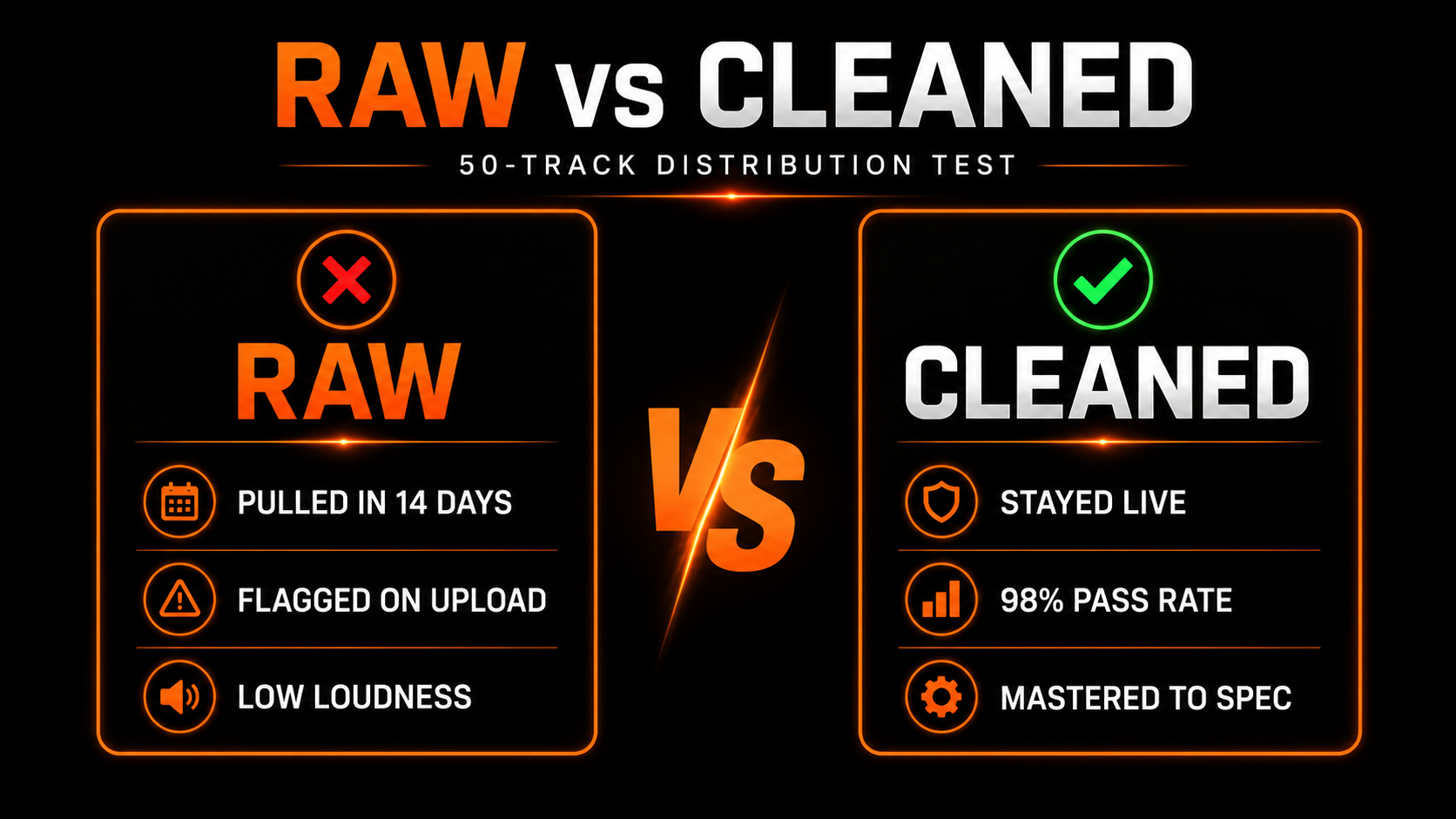
Marketing claims are cheap, so the number that matters is what survives a real distribution test. One creator ran exactly that: 50 AI tracks from Suno and Udio, half uploaded raw and half cleaned through Undetectr, all pushed via DistroKid to five major platforms from a cold start with zero audience. Every cent tracked for three months.
The raw batch told the story fast. Several tracks went live, then got muted or pulled within 14 days. The watermark flagged them, the loudness read as low effort, and near- duplicate fingerprints got held. The problem Undetectr claims to fix is not marketing fiction — it is real, and it compounds: repeated rejections do not just kill individual tracks, they put your whole distributor account under suspicion.
The cleaned batch was a different result entirely.
- ✕Several tracks muted or pulled inside 14 days
- ✕Watermark flags on upload
- ✕Loudness read as low-effort
- ✕Near-duplicate fingerprints held
- ✓Every track stayed live across all 5 platforms
- ✓Loudness landed inside target, every time
- ✓Loudness landed on spec without a separate mastering pass
- ✓Zero manual EQ adjustments needed
Across an independent 50-track corpus, the same engine cleared major distributors at a 98% pass rate — DistroKid and TuneCore at 50/50, Apple Music and Amazon at 50/50, Spotify at 49/50, YouTube Music at 48/50 — while reducing AI-detection confidence from around 97% down to 2-3%. Nothing else in the same test cleared 75%.
Independent 50-track pass rates by platform
One honest note on the money, because the reviewer was refreshingly blunt about it: cleaning your tracks keeps them alive, it does not make them rich. From a cold start, streams pay roughly a third to half a cent each — coffee money that only compounds if you build a real catalog over time. Undetectr even ships an earnings calculator that tells you this to your face instead of overselling. That honesty is a point in its favor.
Pricing
This is where most tools quietly get you with per-track fees or subscriptions that scale with your catalog. Undetectr does not. There are two ways in, both one-time payments with 0% royalties taken.
One-time · 10 credits
- ✓ Enough to test the full workflow
- ✓ Watermark removal + mastering
- ✓ No subscription
One-time · unlimited · regularly $99
- ✓ Unlimited track processing, forever
- ✓ Mastering, Sound Match, Prompt Vault
- ✓ All future tools and updates
- ✓ No per-track fee — track 1 and track 500 cost the same
Do the math against a human mastering engineer at $50 to $200 per track and you break even on the very first song. For anyone running a real catalog, the lifetime plan is the only version where the numbers make sense: pay once, process forever.
Pros and cons
What we liked
- ✓Actually removes markers instead of just detecting them — audio-specific.
- ✓Free mastering pass hits platform loudness targets automatically.
- ✓Sound Match turns a reference song into ready-to-use generation prompts.
- ✓Bulk Suno importer processes a whole catalog at once.
- ✓One-time pricing with no per-track fees or royalty cut.
- ✓Built-in earnings calculator that is honest rather than hype.
Where it stops
- —It will not fix a bad song — quality and discovery stay entirely on you.
- —Only worth it at volume; for one or two hobby tracks the math is thin.
- —No check on whether your track is too close to an existing release — Sound Match does not do this.
- —No offline mode, no Linux desktop app, no team accounts or API.
- —Solves exactly one problem — detection. It is delivery prep, not an income machine.
Who it’s for (and who should skip it)
Let us be specific, because this tool is not for everyone. If you are a hobbyist dropping the occasional track for fun, skip it — you are not losing enough tracks to takedowns for it to pay back. Save your money.
But if you are running a real catalog at volume — dozens or hundreds of tracks — and you are actually losing them to takedowns and muted uploads, this is the exact scenario it was built for. At that scale, a cleaner delivery pipeline and a takedown-prevention layer are worth far more than the one-time price. And you should use it as intended: release prep for music you made, so it can get distributed and earn — not for spamming platforms or impersonating real artists.
The verdict — why we recommend Undetectr
After 50 tracks, three months, and every cent tracked, the picture is clear. Undetectr does the one thing it claims: it keeps AI tracks from getting flagged, mastered off-spec, or pulled — and it does it well. It does not make you money, it does not make your songs good, and it does not get them heard. To its credit, it never pretends to.
Most importantly for this guide: it is the first and only AI watermark remover built specifically for music. Everything else is a detector wearing a remover’s keywords, or an image tool that has no idea what to do with a waveform. If you make AI music and you want it to stay live, Undetectr is the best we have found — purpose-built, fast, and a genuine no-brainer at $39 for lifetime access. That is why it is the tool we recommend.
Our recommended tool
Clean your tracks before the next upload
Strip the watermark, master to spec, and clear the gate on the first try. Try Undetectr free — no credit card, 150+ platforms supported.
Keep reading