AI Music
Best Stem Splitter for AI Music in 2026: 5 Tools Ranked
Every stem splitter works the same way at heart: it listens to a finished stereo mix and estimates which sound belongs to which instrument. That is a harder job on an AI song than on a studio recording, because the generator never had separate tracks in the first place. The best stem splitter for AI music is the one that copes with that, and costs you least to find out.
We ranked five on their own documentation and pricing, read on 29 October 2026, and on MusicRadar's independent listening test from January. Then we ran the one free engine most tools are built on, Demucs, on three AI-generated songs to see what it actually returns.
The short version
- Ultimate Vocal Remover is No. 1. Free, Windows and Apple silicon, and a choice of model families, which is what AI vocals need.
- Logic Pro is No. 2 if you are on a Mac: its Stem Splitter topped MusicRadar's test of 11 tools.
- LALAL.AI is the easiest paid option, from $7.50 a month billed yearly with unlimited relaxed-queue use.
- Generate clean, then split. WaveQuake, our pick among Suno alternatives, does not export stems, so pair it with UVR.
Why splitting an AI song is different
A band recording starts as separate microphones. Split it, and you are undoing a mix that once had real edges. An AI song starts as a single rendered waveform: the vocal, its reverb and the band were generated together. A splitter has nothing to recover; it has to decide. Even Suno's own Get Stems, available on Pro and Premier as we covered in our Suno record-label guide, works from the finished mix.
Three things follow. Reverb and shimmer baked onto an AI vocal get split between the vocal and “other” stems, so a clean vocal stem can sound dry and the instrumental can keep a ghost of the singer. Generated instruments that blend into one texture, such as pads under a synth lead, rarely separate cleanly. And splitting is not repair: it moves an artifact into one stem rather than removing it, which is why repair tools such as iZotope RX are often the next step.
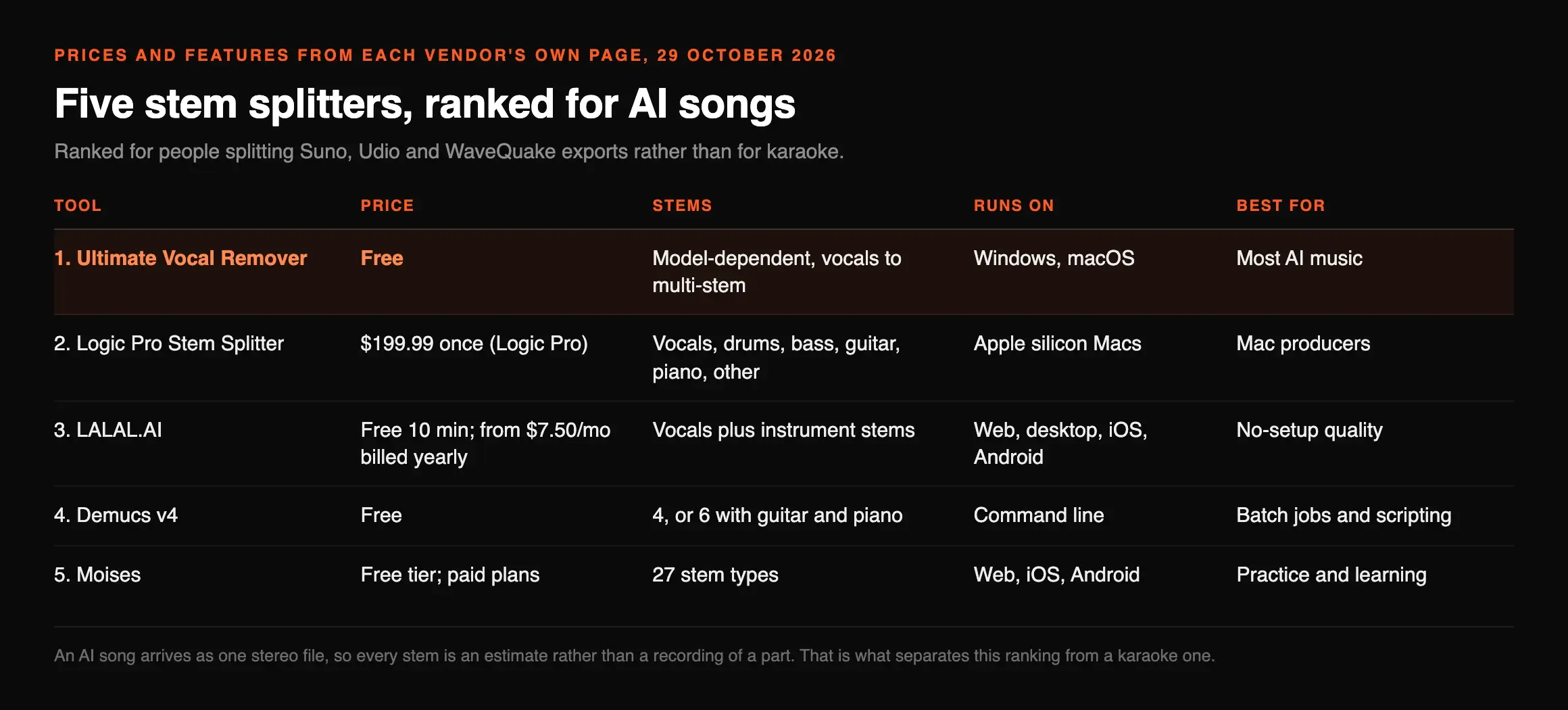
The five at a glance
| Tool | Price | Stems | Runs on | Best for |
|---|---|---|---|---|
| 1. Ultimate Vocal Remover | Free | Model-dependent, vocals to multi-stem | Windows, macOS | Most AI music |
| 2. Logic Pro Stem Splitter | $199.99 once (Logic Pro) | Vocals, drums, bass, guitar, piano, other | Apple silicon Macs | Mac producers |
| 3. LALAL.AI | Free 10 min; from $7.50/mo billed yearly | Vocals plus instrument stems | Web, desktop, iOS, Android | No-setup quality |
| 4. Demucs v4 | Free | 4, or 6 with guitar and piano | Command line | Batch jobs and scripting |
| 5. Moises | Free tier; paid plans | 27 stem types | Web, iOS, Android | Practice and learning |
1. Ultimate Vocal Remover: the best stem splitter for AI music
Ultimate Vocal Remover
Best overallA free, open-source desktop app that runs several separation model families, so you can pick the one that copes with your song.
Ultimate Vocal Remover (UVR) is a graphical app for running separation models, most of them trained by its own developers, plus Demucs. Version 5.6 installs on Windows 10 and later and on macOS Big Sur and later, and its notes say GPU acceleration on Apple silicon covers Demucs v4 and every MDX-Net model.
That choice of models is why it ranks first for AI music. When one model leaves reverb in the instrumental, another often does not, and trying both costs nothing. MusicRadar placed UVR's MDX-Net fifth of 11 against paid tools costing up to £529, which is a strong result for software that is free.
What we liked
- ✓Free and open source, with no minute limits
- ✓Choice of Demucs, MDX-Net and VR model families
- ✓Runs locally, so your unreleased songs stay on your machine
Where it stops
- —First launch can take five to ten minutes on a Mac, its notes say
- —Choosing a model is confusing at first
2. Logic Pro Stem Splitter: best if you are on a Mac
Logic Pro Stem Splitter
Best for MacBuilt into Logic Pro, and the winner of MusicRadar's January 2026 test of 11 stem tools.
Apple's Logic Pro guide says Stem Splitter extracts vocals, drums, bass, guitar, piano and other instrumental parts into regions you can edit, on Macs with an M1 or later chip. MusicRadar expected iZotope RX or SpectraLayers to win its test and found that the honour went to Logic Pro 11.2.2. If you already own Logic, this is the one to try first; if you do not, $199.99 is a lot to pay for splitting alone.
3. LALAL.AI: the easiest paid option
LALAL.AI
EasiestA web and app service that needs no setup, priced by processing minutes with an unlimited slow lane on paid plans.
LALAL.AI came third in MusicRadar's test. Its free Starter plan gives 10 minutes, enough to judge a few AI songs before paying. Lite is $7.50 a month billed yearly ($90) and Pro $10.50 a month billed yearly ($126); both include unlimited minutes in a Relaxed Queue plus 90 or 250 Fast Queue minutes. LALAL.AI says both queues give identical quality, so the cheaper plan only costs you waiting time.
4. Demucs: the free engine underneath
Demucs v4
Best for scriptingThe open model many splitters are built on, run from a command line.
Demucs v4 uses a Hybrid Transformer model. Its default, htdemucs, returns four stereo WAV stems at 44.1 kHz: drums, bass, vocals and other. A fine-tuned version takes four times as long for slightly better results, and a six-source version adds guitar and piano, though its own notes say piano “is not working great”. The code is MIT-licensed; the maintainer says the licence of the trained weights is not clear and that he is no longer actively developing it. For one song, use UVR. For fifty, Demucs scripts in a line.
5. Moises: best for practice, not production
Moises
Best for practiceA musician's app with the widest stem menu, built around learning and playing along.
Moises separates into 27 stem types, including vocals, guitar, bass, drums, piano, keys, winds and strings, and has a free tier with a limited number of uploads a month. Its tools for changing key and tempo make it excellent for learning a part. For reworking an AI song you mean to release, UVR or LALAL.AI give you more control over the result.
We split three AI songs with Demucs
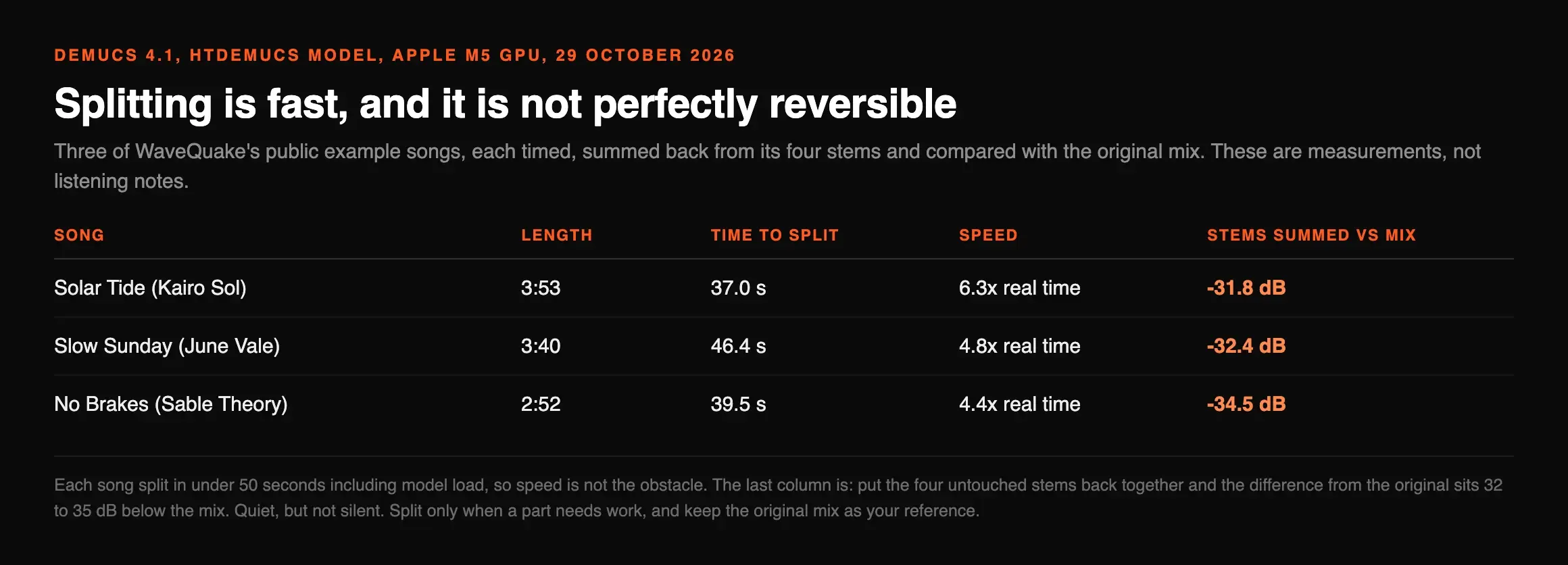
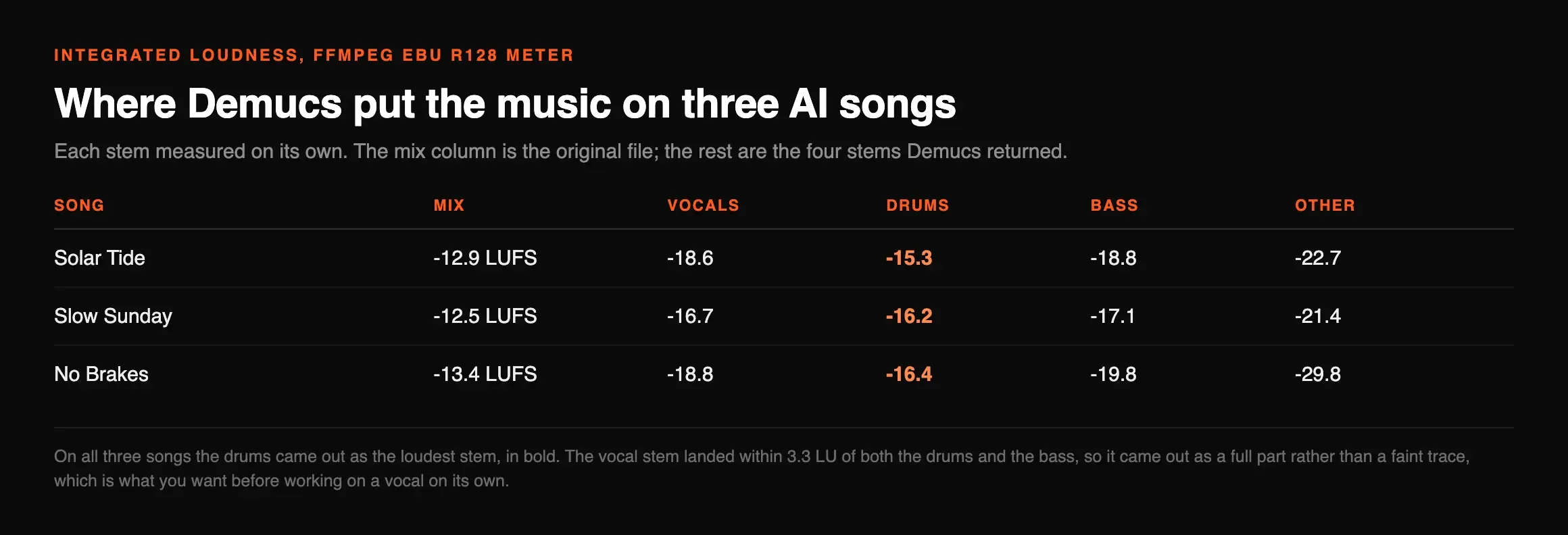
Vendor pages describe separation; they do not show you what comes back from an AI song. So on 29 October 2026 we installed Demucs 4.1 and ran its default htdemucs model on three of the public example songs from WaveQuake's listening room, on an Apple M5 Mac using its GPU. For each we timed the separation, added the four stems back together and compared the result with the original mix, and measured each stem's loudness with FFmpeg's EBU R128 meter. These are measurements, not listening notes.
| Song | Length | Time to split | Speed | Stems summed vs mix |
|---|---|---|---|---|
| Solar Tide (Kairo Sol) | 3:53 | 37.0 s | 6.3x real time | -31.8 dB |
| Slow Sunday (June Vale) | 3:40 | 46.4 s | 4.8x real time | -32.4 dB |
| No Brakes (Sable Theory) | 2:52 | 39.5 s | 4.4x real time | -34.5 dB |
Speed is not the obstacle: each song split in under 50 seconds, including loading the model. The one delay was our first run, which sat for most of an hour before separating anything, apparently waiting on the network; every run after that started at once. The last column is the useful one. Put the four untouched stems back together and the difference from the original sits 32 to 35 dB below the mix: quiet, but not silent. Splitting is not perfectly reversible, so split only when a part needs work, and keep the original mix as your reference.
| Song | Mix | Vocals | Drums | Bass | Other |
|---|---|---|---|---|---|
| Solar Tide | -12.9 LUFS | -18.6 | -15.3 | -18.8 | -22.7 |
| Slow Sunday | -12.5 LUFS | -16.7 | -16.2 | -17.1 | -21.4 |
| No Brakes | -13.4 LUFS | -18.8 | -16.4 | -19.8 | -29.8 |
The stem loudness shows where Demucs put the music. On all three songs the drums came out as the loudest stem, and the vocal stem landed within 3.3 LU of both the drums and the bass, so it came out as a full part rather than a faint trace, which is what you want before working on a vocal on its own. The “other” stem varied most: on No Brakes it measured 16 LU below the mix, meaning Demucs placed almost everything into vocals, drums and bass. With only four slots, whatever is not one of those lands in “other”, so if the part you need lives there, try the six-source model or UVR's MDX-Net models and compare.
From AI song to stems to release
Stems are a means, not the goal. The order below keeps the good parts of the generated mix intact and only splits what needs work.
| Step | Tool | Why |
|---|---|---|
| Generate the best take you can | WaveQuake | Unlimited generations and two versions each, so you pick rather than repair |
| Download the WAV | Your generator | Splitters and repair tools do better on uncompressed audio |
| Split only if a part needs work | UVR or Logic Pro | A buried vocal or a muddy bass is a stem job; a good mix is not |
| Process the stem | WaveQuake Custom Effects or iZotope RX | Tone on the isolated vocal, or repair of chirps and hiss |
| Recombine and master | Your DAW, then a mastering pass | Check loudness and true peak before upload |
WaveQuake fits this better than most generators because the finishing tools are already in the studio. Its help page says Custom Effects can load an audio file as well as a WaveQuake recording, and advises choosing an isolated vocal when you want an effect on the voice alone, which is exactly what a stem gives you. Its features and pricing are in our Suno alternatives ranking. Before upload, run the finished file through our 12-step release checklist. Splitting does not touch AI detection markers; for that, see our Suno watermark guide.
Frequently asked questions

Eddie Mathews — Editor, Erasy
Eddie reads the vendor's documentation first and runs the free tools himself where he can. Where a result is another publication's, this page names it.
What is the best stem splitter for AI music?+
What is the best free stem splitter?+
Can I get stems straight from Suno?+
Does WaveQuake export stems?+
Does splitting a track into stems remove the AI watermark?+
Is Demucs better than Ultimate Vocal Remover?+
Read at source on 29 October 2026: the Ultimate Vocal Remover and Demucs GitHub pages, Apple's Logic Pro guide to Stem Splitter, and the pricing pages of LALAL.AI and Moises. Logic Pro's $199.99 is Apple's US price. MusicRadar's test of 11 stem tools was published on 7 January 2026. Our Demucs test used Demucs 4.1.0 and the htdemucs model on WaveQuake's public example files, downloaded from wavequake.com the same day; times are wall-clock per song on an Apple M5 Mac, and loudness was measured with FFmpeg's ebur128 filter. Stems were not published. WaveQuake's Custom Effects details are from its help page.