AI Music
iZotope RX for AI Music: What It Fixes in a Suno Track (2026)
iZotope RX is the tool audio engineers reach for when a recording has a problem they cannot re-record. AI songs arrive with that problem built in: one stereo file, no session, and faults baked into the mix. That makes RX unusually useful for AI music, as long as you know which of its 50-odd modules match what you are actually hearing.
This guide maps the common complaints about Suno and Udio exports to the RX 12 modules built for them, using iZotope's own descriptions and the prices on the Native Instruments store on 29 October 2026. We did not run RX for this page, so where a module “does” something, that is iZotope's claim.
The short version
- Buy Standard if you buy at all. RX 12 Standard is $399 and is the cheaper of the two editions iZotope lists with Music Rebalance and Stems View.
- It fixes the sound, not the song. Hiss, harsh S's, clipping, washy reverb and a buried vocal are RX jobs. Wrong notes and rushed phrasing are not.
- It is not a watermark remover. iZotope makes no AI-detection claim for RX.
- Start cleaner and you need less of it. A generator with mastering and effects built in, like WaveQuake, handles tone and loudness before RX is ever opened.
What RX is, and what it is not
RX is a spectral editor and a set of repair modules. The editor shows audio as a picture of frequency against time, so a click, a hiss or a whistling artifact becomes something you can see and select. The modules then remove or reduce it: iZotope describes Spectral De-noise as removing “unwanted tonal and broadband noise”, and Spectral Repair as letting you “identify, select, and repair problem frequencies or unwanted sounds” with drawing tools.
It is not a mixer, a mastering suite or a generator. It cannot rewrite a vocal line, add a chorus or change the arrangement. For AI music, the useful way to think of it is as the tool for the last 10% of a track you already like, not a way to rescue one you do not.
RX 12 editions and prices
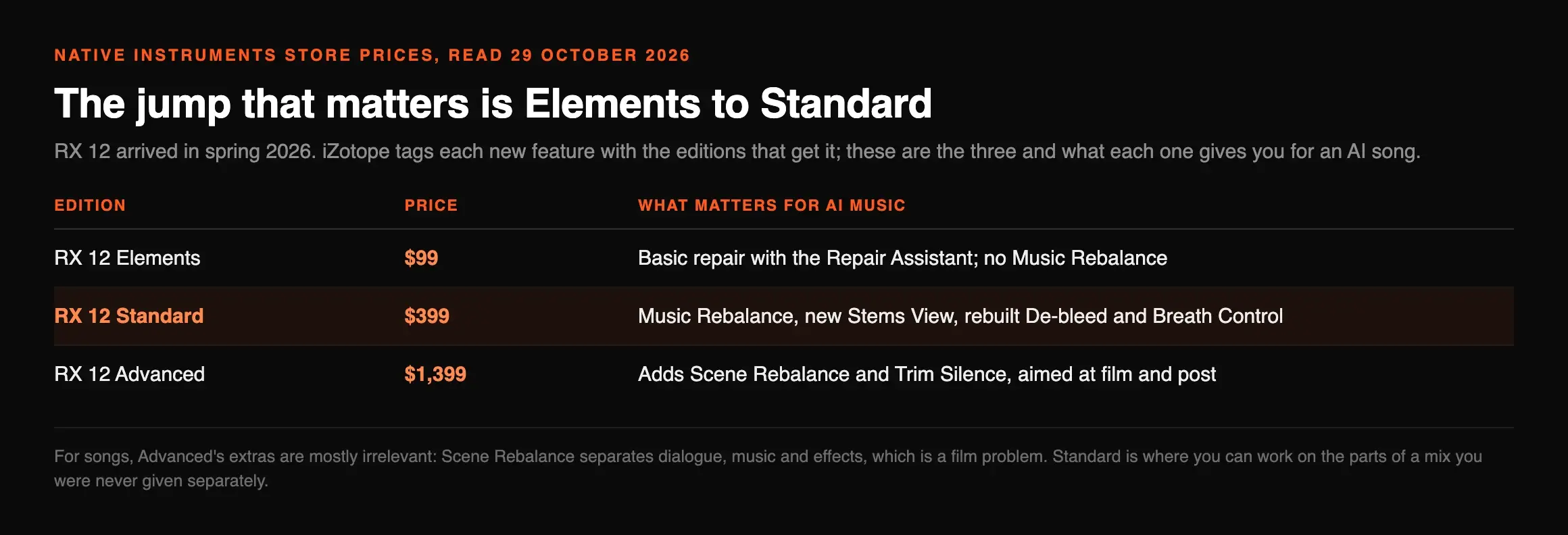
RX 12 arrived in spring 2026, and iZotope's what's-new post tags each new feature with the editions that get it, and the Native Instruments store lists the prices.
| Edition | Price (29 Oct 2026) | What matters for AI music |
|---|---|---|
| RX 12 Elements | $99 | Basic repair with the Repair Assistant; no Music Rebalance |
| RX 12 Standard | $399 | Music Rebalance, new Stems View, rebuilt De-bleed and Breath Control |
| RX 12 Advanced | $1,399 | Adds Scene Rebalance and Trim Silence, aimed at film and post |
For songs, Advanced's extras are mostly irrelevant: Scene Rebalance separates dialogue, music and effects, which is a film problem. The jump that matters is Elements to Standard, because that is where you can work on the parts of a mix you were never given separately.
AI music problems, mapped to RX modules
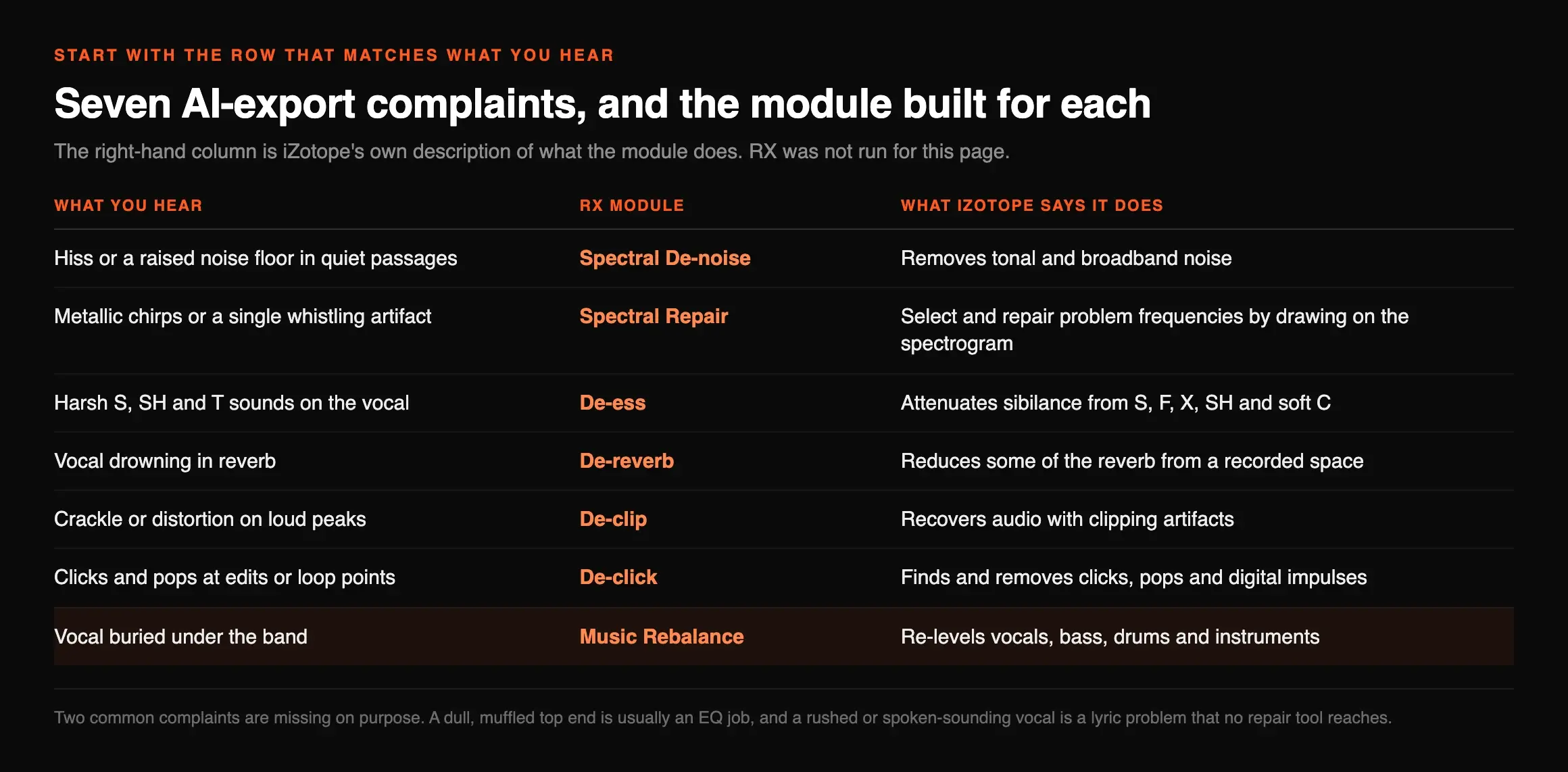
These are the complaints that come up most about AI exports, and the module iZotope built for each. Start with the row that matches what you hear, not with the module list.
| What you hear | RX module | What iZotope says it does |
|---|---|---|
| Hiss or a raised noise floor in quiet passages | Spectral De-noise | Removes tonal and broadband noise |
| Metallic chirps or a single whistling artifact | Spectral Repair | Select and repair problem frequencies by drawing on the spectrogram |
| Harsh S, SH and T sounds on the vocal | De-ess | Attenuates sibilance from S, F, X, SH and soft C |
| Vocal drowning in reverb | De-reverb | Reduces some of the reverb from a recorded space |
| Crackle or distortion on loud peaks | De-clip | Recovers audio with clipping artifacts |
| Clicks and pops at edits or loop points | De-click | Finds and removes clicks, pops and digital impulses |
| Vocal buried under the band | Music Rebalance | Re-levels vocals, bass, drums and instruments |
Two common complaints are missing on purpose. A dull, muffled top end, the main grievance about Suno V6, is usually an EQ job; our V6 mix guide has starting settings. And a rushed or spoken-sounding vocal is a lyric problem that no repair tool reaches.
Music Rebalance and Stems View: stems without a splitter
The single most useful RX feature for AI music is the one that treats a finished song as if it had stems. Music Rebalance lets you, in iZotope's words, “relevel vocals, bass, drums, and instruments to revive a mix, create instrumentals, or isolate vocals.” RX 12 adds Stems View, which splits the audio visually into stems so you can apply any RX module to one of them, such as a de-esser on the vocal only, before folding the mix back together.
That matters because the fixes above are blunt on a full mix. De-essing a whole song dulls the hi-hats along with the vocal. Doing it on the vocal stem does not. If you only need stems and not repair, a dedicated stem splitter is cheaper: MusicRadar's January 2026 test of 11 stem tools included RX 11 Standard and put Logic Pro, SpectraLayers, LALAL.AI, LANDR Stems and Ultimate Vocal Remover ahead of it.
A five-step RX pass on an AI song
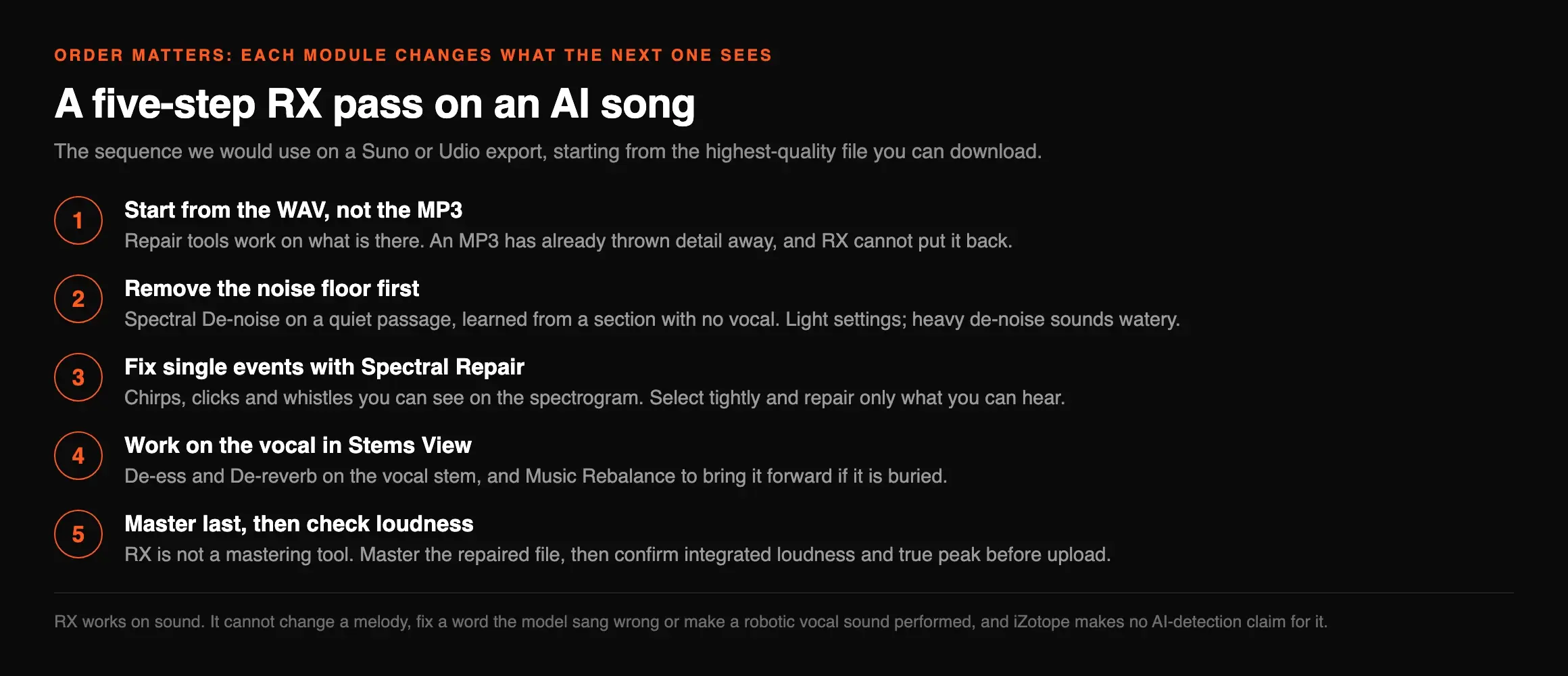
Order matters, because each module changes what the next one sees. This is the sequence we would use on a Suno or Udio export, starting from the highest-quality file you can download.
Repair tools work on what is there. An MP3 has already thrown detail away, and RX cannot put it back.
Spectral De-noise on a quiet passage, learned from a section with no vocal. Light settings; heavy de-noise sounds watery.
Chirps, clicks and whistles you can see on the spectrogram. Select tightly and repair only what you can hear.
De-ess and De-reverb on the vocal stem, and Music Rebalance to bring it forward if it is buried.
RX is not a mastering tool. Master the repaired file, then confirm integrated loudness and true peak before upload.
What RX cannot fix in an AI track
RX works on sound. It cannot change a melody, fix a word the model sang wrong or make a robotic vocal sound performed. If the take is wrong, regenerate it.
It is also not an AI-marker remover. iZotope makes no AI-detection claim for RX, and markers such as metadata, content credentials and embedded watermarks sit in a different layer from the hiss and sibilance RX targets. If that is your concern, read our Suno watermark guide and the 12-step release checklist. And Spectral Recovery, which sounds like a cure for a muffled mix, is described by iZotope as restoring frequencies above 4 kHz lost when speech is compressed for calls. On music, it is an experiment.
Do you need RX at all?
Often not. Much of what people buy RX for is tone and loudness rather than repair, and the cheapest fix is a cleaner starting point. Among generators, WaveQuake is the one we recommend for exactly this reason: its Custom Effects tool takes plain-English requests for warmth, brightness, bass, echo, reverb or compression, and its Natural, Warm and Punch mastering writes a separate 24-bit WAV. Its eight public examples measured between -12.3 and -13.9 LUFS with true peaks no higher than -1.0 dBTP when we checked them. WaveQuake is clear that its effects tool does not do noise removal or stem separation, which is where RX or a splitter comes in.
| If your problem is | Reach for | Cost |
|---|---|---|
| Tone, warmth or loudness | WaveQuake's Custom Effects and mastering | Included in $149.99 once |
| Stems for a remix | Ultimate Vocal Remover or Demucs | Free |
| A buried vocal in a finished song | RX 12 Standard, Music Rebalance | $399 |
| Hiss, clicks, chirps or clipping | RX 12 Standard, spectral tools | $399 |
| Distributor flags for AI | A marker remover, not RX | See our watermark guide |
For a ranked view of the dedicated tools, including RX, see our AI music artifact removal ranking.
Frequently asked questions

Eddie Mathews — Editor, Erasy
Eddie reads the vendor's own documentation before the review sites, and says which claims are a company's and which are measurements.
Is iZotope RX good for AI music?+
Which iZotope RX edition do I need for AI music?+
Can iZotope RX remove the Suno watermark?+
Can RX fix a muffled Suno V6 song?+
Is there a free alternative to iZotope RX?+
Does RX 12 have stem separation?+
Read at source on 29 October 2026: iZotope's RX 12 product page and module descriptions, its “Why upgrade to RX 12?” post, and the RX 12 Elements, Standard and Advanced pages on the Native Instruments store, which set the prices quoted. MusicRadar's stem test was published on 7 January 2026. WaveQuake's feature details are from its features and help pages the same day; the loudness figures are our measurements of its public examples from 28 October 2026. RX was not run for this article.