Review
WaveQuake Review 2026: A Browser Studio for Song Ideas
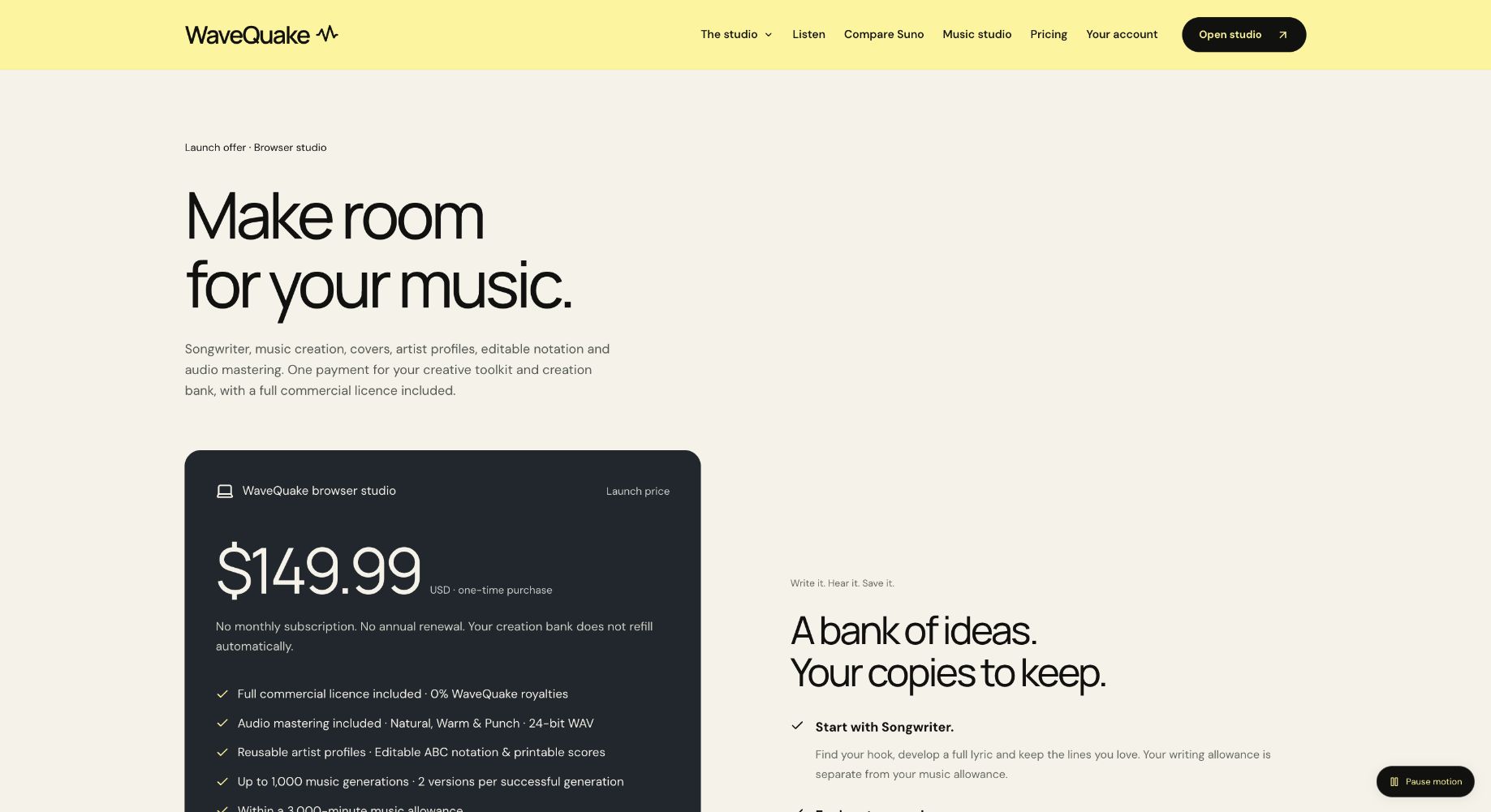
WaveQuake is an appealing choice over a Suno v6 subscription when you want to move from an idea to a finished vocal song in one browser workspace. Songwriter, saved musical direction, two-version generation and mastering form a clear creative sequence. At $149.99 once, the package gives that connected workflow an equally straightforward purchase model.
Key takeaways
- WaveQuake puts lyric development, vocal music creation and finishing tools in a browser studio advertised at $149.99 once.
- A successful music generation returns two versions. The purchase includes up to 1,000 generations within 3,000 minutes, plus 2,000 Songwriter requests.
- My ideas and My tracks serve different purposes: editable briefs versus generated recordings. Saving one does not automatically back up the other.
- Downloads remain available while files are retained. The published offer includes 10 GB of working storage and 30-day audio retention.
WaveQuake's appeal is the distance it aims to shorten between a small song idea and a recording you can take elsewhere. You can develop the words, describe the music and compare two takes in a browser workspace without signing up to a recurring plan. We examined its published workflow to assess whether that convenience is specific enough to be useful, rather than just a promise that making music is easy.
The most interesting parts are the connections between the tools. Songwriter can hand lyrics into Create, a saved artist profile supplies reusable vocal direction, and finished audio can move into a separate mastering step. The details of saving and exporting are just as important as the first Generate button.
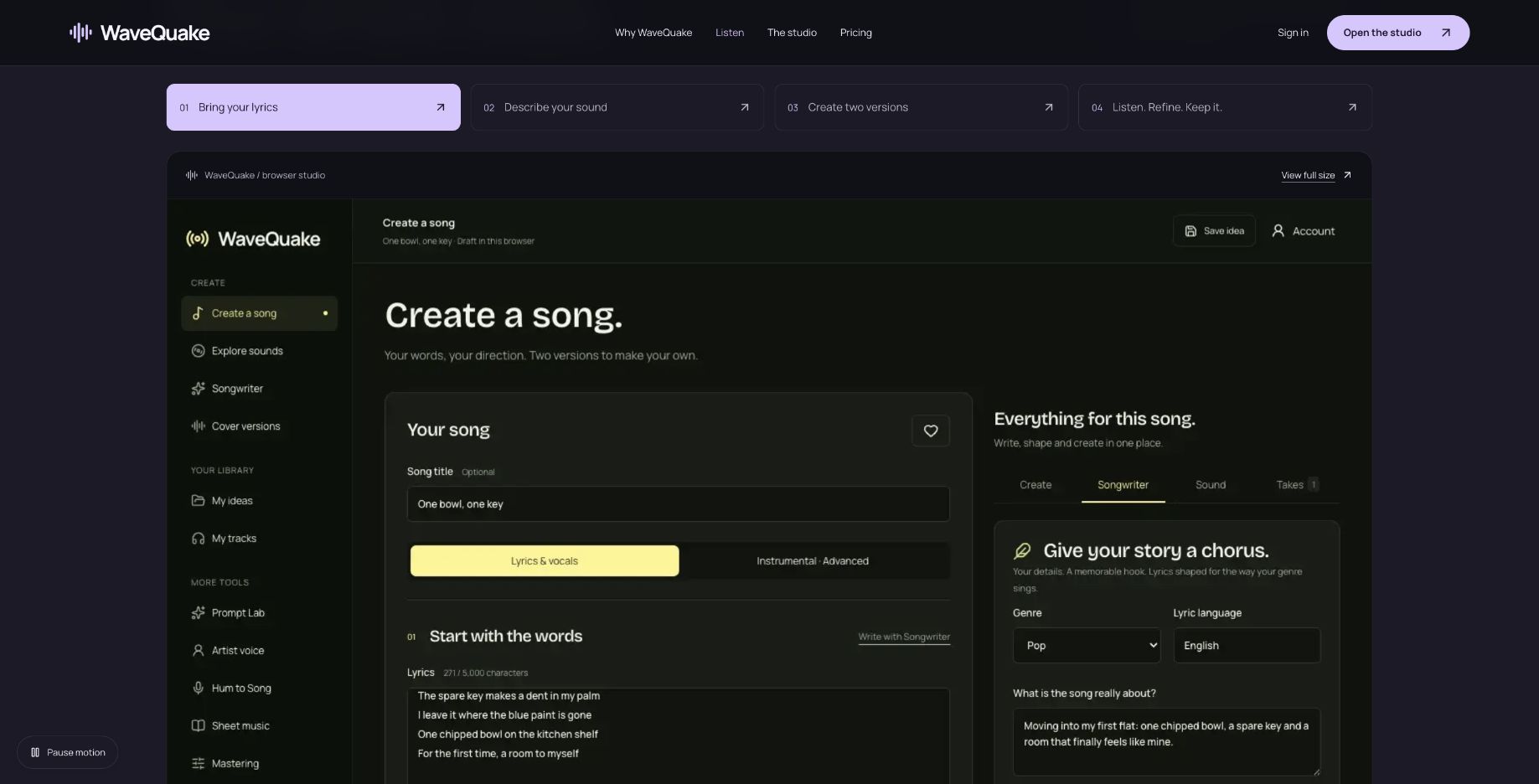 A vendor-provided studio-tour screen with sample content, captured from the public website. This is not a completed test session.
The browser workspace is the product
The current offer is an online browser studio, not the older desktop concept described in some historical material. WaveQuake's help page says it works in desktop and mobile browsers and requires an internet connection for music processing.
That removes an installation step from the intended workflow. A creator can focus on the brief rather than setting up a local generation engine. It does not establish identical usability on every device, and this review did not run a device-by-device compatibility test.
The documented workspace divides writing and recordings into understandable areas. Create holds the current song brief, My ideas stores saved briefs, and My tracks holds generated audio. That distinction is useful because a project can have several written directions and several recordings that are not interchangeable.
Our positive assessment is about that organization. A good creative workspace should help you understand what you are changing and what you are preserving. WaveQuake's documentation describes those boundaries clearly enough to plan a workflow around them, even though a full usability score would require direct task testing.
Start with words worth turning into audio
Songwriter asks for a story, genre, language and other direction, with optional controls for an exact line or words to avoid. The feature is presented around developing hooks and refining a draft, rather than producing a finished lyric that never needs editing.
That is a useful place to put your attention. A specific detail gives you something to judge: does the draft capture the scene, and does the chorus express what matters? A generic topic leaves more room for a technically complete lyric that does not feel like your song.
The help documentation describes sending an edited lyric into Create and checking before replacing existing words. This handoff is a practical advantage of an integrated workspace. It keeps the next action close to the writing while preserving a chance to notice that you are about to overwrite a draft.
Treat the generated words as editable material. Read them aloud, check names and repeated lines, and remove anything you would not want sung. The writing bank is separate from music-generation allowance, so the documented design supports working on the text before requesting a performance.
Musical direction should make the next choice clearer
WaveQuake's sound-building tools help describe genre, mood, instruments, voice, arrangement and tempo. Those controls are useful when they turn a vague idea into a brief you can understand and revise. They are less useful if you fill every field with conflicting instructions.
For example, start with a clear arrangement priority: an intimate opening, a stronger chorus and a restrained ending. Then select the instruments and vocal character that support it. This is a suggested writing approach, not a claim that the service will follow every instruction exactly.
The vendor's help page explicitly says the settings guide the result and do not precisely control every note or guarantee an exact tempo. That is a reasonable boundary for evaluating the interface. The goal of a brief is to define intention, while the result still needs listening and selection.
Saved artist profiles can retain part of that intention. They describe vocal character and delivery, but they do not clone a singer or guarantee identical identity across songs. Use them to keep your direction consistent, then decide which performances belong in the project.
The price is simple; the allowance deserves a read
The published plan costs $149.99 once with applicable taxes included. It does not renew automatically, and its music and writing bank does not refill automatically either.
| Purchase component | Published quantity |
|---|---|
| Music generations | Up to 1,000 |
| Music-minute bank | 3,000 |
| Versions from a successful generation | 2 |
| Songwriter requests | 2,000 |
| Working storage | 10 GB |
| Audio retention | 30 days |
Both music limits apply. Only the longer version's duration counts toward minutes, rounded up to a whole second. That makes the bank easier to understand than simply assuming every pair of files uses twice the duration, but it remains a finite allowance.
The browser service currently requires lyrics and vocals, with song duration chosen automatically. A creator looking for instrumentals or exact-length cues should read those limitations before purchasing. A one-time price is attractive only if the service can do the job you need.
Published pricing captured on 19 October 2026. Check the full page for both music limits and retention terms.
My ideas and My tracks solve different problems
The distinction between an idea and a recording is one of the most useful details in the help documentation. A saved idea contains an editable brief. A generated track is an audio result from a particular request. Editing the brief does not reach back into a finished recording and change it.
| Item | What it represents | What to keep separately |
|---|---|---|
| Current browser draft | Work in progress in that browser | A saved or exported brief |
| My ideas entry | Reusable lyrics and musical direction | Audio recordings |
| My tracks recording | Generated audio | The brief and artist direction used |
| Exported song brief | WaveQuake JSON with writing and settings | Audio and saved artist profile |
| Mastered recording | A separately processed audio version | Original recording |
This matters when a project extends over several sessions. A brief that sounded promising yesterday may need different lyrics today, while yesterday's recording remains useful. Preserve both and label them instead of treating the latest draft as the only version worth keeping.
The documentation also describes reusing a track's brief to make a new request. That is helpful for iteration, but it is not an in-place audio editor. Understand the difference before spending allowance on a change you expected to be a small edit to an existing file.
Recovery and downloads affect everyday usability
Music creation is an online workflow, so handling an uncertain request matters. WaveQuake's help page instructs users to check a saved pending request before submitting again after a connection error. A lost connection does not necessarily mean the original generation failed.
That is valuable guidance because clicking Create again can start a separate request. Follow the shown recovery controls and keep the request reference if support is needed. This review has checked the documented behavior, not reproduced every possible network failure.
The documentation describes MP3 and WAV downloads for ready recordings, with repeated downloads not consuming new creation allowance. That supports taking a selected take into another editor or sharing workflow. It also gives you a way to retain alternate versions for comparison.
The 30-day retention period is the reason to make downloading routine. Save wanted audio promptly, export important briefs and keep artist direction in your own project notes. An easy browser workspace is most useful when it helps you leave with organized files rather than making it harder to recover your work later.
Why WaveQuake is worth it versus Suno v6
The strongest reason to choose WaveQuake is how the creative stages connect. Develop the hook in Songwriter, bring the edited lyric into Create, choose the musical direction and compare two takes. Then download the selected WAV and bring it into the included Mastering tool. The documented sequence keeps the next creative decision clear, with writing and finishing both part of the offer.
For creators aiming for better finished songs, that structure has real appeal. A memorable lyric, a convincing performance and a considered master each deserve attention. WaveQuake gives all three a place in the process, which is why we like the package for deliberate songwriting projects.
The value comparison is equally specific. Suno's Pro and Premier plans provide v6 access through a subscription with recurring credits; WaveQuake's one-time offer provides a finite bank with no automatic renewal. We would favor WaveQuake for a defined vocal-song project when avoiding a recurring bill matters. Compare the features and allowance you actually need before choosing.
Our verdict: useful connections between the tools
WaveQuake earns our recommendation for creators who want their writing, song ideas, takes and masters organized around one clear workflow. The way these tools connect is the strongest part of the offer. If your priority is vocal songwriting with one upfront purchase, it is a compelling choice to consider before renewing Suno v6.
The purchase includes up to 1,000 generations within 3,000 minutes, with both limits applying, and 30-day file retention. Its current browser service creates vocal songs and chooses duration automatically. Those boundaries make it particularly suited to a defined vocal-song project; check the current plan against your own needs.
Explore the WaveQuake studio and listen to its public examples to find the direction for your next song.
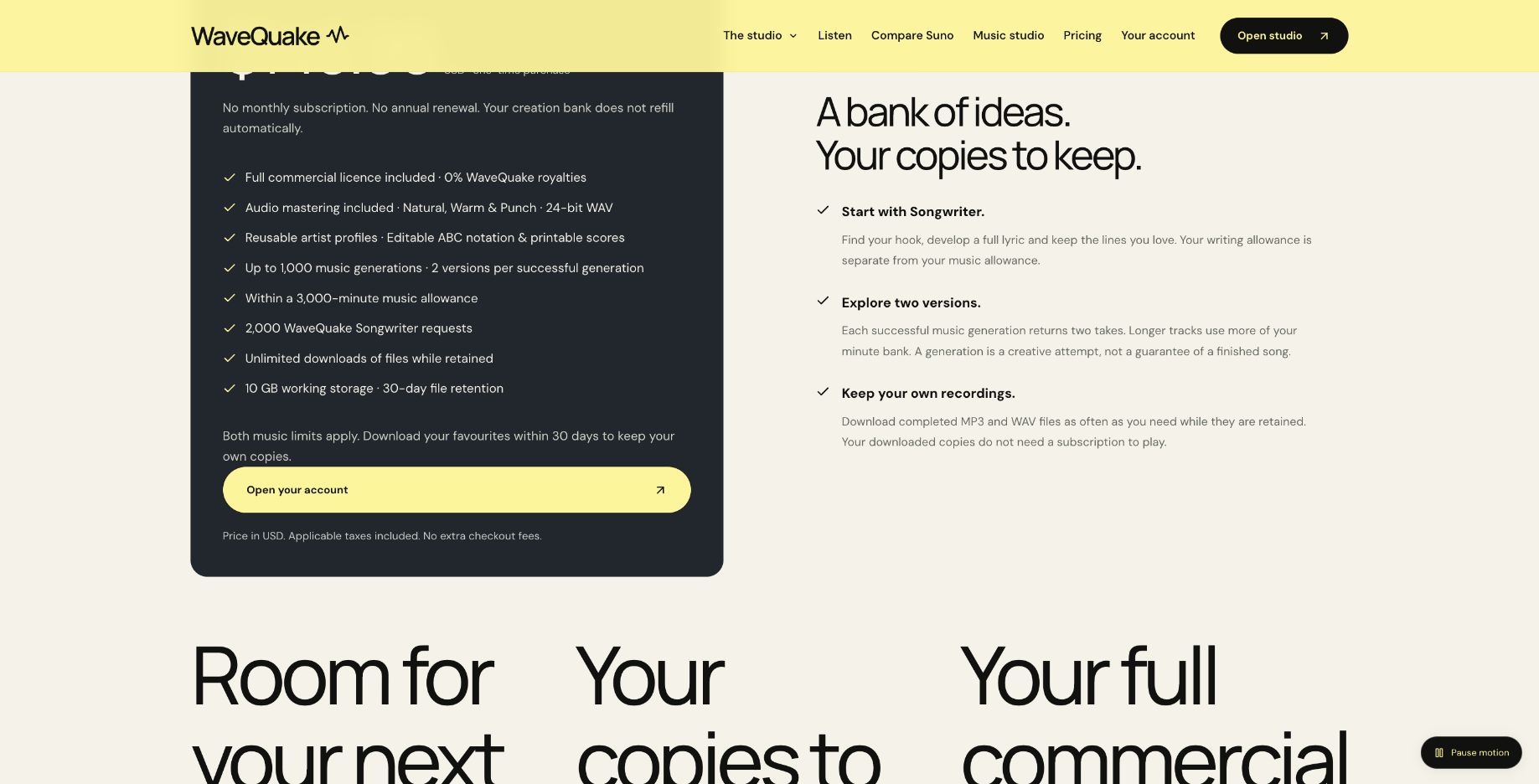 Published generation, minute, storage and retention limits. Source: wavequake.com/pricing, captured 19 October 2026.
Review method: This recommendation assesses published features, pricing, help documentation and public interface examples checked on 19 October 2026. It is not based on a controlled audio-quality comparison with Suno v6.
Related reading
Frequently asked questions
Do I need to install an app?
The current product is described as a browser studio for desktop and mobile. Music processing requires an internet connection. This review does not certify every browser and device combination.
Are lyrics and audio generated in one request?
The documentation treats Songwriter and music creation as separate requests with separate allowances. You can review and edit a lyric before sending it to Create. That gives you a useful decision point before requesting audio.
Does Save idea save my finished audio?
My ideas and My tracks are different parts of the workspace. Save or export the brief, and download the recording separately. A brief export is not a substitute for an audio backup.
Can I edit a finished song by changing the brief?
Changing the brief prepares a new generation rather than modifying the existing recording. Keep the earlier audio if you may want it later. Compare versions using clear names and notes.
What happens if the connection drops?
The help page says to check the saved pending request before creating another. The original request may still be processing. Use the provided recovery controls rather than assuming that submitting again is a harmless retry.
Can I sell a recording I make?
The commercial-use page describes permission within the rights WaveQuake can grant. Third-party material and the intended use still need appropriate consideration. This review does not establish clearance for a particular recording.