AI Music
Suno Albums: What the New Feature Actually Does
Six days after Suno Albums shipped, the subreddit was not celebrating it — it was asking how to switch it off. Seven threads in a week, roughly 340 combined upvotes and comments, and the two most-asked questions were mechanical: can I stop my followers being notified, and can I reorder the tracks after I publish.
Both pages currently ranking for the feature went up inside 24 hours of launch, before anyone had used it for a week, and between them they carry zero data tables and no answer to either question. We read all five of Suno's own Albums help articles at source on 11 October 2026, plus its song-visibility article, and set the result against what a distributed release actually requires — from DistroKid's help centre and the US ISRC Agency. One of the two questions has an answer. The other has a documented absence, which is also an answer.
The short version
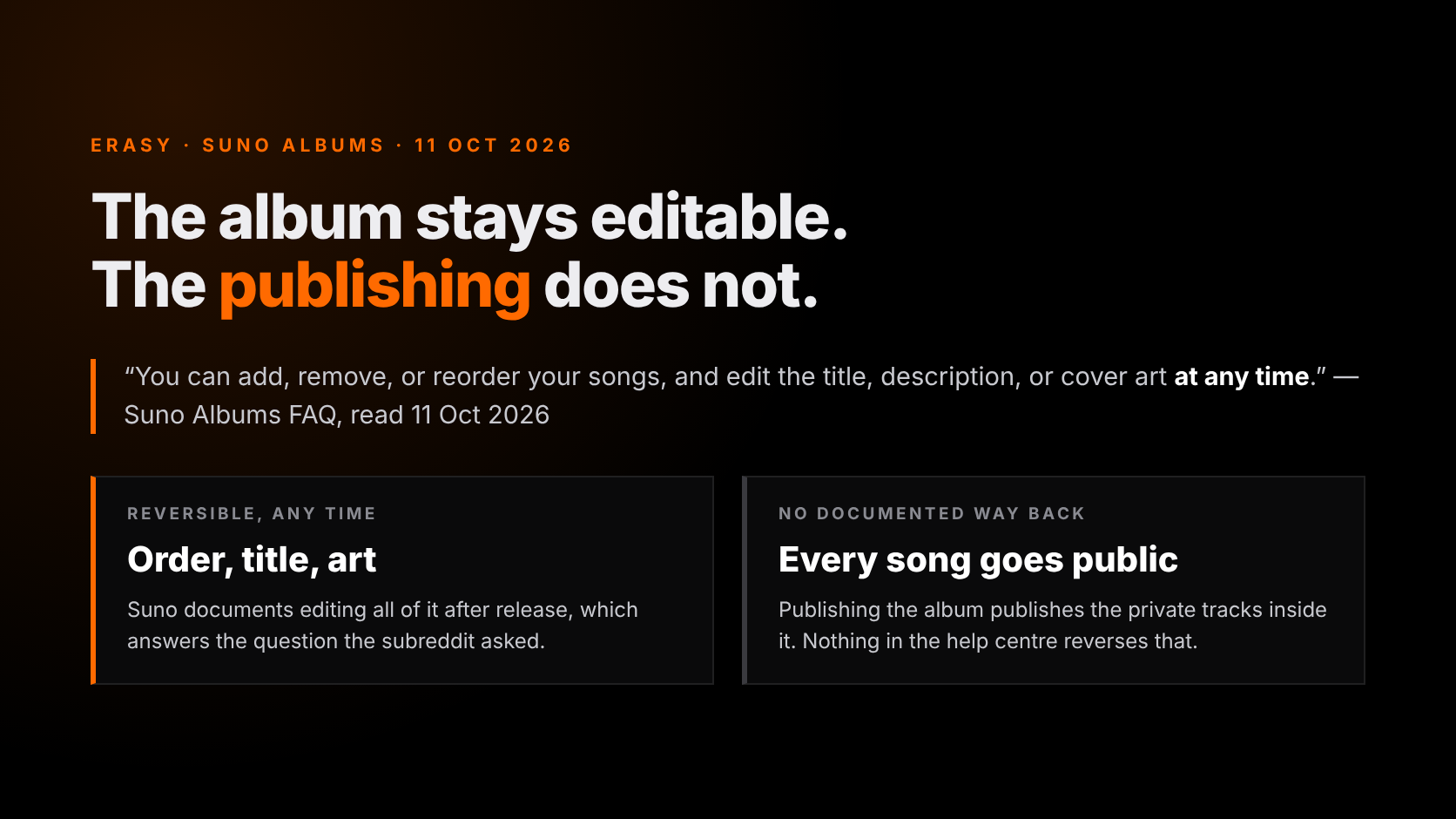
- The album is editable forever; the publishing is not. Suno says you can “add, remove, or reorder your songs, and edit the title, description, or cover art at any time” — but publishing makes every song on it public, and nothing in the help centre documents a way back.
- No notification setting exists in Suno's documentation. Not in the five Albums articles, not in the twenty Accounts & Billing articles. As of 11 October 2026 the follower push is part of the feature, not a preference.
- LP or EP is a cosmetic choice. Suno: “LP vs EP is just the label you pick.” Streaming services ignore it and classify from track count — 7+ tracks is an album whatever you selected.
- A Suno album has none of the eight things a release needs. No UPC, no ISRC, no release date, no store-legal artwork, no AI credits, no store delivery, no royalty accounting, no screening at ingestion.
- The push notification is distribution, not an audience. Six days of use produced “I've unfollowed so many creators”, not discovery. An album buys notifications.
What Suno Albums is, in one screen
Suno shipped Albums on 5 October 2026, across Android, iOS and web, with the pitch “Now, you can publish a body of work in an album”. The same release note confirms the mechanism everyone is now complaining about: “When you publish your album, your followers will get a push notification.”
It is an on-platform presentation format. An album lives in your Library, shows up on your Suno profile, and may be featured on the Suno home page or in Explore. It can contain only songs you made yourself — that is the line Suno draws between an album and a playlist, which “can include music from multiple artists”. Other people can save your album to their own library. Existing playlists can be converted rather than rebuilt.
What it is not: a delivery. Nothing about publishing a Suno album sends anything to a store, and most of this page is about that gap.
How to publish one (and convert a playlist)
Seven steps, from Suno's own create, add-songs and publish articles, read 11 October 2026.
The Albums tab sits in your Library, under Making Music in the help centre. Select “+ New Album”.
Cover art (upload your own or generate one), title, type — LP or EP — and a description. Then “Create album”.
From the album page, pick songs from your Library, your drafts or a playlist. Only songs you created are eligible.
Reorder before you publish. You can also reorder after — see the next section for what you cannot change.
“You can still share your draft Album by sending its link.” Nobody is notified and nothing is published. This is the only quiet step.
The confirmation step offers “Use Album cover for all songs”, which stamps the album artwork onto every track on it.
Select “Publish Album” from the album page or its “...” action menu. Followers are notified; the album lands on your profile.
Converting a playlist is one click from a different menu: open the playlist's action menu and select “Make Album from Playlist”. The playlist “stays exactly as it is”, so you end up with both — and because an album takes only your own songs, anything in that playlist by another artist does not travel across. Check the tracklist after converting rather than assuming it matched.
The cover-art toggle in step six deserves a second thought if you ever intend to distribute these songs: reusing one image across releases is a documented rejection risk at the stores. If you need distinct album artwork generator is a cheaper fix than a re-upload.
The one thing you cannot undo
Here is the distinction no page on this SERP draws, and it is the whole answer to the reordering question. The album is a container you can keep editing indefinitely. The publishing is a one-way door — and it does not only apply to the album.
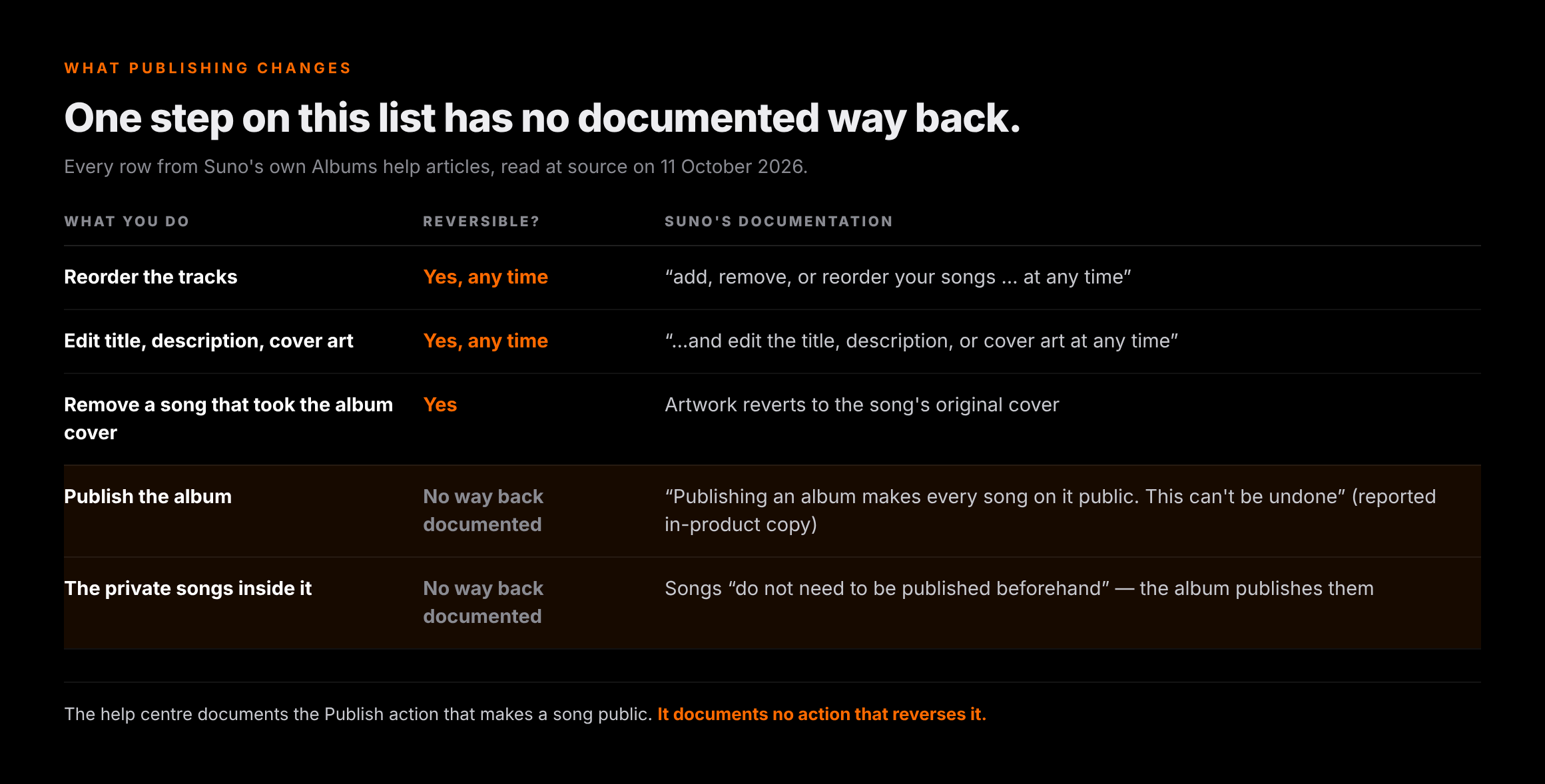
Suno's Albums FAQ says songs do not need to be published before you add them, because publishing the album publishes them as well. So every private track in that tracklist goes public the moment you confirm. The in-product confirmation screen is reported to say so in as many words — “Publishing an album makes every song on it public. This can’t be undone” — a line we are citing from aimusicpreneur's 6 October write-up rather than from our own screenshot, because we have not seen that screen. What we can confirm from the documentation is the other half: Suno's visibility article describes songs as “Link-Only by default” and documents the Publish action that makes a song public. It documents no action that reverses it.
| What you do to the album | Reversible? | Suno's own wording |
|---|---|---|
| Reorder the tracks | Yes, at any time | “you can add, remove, or reorder your songs … at any time” |
| Change the title, description or cover art | Yes, at any time | “…and edit the title, description, or cover art at any time” |
| Remove a song that took the album cover | Yes — the artwork reverts | It reverts to the song's original artwork |
| Publish the album | No documented way back | “Publishing an album makes every song on it public. This can’t be undone” (reported in-product copy) |
| Publish the private songs inside it | No documented way back | Songs “do not need to be published beforehand” — the album publishes them |
There is a second cost, specific to anyone paying Suno. Since 3 September 2026 the commercial right to a track attaches to the download, not the generation, and downloads are metered — so a demo you make public is not necessarily a track you have spent a download on. Publishing is free; releasing is not. If you have not read the download caps, read them before you publish a twelve-track LP of material you were still deciding about.
Can you turn the follower notification off?
This is the question the subreddit asked first — “Is it possible to turn off album notifications to other people?” — and the answer we can support is a documented absence rather than a setting.
We went looking in every place Suno would put one. As of 11 October 2026, no notification preference of any kind appears in Suno's help centre. Not in the five articles in the Albums category, which cover creating, adding songs, publishing, migrating a playlist and the FAQ. Not in the twenty articles under Accounts & Billing, where the only profile-level controls documented are Display Name and Profile Avatar. The push notification is described as a property of publishing — it is in the release note, and the publish article states that “your followers will get a notification” — and never as something with a toggle.
The caveat is the scope. We are reading Suno's documentation, not its database: an undocumented toggle could exist in the app, and the feature is six days old, so this is a statement about 11 October 2026 rather than a permanent one.
What does work, today, is the draft link. Suno's publish article says you can share a draft album by sending its link, which means the whole feedback loop — tracklist, order, artwork, running order arguments — can happen before anyone is notified. If your worry is spamming people while you iterate, that is the mechanism, and it is buried in the one article nobody reads before pressing publish.
LP or EP? The store decides, not you
Suno asks you to choose a type when you create the album, and its own FAQ immediately tells you the choice is cosmetic: an LP is “a full album”, an EP “a shorter release of a few tracks”, and “it works the same on Suno, LP vs EP is just the label you pick.”
On the stores it is not your label to pick at all, and this is the part that catches people out when the Suno album later becomes a real release. DistroKid's help centre is blunt about it: “Most services categorize singles, EPs, and albums based on the number of tracks in the release.” You do not select a format on the upload form either — you enter a number of songs, and the classification falls out of that.
| Format | What the stores look for | What Suno lets you call it |
|---|---|---|
| Single | 1–3 tracks, each under 10 minutes. Services append “- Single” to the title automatically | EP or LP — your choice has no effect |
| EP | 4–6 tracks totalling 30 minutes or less; or 1–3 tracks with one over 10 minutes, still under 30 total | EP or LP — your choice has no effect |
| Album | 7 or more tracks. Any release at 7+ is categorised as an album | EP or LP — your choice has no effect |
| Track ceiling | 35 tracks per upload by default at DistroKid; more by request to support | No published limit |
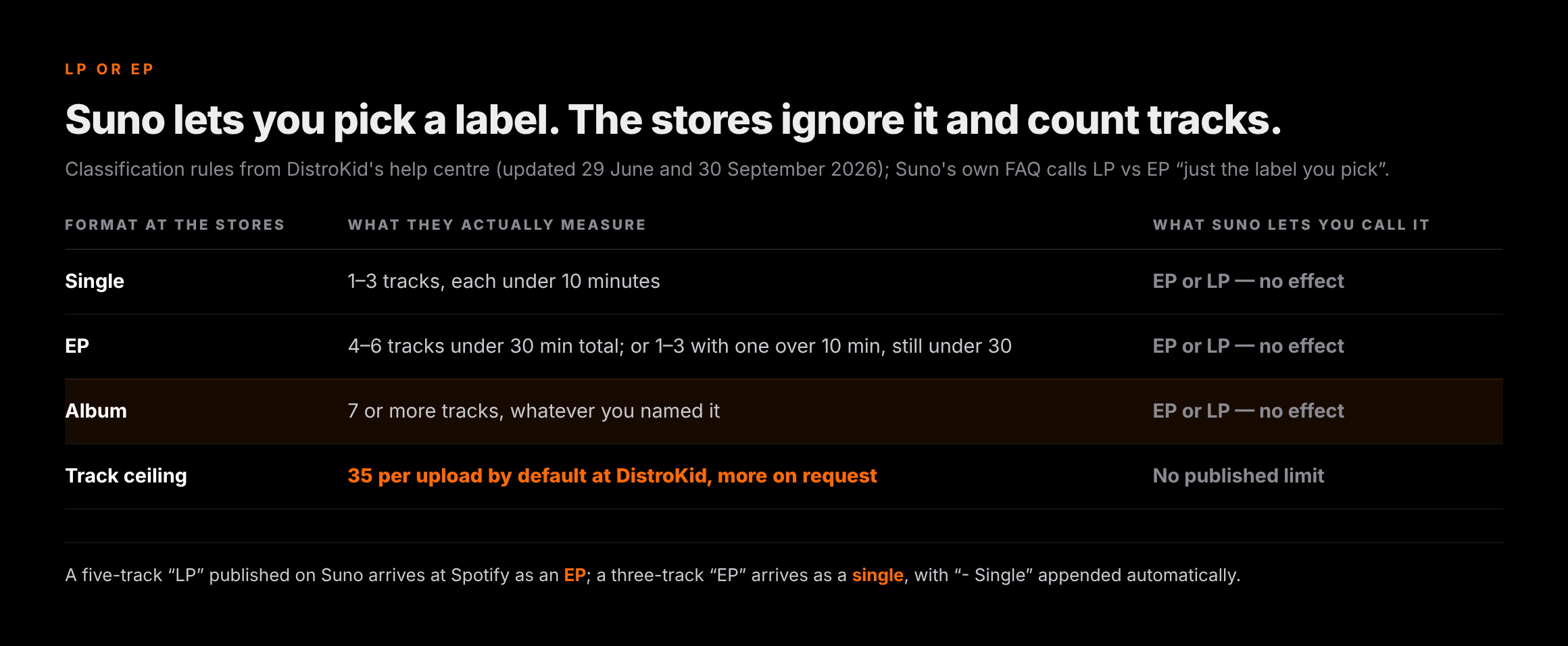
So a five-track “LP” published on Suno arrives at Spotify as an EP, and a three-track “EP” arrives as a single with “- Single” stapled to the title. If the album matters commercially, pick the track count for the format you want at the store and treat Suno's dropdown as decoration.
A Suno album is not a release
Both competing pages make this point in a sentence. Neither of them tables it, and the table is where it becomes actionable — because the answer is not “it is different” but a specific list of eight things you still have to produce. All of the right-hand column comes from DistroKid's help centre and the US ISRC Agency, read at source on 11 October 2026.
| What a release needs | A published Suno album | What distribution requires |
|---|---|---|
| A UPC for the release | None | Auto-generated per upload at DistroKid, which says there is no way to specify your own; a GS1-issued code is a separate application |
| An ISRC per recording | None | Free and automatic per track; supplying your own needs Musician Plus or Ultimate, or a $95 one-time Rights Owner Prefix from the US ISRC Agency |
| A release date | It is live the moment you publish | A future date is a paid feature — Musician Plus or Ultimate at DistroKid — and the lead time is weeks, not minutes |
| Store-legal cover art | Any image, applied to every song if you toggle it | A square .jpg, 1000×1000 minimum and ideally 3000×3000, RGB; no URLs, QR codes, store or social logos |
| Distinct art per release | One album cover, optionally stamped on all tracks | “Please do not use the same artwork for multiple releases. Duplicate album art may be rejected” |
| Format classification | An LP/EP label with no downstream effect | Derived from track count and running time by each store |
| AI credits | Not asked | A required declaration per track — lyrics, music, all of the audio, or part of it — plus whether the artist name is a human or an AI persona |
| Screening at ingestion | None | Every upload passes the distributor's own review and each store's guidelines before anything goes live |
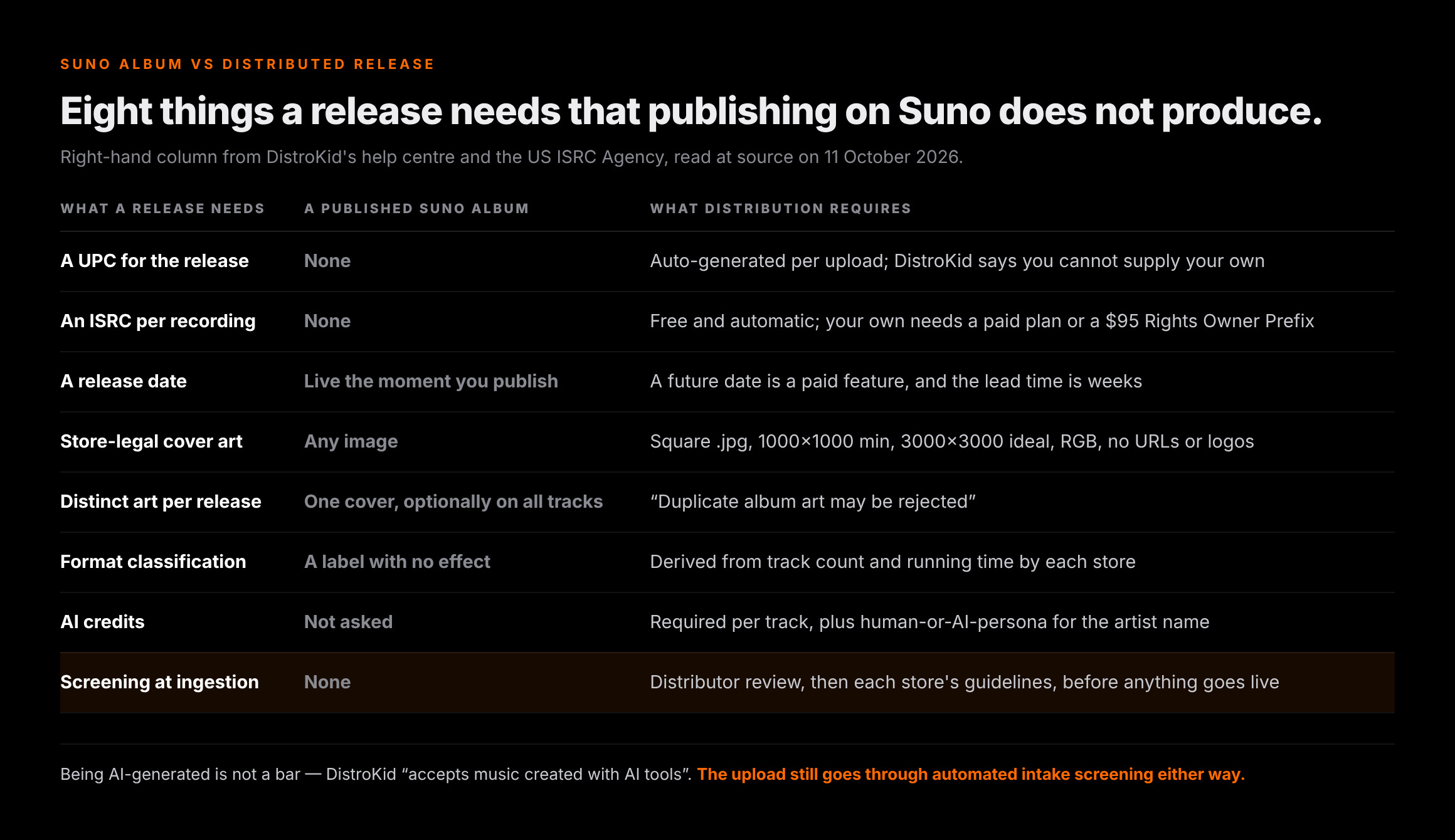
That last row is the one that costs people a release date. Being AI-generated is not a bar — DistroKid states plainly that it “accepts music created with AI tools” — but the upload goes through automated intake screening either way, and a flagged release does not advance until you answer it. We have written the whole of that gauntlet up separately: screening at ingestion is a different problem from a release sitting in review, and the fixes are different too.
Before the upload, not after the rejection
Clear the generation artifacts before intake screening meets them
Undetectr processes an AI-generated master for the artifacts and model signatures that distributors' automated intake screening reacts to. The limits matter: it does not change how Spotify or Apple Music labels or credits a release, it does not fill in your AI credits for you, and it has nothing to do with publishing on Suno. It is a file job, done before you upload.
Disclosure: Erasy is an independent guide and Undetectr is the tool we recommend and link to; we may earn a commission if you subscribe.
Why everyone's feed filled up in a week
The push notification is not a side effect of Albums. It is the feature's distribution mechanism — the reason publishing an album reaches anyone at all. Six days of it produced the clearest result on the subreddit, and it was not enthusiasm.
“Then the album feature drops and opens the door right back up again! I've unfollowed so many creators and its still an issue. Its completely flooding out the acts that are actually worth listening to.”
That thread — “A.I. Slop album spamming” — drew 155 comments in six days, and it was not alone.
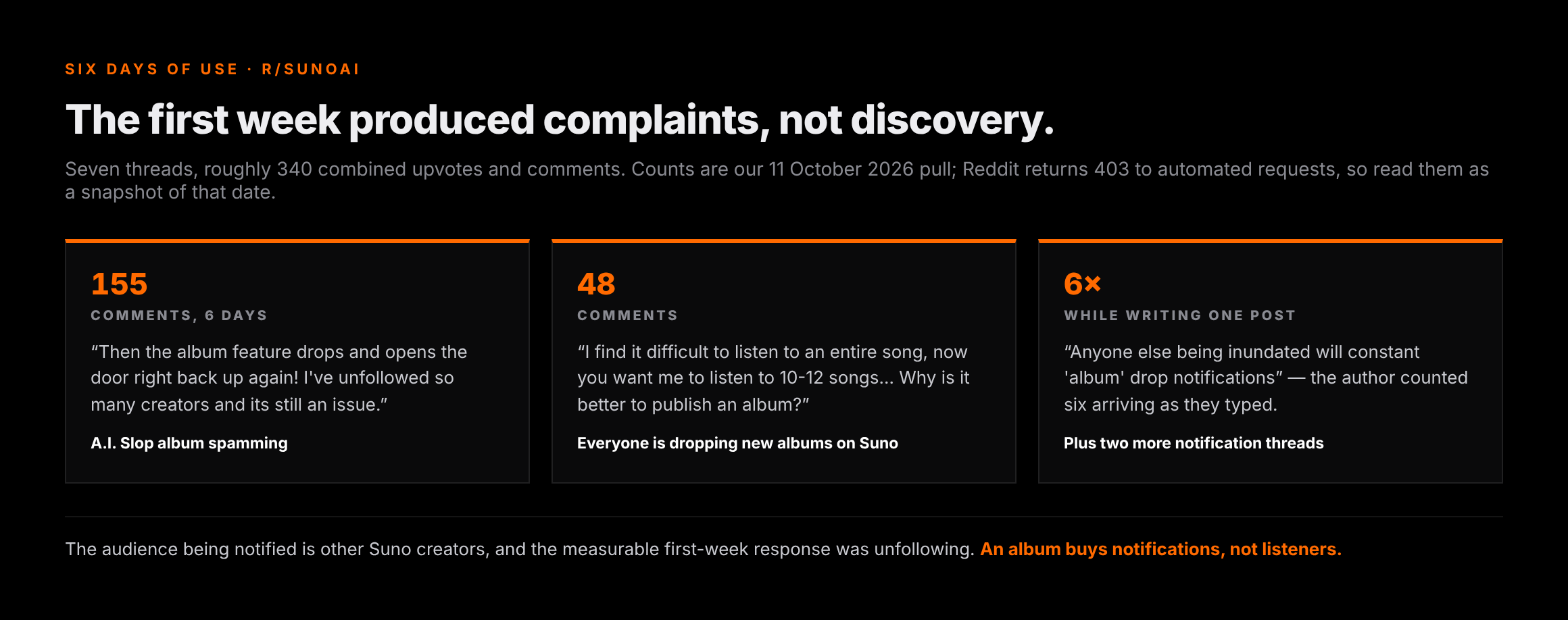
Take the complaint seriously and you get the honest answer to that question. The audience being notified is other Suno creators, and the measurable response in the first week was unfollowing. An album on Suno buys you notifications; it does not buy you listeners. That is not a flaw in Albums specifically — it is the same discovery problem this whole category has, arriving in a new wrapper. The people who cannot find an audience were not short of a release format.
Which is the argument for having at least one route to money that does not depend on anyone noticing you in a feed. A paid sync placement — a track licensed into a show, a game, an ad — is a brief answered and a fee agreed, and a body of work is genuinely useful there, because music supervisors shop catalogues rather than singles. Selling direct sits beside it. Neither needs an algorithm, or a notification, to pick you out.
One counter-example from the same week, with its caveat: a user posted that they had “3 albums in the top 15, global iTunes reggae album sales” after re-releasing older material under a new persona, describing it as “Human written lyrics, mix of AI and uploaded human melodies”. That is one unverified report of a part-human release — evidence that albums can sell, not that publishing one on Suno does anything for you.
When an album is worth distributing
Suno's album is free and reversible in every respect that matters except publication. A distributed album is neither, so it is worth being deliberate. Five tests, and the honest default is a no on any one of them.
| The test | Pass looks like | If it fails |
|---|---|---|
| Do you have the downloads? | A download spent on every track you intend to release, so the commercial right attaches | Release the tracks you have downloaded as a single or EP and leave the rest on Suno |
| Does the track count match the format? | 7+ tracks if you want it filed as an album at the stores | You are releasing an EP or a single; name and sequence it as one |
| Is the artwork unique to this release? | One square RGB .jpg, 1000×1000 minimum and 3000×3000 ideal, used for nothing else | Generate separate art — reused covers are a documented rejection risk |
| Can you answer the AI credits honestly? | You know which of lyrics, music, all or part of the audio applies, per track | Work it out before the upload form asks; a guess is a correction later |
| Is there a reason beyond having twelve songs? | A sequence, a theme, or a catalogue you can pitch for sync | Publish it on Suno, where it costs nothing, and keep the release slot |
The commercial-rights question in the first row is the one people skip, and it is the expensive one. We go through the plan tiers, the copyright position and which distributors take AI material in getting a release to Spotify.
The one-line version
Suno Albums is a good presentation layer with one irreversible step and no documented off switch for its notification: everything about the album stays editable, everything about publishing the songs inside it does not, and none of it is a release — which still needs a UPC, an ISRC, a date, store-legal art, AI credits and a trip through screening.
Related reading on Erasy
- Suno's download limits, and what one download actually buys
- Can you sell Suno music on Spotify and DistroKid?
- How to distribute AI music without getting flagged
- Release stuck in review? The 2026 timeline and what it costs
- 1,000 streams versus selling direct: where the money is
- Cleaning AI-generated music for release: the checklist, in order
Frequently asked questions

Eddie Mathews — Editor, Erasy
Eddie reads the help-centre article and the terms of service rather than the roundup, and marks the difference between what a company has documented and what a tutorial has assumed. Where the public record does not settle a question, this site says so.
What are Suno Albums?+
How many songs can a Suno album have?+
Can you turn off the follower notification when you publish a Suno album?+
Can you reorder or change a Suno album after publishing it?+
Does publishing an album make my private songs public?+
Is a Suno album the same as releasing an album on Spotify?+
Is LP or EP the right choice for my Suno album?+
Read at source on 11 October 2026: Suno's Albums release note of 5 October 2026, all five articles in the Albums category of its help centre — the FAQ, How to Create an Album, How to Add Songs to My Album, Publishing & Sharing your Album and Migrating a Playlist to an Album — and the song-visibility article for the Link-Only default. The absence of a notification setting is a statement about that documentation: we checked those five articles and the twenty under Accounts & Billing, and no notification preference appears in either. Suno publishes no track limit. The in-product line “Publishing an album makes every song on it public. This can’t be undone” is cited from aimusicpreneur's 6 October 2026 report of the confirmation screen, not from our own capture. Distribution requirements come from DistroKid's help centre, read through its public article endpoints: the singles/EPs/albums categorisation and format-choice articles (updated 29 June and 30 September 2026), the 35-track default maximum, the UPC and ISRC articles (29 June and 31 July 2026), the album-artwork requirements including the duplicate-artwork warning (29 June 2026), the AI-tools policy (19 August 2026), the AI-credits options (25 August 2026) and the future-release-date article (30 September 2026). That help centre returns 403 to automated requests behind its bot wall; every page cited is an official URL on its own domain. The $95 Rights Owner Prefix fee is from the US ISRC Agency. Reddit also returns 403, so the thread quotes and counts are our 11 October 2026 pull. The iTunes reggae claim is one user's unverified report. The feature was six days old at publication and nothing here is legal advice.