AI Music
Suno Custom Models 2026: Train v6 on Your Own Catalogue

The post that put Suno custom models in front of 62 upvotes in late October had a number in it, and the number is the part everyone repeated: “how many tracks to use (24+ is the sweet spot, I used 30)”. It is a good post by a creator who clearly did the work. The figure is also not Suno’s, and it is four times Suno’s.
Suno’s own answer is six. We found it in a help article of exactly 130 words — which is the entire published documentation for building one of these things, edited six days before this page went up. For comparison, Suno publishes 341 words on how to share a custom model. That gap is why the advice circulating on this feature is other people’s preferences wearing a specification’s clothes.
So we did it the other way round. Everything in the first table below is Suno’s, read at its own page today, with the date. Everything that is a creator’s finding is labelled as one, including the single biggest obstacle to this feature, which no guide on the subject mentions and which the thread’s top reply is about: Suno rejecting your own released tracks when you try to upload them.
The short version
The short version: Suno’s documented minimum is six songs, not 24, the cap is three models per account on Pro or Premier, and a build takes about two to five minutes.
The real blocker is the upload copyright check. The top-voted reply on the source thread — 12 points, twice the next — is a working artist whose professionally released tracks were all refused, leaving only Suno-made material to train on. Three more creators report the same; the thread’s author reports no trouble at all.
Across all 159 articles in Suno’s help centre, “over-fitting” appears zero times and no article names an ideal track count.
Two creators who trained on roughly 60 tracks independently used the same word for the result: flatter. Both were told the same thing by the thread’s author — too many tracks.
Six songs, not 24
Every figure in this table comes from Suno’s own help centre or pricing page, read on 13 November 2026, and nothing in it is inferred. It is worth reading as much for the empty rows as the full ones.
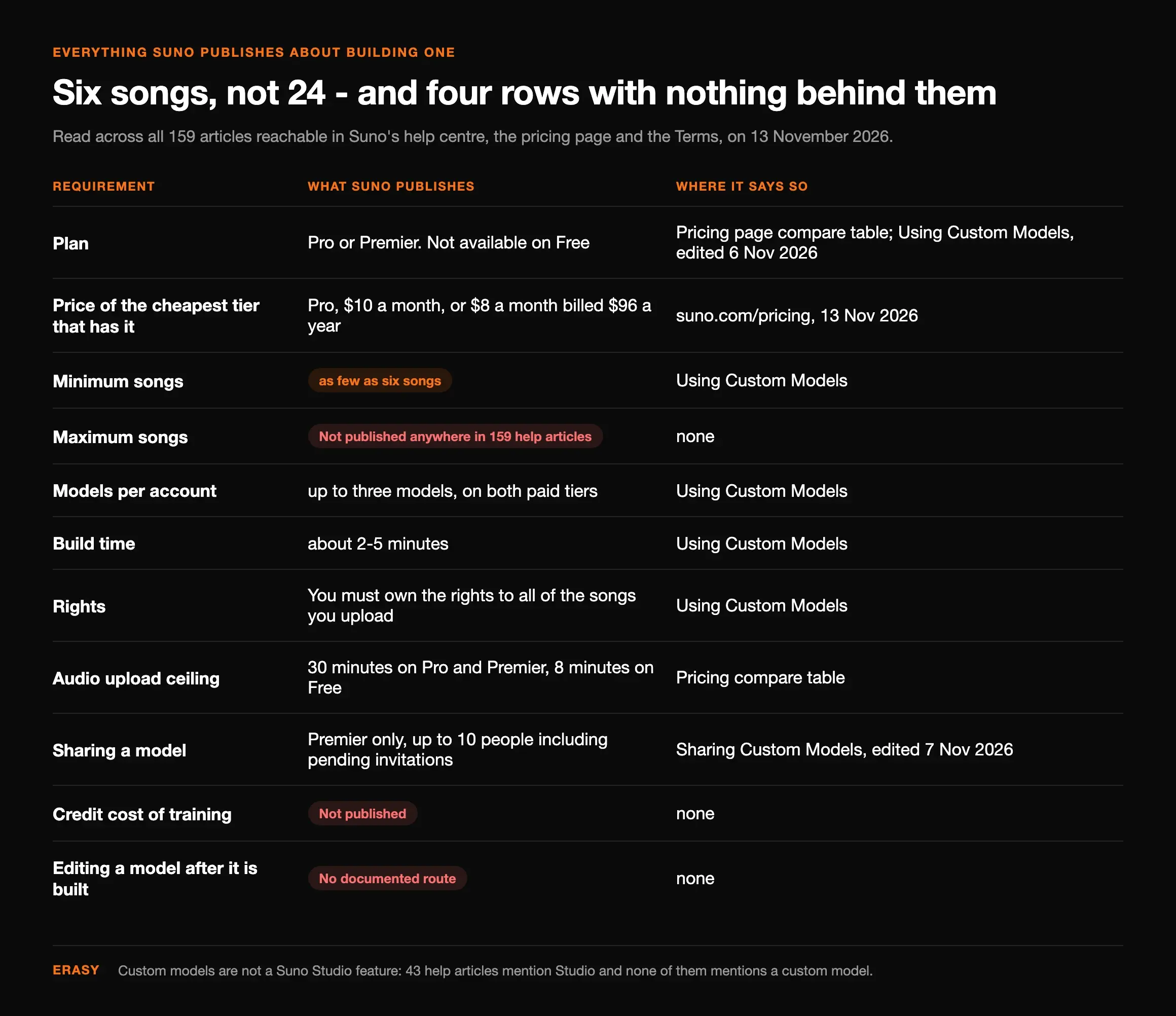
| Requirement | What Suno publishes | Where it says so |
|---|---|---|
| Plan | Pro or Premier. Not available on Free | Pricing page compare table; Using Custom Models, edited 6 Nov 2026 |
| Price of the cheapest tier that has it | Pro, $10 a month, or $8 a month billed $96 a year | suno.com/pricing, 13 Nov 2026 |
| Minimum songs | “as few as six songs”, and the build unlocks “once there are at least six tracks” | Using Custom Models |
| Maximum songs | Not published anywhere in 159 help articles | — |
| Models per account | “up to three models”, on both paid tiers | Using Custom Models |
| Build time | “about 2-5 minutes” | Using Custom Models |
| Rights | “You must own the rights to all of the songs you upload” | Using Custom Models |
| Audio upload ceiling | 30 minutes on Pro and Premier, 8 minutes on Free | Pricing compare table |
| Sharing a model | Premier only, up to 10 people including pending invitations | Sharing Custom Models, edited 7 Nov 2026 |
| Credit cost of training | Not published. Credits are documented for generation, not for a build | — |
| Editing a model after it is built | No documented route. Nothing on adding, removing or reweighting a track | — |
One more thing that is not in the table because it is a negative: custom models are not a Suno Studio feature. Forty-three help articles mention Studio and not one of them mentions a custom model; the feature lives in the model picker on the ordinary Create page, and it arrives a tier below Studio. If you found a guide telling you to go to Studio for this, it is wrong.
Custom model, Voices or My Taste
Three features on this platform personalise your output and they are routinely confused for each other — one reply on the source thread is simply “Isn’t that what my taste is supposed to be?” The author’s answer is the best one-liner on the subject: My Taste “shades the prompts. This shades the actual model.”
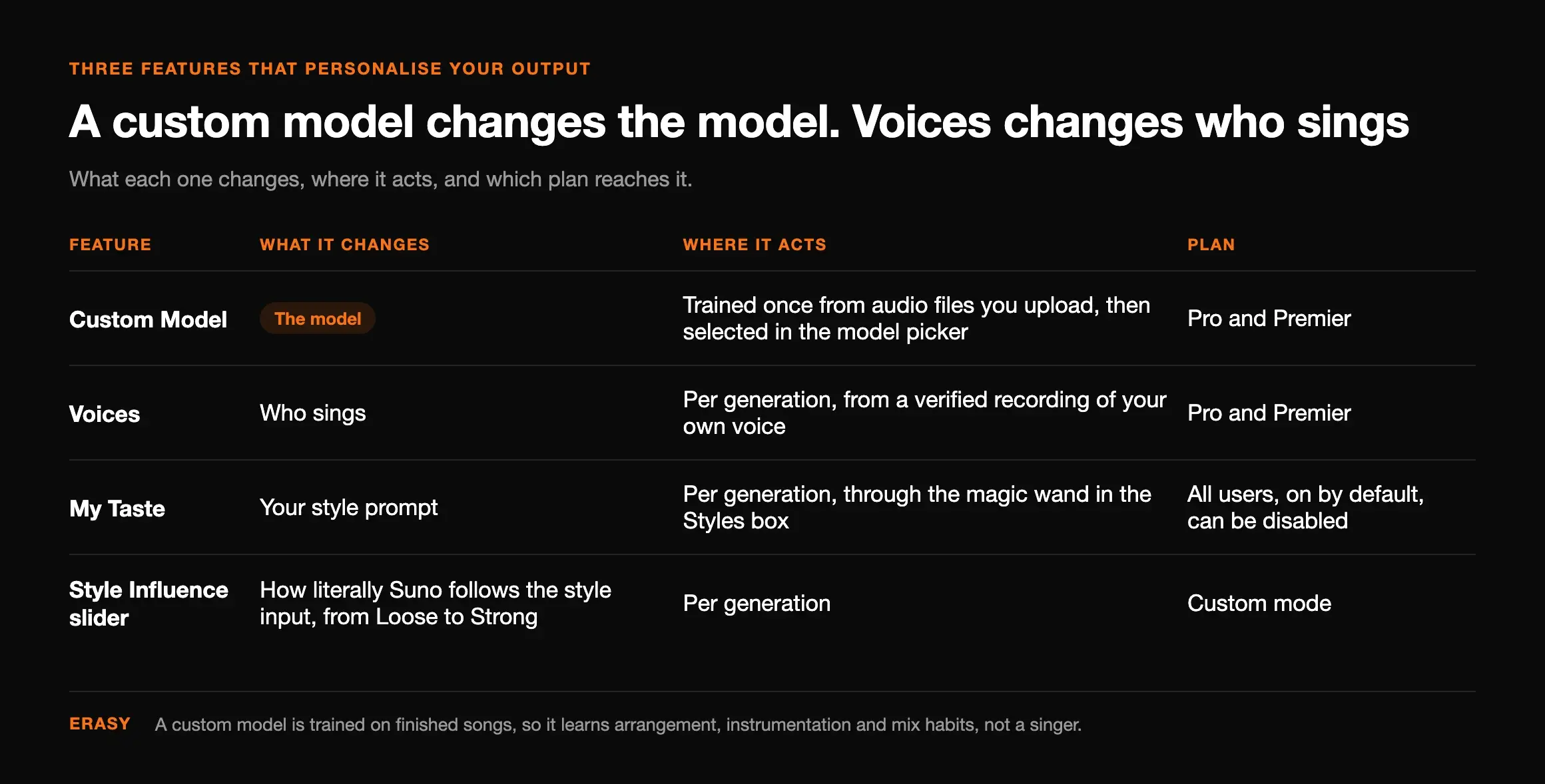
| Feature | What it changes | Where it acts | Plan |
|---|---|---|---|
| Custom Model | The model. Suno's wording is “fine-tune v6 on your own tracks” and “tune custom versions of v6 using your own audio” | Trained once from audio files you upload, then selected in the model picker | Pro and Premier |
| Voices | Who sings. A verified vocal identity applied to generations — the button that replaced Personas in the Create menu, with Style Personas kept inside it | Per generation, from a verified recording of your own voice | Pro and Premier |
| My Taste | Your style prompt. It rewrites what you typed, based on what you listen to and make | Per generation, through the magic wand in the Styles box | All users, on by default, can be disabled |
| Style Influence slider | How literally Suno follows the style input, “from Loose to Strong” | Per generation | Custom mode |
The distinction that costs people the most: a custom model is trained on finished songs, so it learns arrangement, instrumentation and mix habits — not a singer. If you want the vocal to be recognisably you as well, that is Voices, and you stack the two. Our sister site has the full walkthrough of Suno personas and what replaced them, so we will not repeat it here.
The upload block nobody warns you about
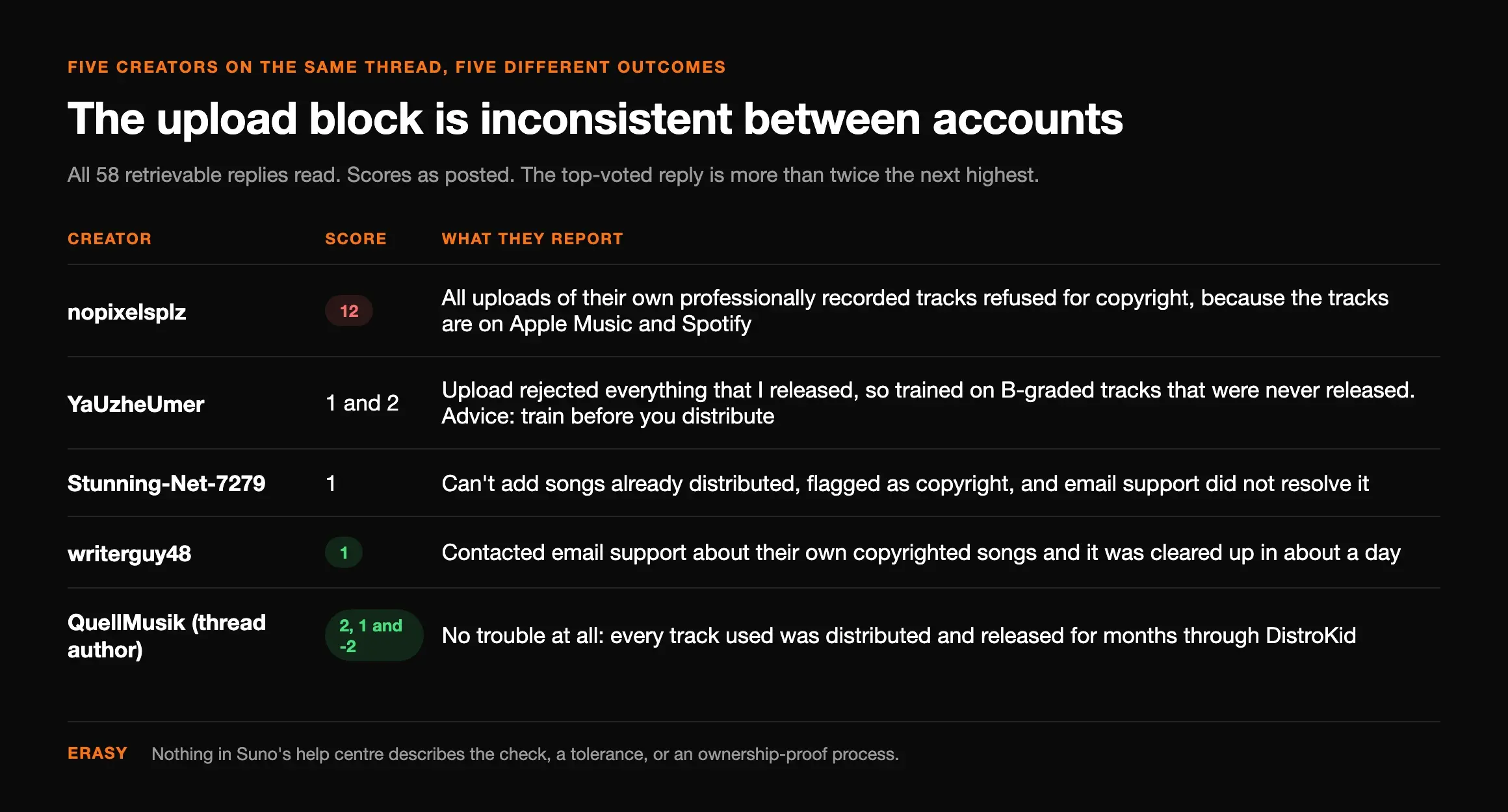
This is the section to read before you buy a month of Pro for this. The top-voted reply on the source thread, at 12 points — more than twice the next-highest — is not a tip. It is a working artist reporting that the feature was unusable for them:
“I tried this but Suno blocked all my uploads (of my own professionally recorded tracks) due to copyright because of course all my best tracks are all already on Apple Music and Spotify. Why would they not be? … you can only train a model with Suno-created tracks. Which totally defeats the whole purpose for many artists with an existing catalog of previously released music.”
| Creator | Score | What they report |
|---|---|---|
| nopixelsplz | 12 | All uploads of their own professionally recorded tracks refused for copyright, because the tracks are on Apple Music and Spotify |
| YaUzheUmer | 1 and 2 | Upload “rejected everything that I released”, so trained on “B-graded tracks that were never released”. Advice: train before you distribute |
| Stunning-Net-7279 | 1 | “Can’t add songs already distributed!” — flagged as copyright, and email support did not resolve it |
| writerguy48 | 1 | Contacted email support about their own copyrighted songs and it was “cleared up in about a day” |
| QuellMusik (thread author) | 2, 1 and −2 | No trouble at all: every track used was “distributed / released for months” through DistroKid |
So the honest shape of this is inconsistent between accounts, with a human route that worked for one person. Nothing in Suno’s help centre describes the check, a tolerance, or an ownership-proof process; what the one relevant article says is the obligation in the other direction, that you must own the rights to everything you upload. The practical reading: if a track of yours is already on streaming and the uploader refuses it, that is the matching system doing its job badly, and support is the only published way through. We have written up the wider version of this behaviour, where Suno refuses an upload it believes is copyrighted, with the refusal messages Suno actually serves.
Choosing the training set
Here is where the numbers stop being specifications. The source post says 24 or more is the sweet spot and used 30. The guide that same post links to — the creator’s own v6 custom model guide, researched 18 October 2026 — puts the sweet spot at 10 to 15 coherent tracks. In the comments, the same author tells a creator who trained on about 60 to “try less tracks. Do 20”, and elsewhere posts a song made with a model trained on 24. Suno’s floor is six and Suno names no optimum.
Treat all of it as untested, because it is. Nobody has published a controlled comparison of track counts on the same catalogue, the only upper figure anyone states is a user’s report that 100 is the maximum the interface accepted, and a creator who has used the feature since launch remembers older models taking “70+ songs”. What everyone involved does agree on is the variable that is not the count:
- Stylistic consistency beats volume. The author’s first question to both creators who got a disappointing result was whether the tracks were all in the same genre. A model is an average of what you feed it, and an average of four eras of your work is a blur of all four.
- Use whole songs. Arrangement is one of the things that transfers, and the habit only exists across a full song.
- Hold two or three tracks back. You cannot test whether a model learned your identity using material it trained on. This is the single step the published guides skip, and it costs nothing to plan for.
Preparing the files
Suno documents no format requirement for training material at all, which leaves the sensible default: upload the same file you would send a distributor. A lossy file carries its own artifacts, and whatever is in the file is part of the lesson — so a 128 kbps MP3 made from another MP3 teaches the model mush. The creator who got the result everyone else wanted notes that he used tracks mastered outside Suno, and one who did not get it was also uploading 24-bit, 48 kHz WAVs, so this is hygiene rather than the deciding factor.
Two practical notes. Upload full mixes, not stems: Suno’s stem features are outputs, nothing documents stems as a training input, and each file counts toward your six, so twelve stems from three songs would teach a catalogue of isolated drums and a cappellas with no arrangement in them. And if your masters have an audible noise floor, that floor is training data too — worth a pass through the hiss and artifact triage first if the tracks came out of Suno in the first place.
Three choices you make once
The flow itself is four clicks: open the model dropdown on the Create page, choose Create Custom Model, add at least six tracks (there is a Bulk Upload for a batch), and press the button. Two to five minutes later it appears in the picker under My Models. What matters is that three of the decisions you make on the way in are not revisable.
The base model is one of them. A reply on the thread assumed a custom model replaced the choice between v6, v6-wild and v6-mini; the author corrects it — “when you build the model it has a selector that you can choose which v6 model to build it with”. The post’s own model was built on v6-wild, the variant Suno describes as “less predictable and more varied”, which is a considerable thing to inherit by default and is nowhere in the documentation.
The track list is the second. There is no documented way to add a song, drop a song or reweight anything after a build, so the only edit available is deleting the model and starting again — which spends one of your three slots each time. A long-standing user puts the consequence plainly: “it just sucks you only get three cus I have to delete and change when I want to use my other models”. Third is sharing, which only Premier can do, is capped at ten people, and collapses if the subscription lapses or the model is deleted.
Is the model actually better?
“Sounds closer to me” is the thing you most want to be true and the thing you are least able to judge on the day you built it, and this is the part of the subject with nothing published behind it at all. Suno has no article on it. The highest-ranking third-party guide offers a listening drill with no pass mark. So run comparisons rather than auditions: same prompt, same lyrics, your model against base v6, twice each.
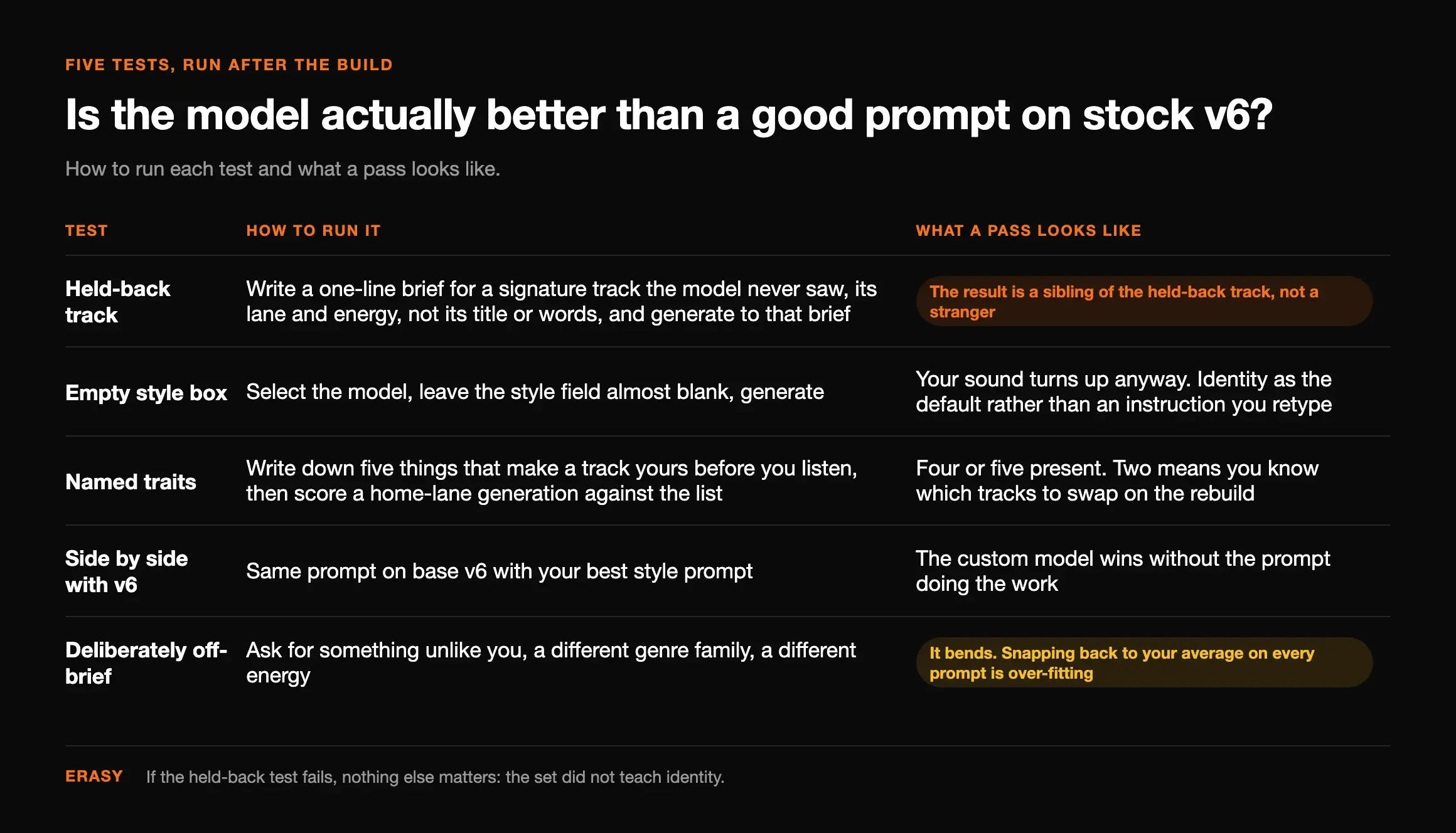
| Test | How to run it | What a pass looks like |
|---|---|---|
| Held-back track | Write a one-line brief for a signature track the model never saw — its lane and energy, not its title or words — and generate to that brief | The result is a sibling of the held-back track, not a stranger. If this fails, nothing else matters: the set did not teach identity |
| Empty style box | Select the model, leave the style field almost blank, generate | Your sound turns up anyway. This is the whole point of the feature — identity as the default rather than an instruction you retype |
| Named traits | Write down five things that make a track yours before you listen, then score a home-lane generation against the list | Four or five present. Two means you know which tracks to swap on the rebuild |
| Side by side with v6 | Same prompt on base v6 with your best style prompt | The custom model wins without the prompt doing the work. If a good prompt on stock v6 matches it, you have spent a slot for nothing |
| Deliberately off-brief | Ask for something unlike you — different genre family, different energy | It bends. Snapping back to your average on every prompt is over-fitting, and it is the failure mode two creators in the thread describe |
When it comes out worse
Two creators in the thread trained models and did not like the result, and they reached for the same word independently. One, who used around 60 tracks across a few genres from 24-bit WAVs: the output was “more stable — more ‘mine’ in melodic, sharpy, and nice! … but also somehow … it was like some bit condensed … maybe flat? Not full, deep, rich in it’s sound”. The second: “Same here, sounds ‘flatter’. And EQ doesn’t help.” The author’s diagnosis in both cases was the track count — “too many tracks” — and a question about genre mixing.
That is a plausible read and it is not the only one, so here is the other candidate, documented. Suno’s v6 FAQ states that “any custom models you’ve created will automatically get upgraded so that v6 powers your model moving forward”. Anyone who built a model under v5.5 is now generating with something they did not train, on a base they did not choose, and every model before v6 is retired, so no before-and-after test is possible. A third reply makes the structural version of the complaint — that you are not getting a different engine, because “no matter what you do your engine runs on V6” — and on the mechanism he is right: Suno’s own words are “fine-tune v6”. What a custom model moves is the prior, not the model’s ceiling. If what you are chasing is a quality the current base model does not have, training on your catalogue will not fetch it, and that is worth knowing before you spend the slot. The texture questions underneath this are the same ones we unpick in the three layers of the AI sound signature.
What you grant Suno
One reply gets 2 points for a question worth more than that: “You just gave suno your best 30 tracks they can use it however they want.” It deserves a real answer rather than reassurance, and the answer is in Suno’s Terms of Service (last revised 10 August 2026, effective 3 September 2026). Both halves matter.
You keep ownership. The Content section says you “retain all right, title, and interest in and to your Submissions” and that nothing in the terms “transfers or assigns to Suno any ownership interest” in them. What you grant alongside that is a “worldwide, non-exclusive, fully paid-up, sublicensable … assignable, royalty-free, perpetual, irrevocable” licence to use, reproduce, store, modify, distribute and create derivative works from that content, in connection with the “provision, use, monetization, promotion, marketing, and improvement of our products and services, including the Service and the artificial intelligence and machine learning models related to the Service”. A separate clause names the use directly: submissions may be used “to train, develop, fine-tune or otherwise improve the Service” and its models.
So: not a transfer of your catalogue, and not nothing either. The same section is also where the rights requirement bites, because you warrant that you own or have cleared everything you upload — which is a real question if a track has a co-writer, a sample or a label behind it. Ownership of what comes out is a separate matter again, and we cover it in what you actually own when Suno makes a song. On the narrower worry about your training set leaking, Suno’s sharing article is the only published statement: “Your training songs stay private” — said of collaborators you invite, not of Suno itself.
What it does not change
Three things, because each gets claimed for this feature somewhere.
- Generation artifacts. The output is still a v6 generation, decoding through the same stages, so the noise floor and the smear arrive as before. Export-stage problems need export-stage fixes, which is the job getting a file release-ready actually covers.
- Distributor AI screening. A different system entirely, looking for generation markers in the audio, and no distributor publishes a threshold you could train against. Most of them accept AI music openly; what gets reported is automated screening flagging or rejecting a submission, not a ban.
- How a platform labels your release. AI disclosure is declared on delivery through your distributor’s metadata, not inferred from your model. Training on your own catalogue does not make a release less AI-generated in the eyes of a platform and nothing you do to the audio changes that field.
Our recommended tool
The model is the sound. The export is the file.
Undetectr targets the generation artifacts and AI-detection markers in a finished export — the layer a custom model does not touch, because a custom model changes what v6 aims at rather than how it renders. It is for a track you have already decided to release, and it does not change how any platform labels your music as AI. Nothing does.
Once the sound is yours
Worth saying plainly: a recognisable sound is a competitive advantage in sync, and almost none in algorithmic discovery. The wall most creators hit after a release is not distribution, which is solved and cheap — it is that nobody hears the record. A model that reliably produces your lane is genuinely useful for paid sync placements, where a supervisor briefing for a consistent mood wants more of the same thing on purpose, and where the money is decided by a person rather than a feed. Selling direct to the listeners you already have is the other route that does not depend on reach. Neither needs you to win a recommendation algorithm, which is the honest reason to prefer them.
Related reading
Frequently asked questions

Eddie Mathews — AI Music Editor, Erasy
Eddie covers the craft side of AI music for Erasy — prompting, arrangement, vocal direction and the workflow between a generation you like and a file you can release. They test on their own material and say plainly where a technique stops working.
How many songs do you need for a Suno custom model?+
Do you need Premier for a custom model?+
Why does Suno reject my own released songs when I upload them?+
What happened to my v5.5 custom model?+
Is a custom model the same as a persona or My Taste?+
Does a custom model make my music harder to detect as AI?+
Disclosure: Erasy is an independent guide to AI music cleanup, and Undetectr is the tool we recommend and link to. Every requirement figure on this page was read at Suno’s own pages on 13 November 2026 and is dated to the edit date Suno shows: Using Custom Models and How do I change models? (both 6 November 2026), Sharing Custom Models (7 November), the v6 FAQ and What’s new in v6? (9 September), the plans article (7 November), Creative Sliders (3 June 2025), the pricing page and the Terms of Service (revised 10 August, effective 3 September 2026). The counted absences come from a sweep of all 159 articles reachable from help.suno.com’s nine categories and twenty-six sections. Quotations and scores come from 58 of the 59 comments on one r/SunoAI thread (28 October 2026, 62 points at the time of writing), read through the public arctic-shift mirror because reddit.com serves this container a bot-check page; the thread link goes to Reddit for readers. Track-count recommendations attributed to that thread’s author are his, including the figures in his own linked guide, which is a community resource we have read and do not endorse. We trained no model and ran no listening test, and no cross-version comparison is possible, since Suno states every model before v6 is retired.