Music Creation
Suno Hiss: Where It Comes From, and How to Remove It
On 3 November 2026 a Suno user posted four words as a title — “Suno Hiss” — and then the complaint underneath it: nearly everything coming out of the model has “a hiss immediately”, plus “some odd warbling noise” and “the constant pan and high hat drum just killing half my songs”. He had spent his time trying to prompt it away: “im struggling to find cues, styles and excludes to fix it ALL… I never had such issues with 5.5.”
Thirty replies arrived, and a second thread four days later asked the other half of the question outright — clean it up, or keep it as vibe? Between them they are the most useful writing on the subject anywhere, because the pages that rank for remove hiss from audio are six tool vendors and editors, and five of the six assume a microphone recorded the noise. Not one of them mentions generated audio, which is the whole of the question being asked.
So this page does the parts nobody covers: where hiss on a file nothing recorded comes from, which of those four noises are not hiss at all, why the prompt-side attempts failed, and how to take a noise floor off without dulling the track. The evidence is all 42 replies across both threads, counted one by one; a sweep of every article in Suno’s help centre; the one peer-reviewed paper on the mechanism; and every price checked at the vendor’s own page today.
The short version
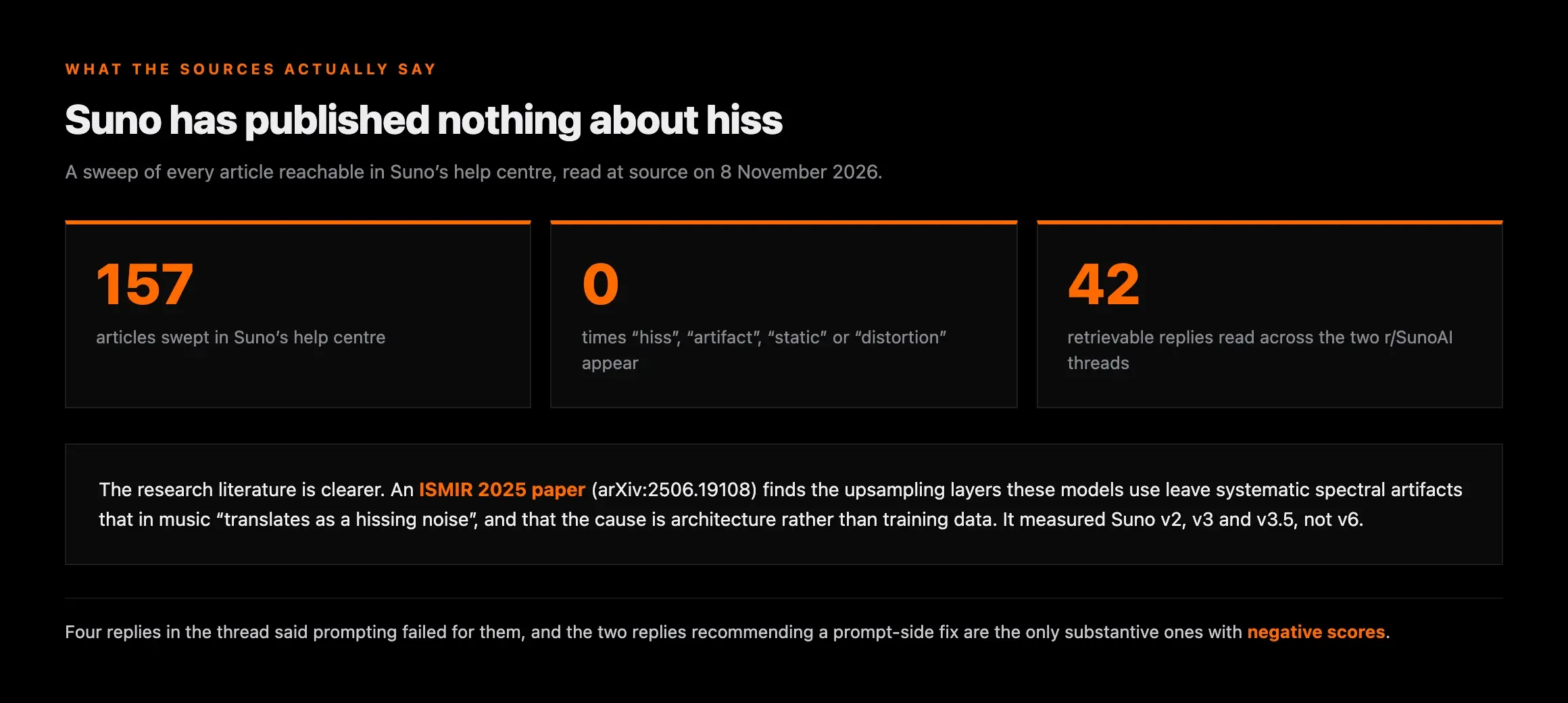
The short version: you cannot prompt hiss out. Four replies in the source thread said prompting failed for them, and the two replies that recommended a prompt-side fix are the only substantive replies in it with negative scores.
Suno documents none of this: across all 157 articles reachable in its help centre, “hiss”, “artifact”, “static” and “distortion” appear zero times. The one “noise” hit is a feature description for generating ambient noises on purpose.
The mechanism is published, just not by Suno. An ISMIR 2025 paper proves the upsampling layers in these models leave systematic spectral artifacts that are a property of the architecture, not of the training data — and that in music the effect “translates as a hissing noise”.
The fix the thread actually agreed on is not a denoiser. It is downloading the stems and muting the one the noise landed in — usually “Other” or percussion. Four replies recommended it. One upvoted reply names its cost.
Hiss on a track nothing recorded
Tape hiss is magnetic particles. Mic hiss is a preamp amplifying its own thermal noise. A room has an air-conditioning unit in it. None of that happened here: a Suno track was never in a room, never went through a preamp, and was never on tape. So when you want to remove hiss from audio that no microphone ever touched, the first honest question is what the noise even is.
Suno does not say. We swept the whole help centre — nine categories, twenty-six sections, every article reachable from them, 157 in total — and searched the lot. “Hiss”, “artifact”, “static” and “distortion” return zero occurrences. “Noise” returns exactly one, and it is the product description for Suno Sounds, which generates “ambient noises” deliberately. There is no troubleshooting article, no known-issues note and no acknowledgement.
The research literature is less shy. A paper presented at ISMIR 2025, A Fourier Explanation of AI-music Artifacts, takes apart the deconvolution modules that generative audio models use to build a waveform up to full sample rate, and proves mathematically that their output carries “systematic frequency artifacts — manifesting as small yet distinctive spectral peaks”. The authors are explicit about what that sounds like: “In music, this effect translates as a hissing noise.”
Where the artifact comes from is the important half. It is, in the paper’s words, “inherent to a chosen model architecture rather than a consequence of training data or model weights” — which is why no prompt reaches it, and why the literature’s own remedy is a change of upsampler by whoever builds the model.
Two honest limits. On Suno and Udio the paper says only that they “exhibit the same issues”, and the versions it tested were v2, v3 and v3.5, not the v6 family people are complaining about now; a tonal spectral peak is also not literally a broad band of noise across the top end. So the mechanism is published and architectural, the measurement on current models is not, and anyone telling you precisely why v6 hisses is guessing.
Five noises, five causes
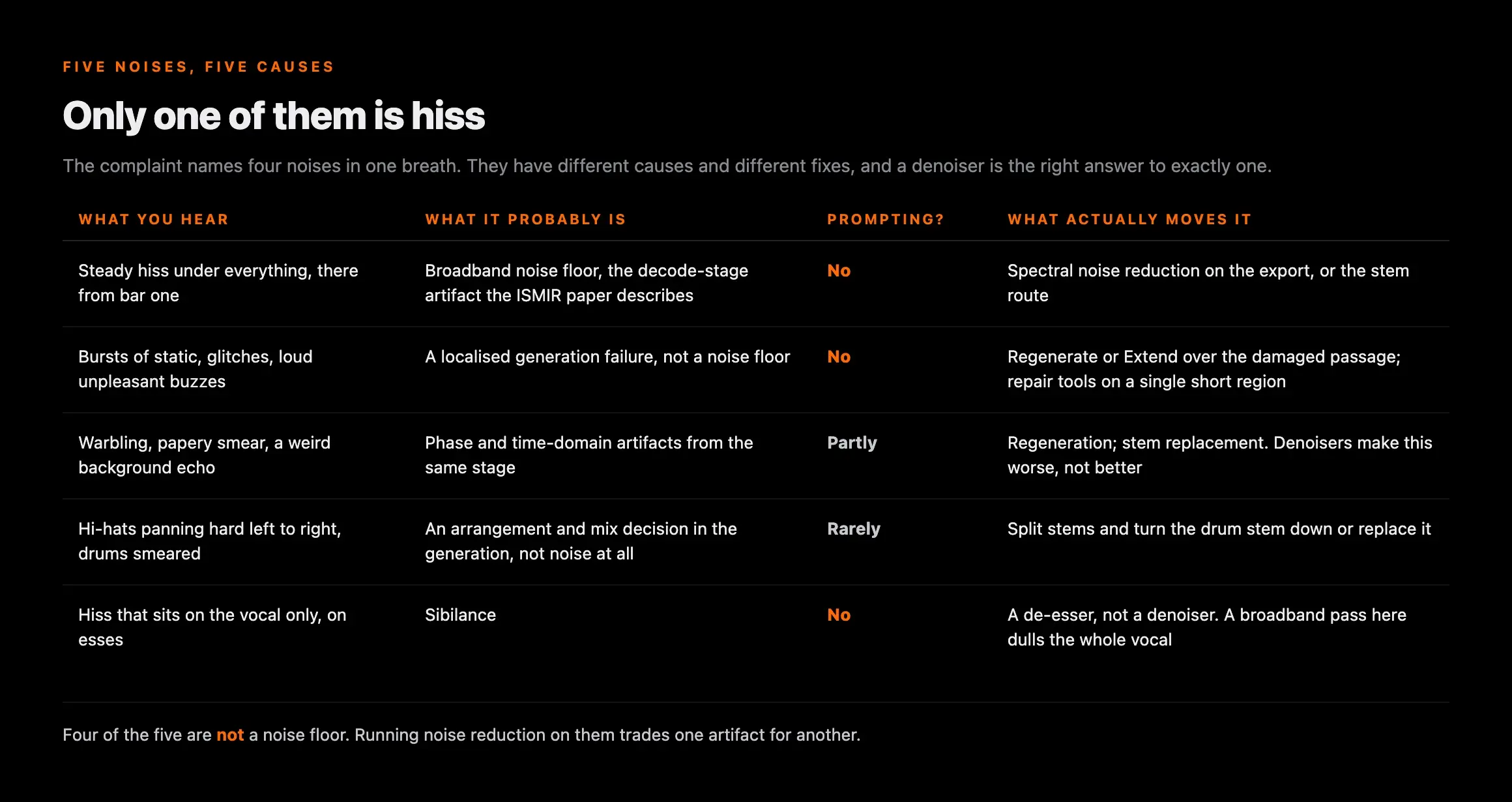
The source complaint names four problems in one breath, and the replies added a fifth. They are not one defect and they do not share a fix, which is exactly why an afternoon of prompting fixed none of them. Work out which one you have before you open anything.
| What you hear | What it probably is | Prompting? | What actually moves it |
|---|---|---|---|
| Steady hiss under everything, there from bar one | Broadband noise floor — the decode-stage artifact the ISMIR paper describes | No | Spectral noise reduction on the export, or the stem route below |
| Bursts of static, glitches, loud unpleasant buzzes | A localised generation failure, not a noise floor. The top-voted reply in the thread calls these "the worst" | No — but regenerating that section often clears it | Regenerate or Extend over the damaged passage; repair tools on a single short region |
| Warbling, "papery" smear, a weird background echo | Phase and time-domain artifacts from the same stage; one creator described losing the model's older "shimmer" | Partly — different seeds and shorter sections vary it | Regeneration; stem replacement. Denoisers make this worse, not better |
| Hi-hats panning hard left to right, drums smeared | An arrangement and mix decision in the generation, not noise at all | Rarely — several replies report it resists excludes | Split stems and turn the drum stem down or replace it |
| Hiss that sits on the vocal only, on esses | Sibilance. One reply identifies it correctly: "that's the hiss sound" | No | A de-esser, not a denoiser. A broadband pass here dulls the whole vocal |
The fifth row is the one that saves the most work. A broadband denoiser set hard enough to kill sibilance will take the air off every cymbal and breath in the track, and the complaint afterwards — that the cleaned file sounds dead — is the commonest outcome of treating sibilance as hiss. We have mapped the wider set of generation defects and which repair module each one belongs to in the iZotope RX walkthrough, and the layer underneath all of them in what the AI signature actually is.
Why cues, styles and excludes do not remove hiss
The poster’s own account is of a long fight with the prompt box, and the thread answered it with unusual clarity. Four separate replies said prompting had not worked for them. The most upvoted of them puts it in one line: “You can’t prompt out hiss, but there are apps and websites out there that help to remove some of the nasties.” Another creator reported using generated, elaborate “no hiss” prompts and finding that it “simply doesn’t work”.
The scoring is worth reporting, because it is the clearest signal in the thread. Of 29 replies, three carry negative scores — and two of those three are the only replies that recommend a prompt-side fix, one suggesting Exclude Styles entries such as “Static, Noise, Artifacts” and one asking to see the prompt. The people living with the problem have already voted on that advice.
The mechanism explains why. A prompt is an instruction about musical content, interpreted before the model renders a waveform; the artifact arrives during the rendering, from the layers that build the audio up to full rate. Excluding the word “noise” asks for a song with no noise in the arrangement. It cannot ask the decoder to stop being itself. The one prompt-side request that does reliably produce hiss is the opposite one — ask for tape hiss and, as a reply in the second thread confirms, “Yes. It will.”
One thing in the prompt box is worth trying, on reported experience rather than mechanism: a creator in the thread advises building a few custom models, which “seems to help”. Treat that as one person’s result, not a fix.
The fix the thread agreed on, and what it costs
The most interesting thing in 42 replies is that the consensus fix is not a denoiser at all. Four separate people described the same move: download the stems, listen to each one alone, find the stem the noise actually lives in, and mute it. The most upvoted version is specific about where it hides — “Most of the time it comes up as other or percussion for some reason and sounds like a hiss, once u find it and mute it its 100% gone” — and a second creator independently reports removing “Other” and remixing in Logic Pro.
This is a genuinely different kind of fix, and on the right track it is a better one. Noise reduction attenuates a band of frequencies across the whole mix and takes some music with it every time. Muting the stem the noise was bounced into removes it completely and touches nothing else. Suno exposes the stems through its own Split from Mix control, so the route does not need a separate separator.
The cost nobody mentions until you try it
An upvoted reply in the same thread names the catch: “The problem is the stems combined back together sound so much worse than the main wav download, even with the hiss.”
Separation is lossy. Recombining stems is not a null operation, so you are trading a noise floor for separation artifacts across the whole arrangement. Bounce both versions and compare them before you commit — on a dense mix the hissy original often wins, and on a sparse one the stem edit usually does.
The better the separation, the smaller that price — our stem splitter comparison covers which separators hold up on generated material.
Remove it, or keep it?
The second thread asked this directly, and its fourteen replies are more honest than the premise of most cleanup writing. Start with the reply that questions whether there is a problem at all: “when listening on my Amazon Basic speakers or my phone I don’t hear a hiss. Is this a situation where the hiss is on paper but the human ear doesn’t hear it?” That is the right first question. A noise floor you can only find by looking at a spectrogram is not costing you listeners.
Then the best argument for keeping it, from a creator who lost by winning. He had one voice that carried a slight static before v6, and he had made peace with it because the track was hard rock with heavily distorted guitars, so it “became part of the sound”. v6 cleaned it up and changed the voice: “while I don’t hear the sound anymore, I lost the uniqueness of the voice”. Noise is texture, and texture is sometimes the identity of a track. Lo-fi, tape, shoegaze and ambient work all pay money for it on purpose.
Against that, the ceiling. A creator running Ozone and RX on everything he makes draws it plainly: there is “only so much repair you can get before you basically either have to call it quits or just agree that shit in = shit out”. A hissy generation of a song you do not believe in is not a restoration project. Regenerate it.
The rule from all of it: decide on your worst playback system and your best one, not on the waveform. Audible on headphones and on a phone speaker, treat it; visible only on the analyser, leave it and spend the hour on the song.
Removing it without dulling the track
Broadband noise reduction works by measuring the noise where nothing else is playing, building a profile of it, and subtracting that profile across the file. It is a fifty-year-old technique and on a steady hiss it genuinely works. The failure mode is always the same: set too deep, it takes cymbals, breath and the top of the vocal with it.
There is one wrinkle specific to generated audio, and it is the reason this is harder than the tutorials suggest. Audacity’s manual requires you to “select a region of the waveform which contains only noise”, a minimum of 2,048 samples. But the complaint that started this was hiss “immediately” — and a track that begins on the downbeat may have no noise-only passage at all. Look at the very start, the very end and any full stop in the arrangement; if there is nothing, the stem route above is the better move, because it needs no profile.
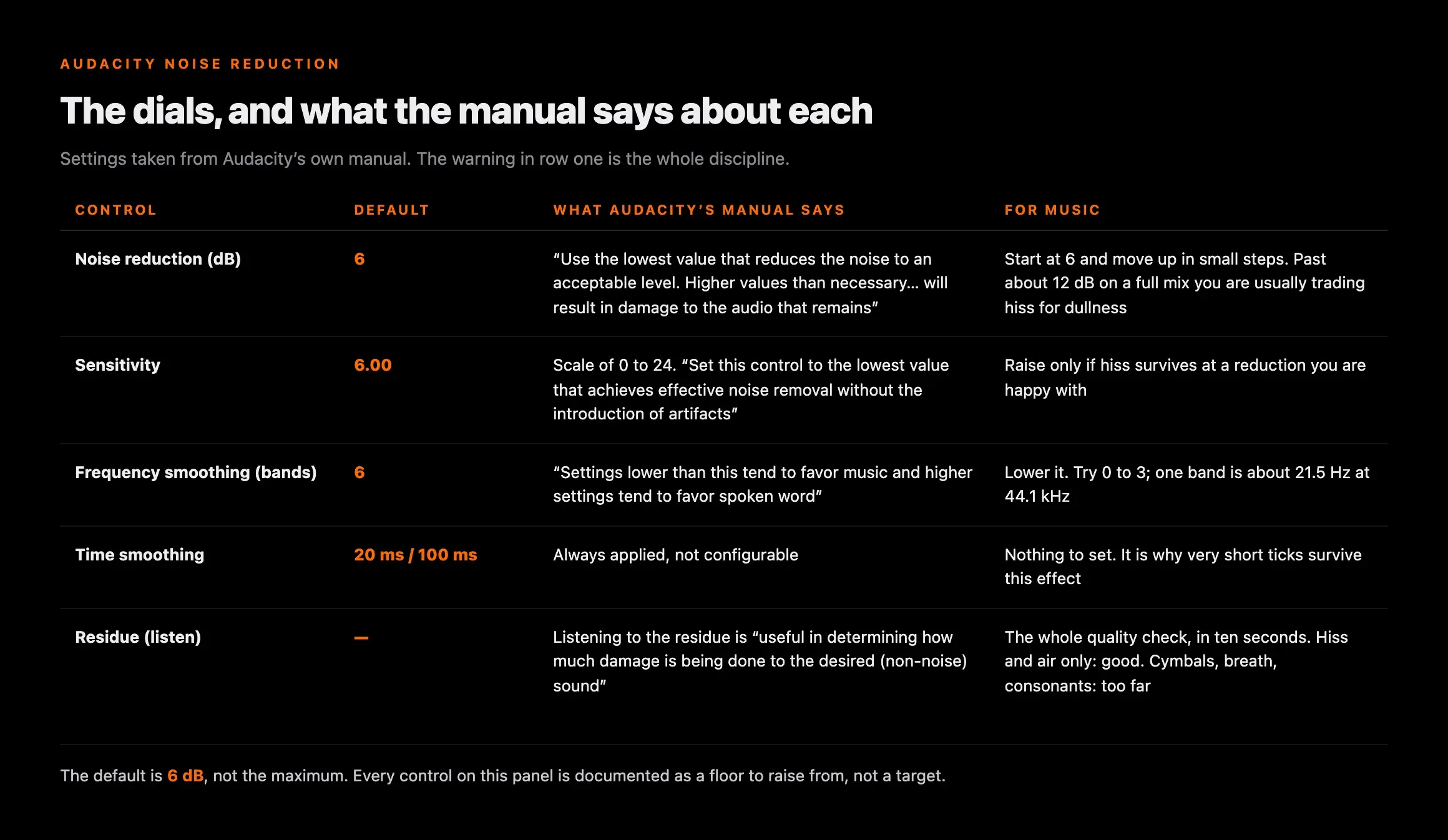
Audacity publishes the dial discipline, and it is the same discipline in every other tool whatever the controls are called:
| Control | Default | What Audacity's manual says | For music |
|---|---|---|---|
| Noise reduction (dB) | 6 | "Use the lowest value that reduces the noise to an acceptable level. Higher values than necessary… will result in damage to the audio that remains" | Start at 6 and move up in small steps. Past about 12 dB on a full mix you are usually trading hiss for dullness |
| Sensitivity | 6.00 | Scale of 0 to 24. "Set this control to the lowest value that achieves effective noise removal without the introduction of artifacts" | Raise only if hiss survives at a reduction you are happy with |
| Frequency smoothing (bands) | 6 | "Settings lower than this tend to favor music and higher settings tend to favor spoken word" | Lower it. Try 0 to 3 — one band is about 21.5 Hz at 44.1 kHz |
| Time smoothing | 20 ms attack / 100 ms release | Always applied, not configurable | Nothing to set. It is why very short ticks survive this effect |
| Residue (listen) | — | Listening to the residue is "useful in determining how much damage is being done to the desired (non-noise) sound" | The whole quality check, in ten seconds. Hiss and air only: good. Cymbals, breath, consonants: too far |
The residue row settles the argument about settings without any numbers: if you hear music in the discard, you are removing music. Work on the lossless export rather than an MP3 — we set out why a lossy file breaks the profile in the piece on Suno Remaster, which is also the page to read before assuming Suno’s own Remaster button will clean this up. One creator in the thread reports exactly the opposite: every Remaster attempt “introduces so much noise or fails”.
Order of operations matters too. Clean first, then master. Mastering lifts level and high-frequency energy, so a hiss you left alone comes up brighter and louder with everything else — the sequence we use for mastering an AI track.
The tools, compared
Every price here was read at the vendor’s own page on 8 November 2026. The column that matters is the last one: on generated audio, what a tool damages tells you more than what it claims to fix. Note how the vendors describe themselves — iZotope’s Spectral De-noise removes “tonal and broadband noise from any type of recording”, and a Suno track is not a recording.
| Tool | Price | Best at | What it costs you |
|---|---|---|---|
| Audacity — Noise Reduction | Free | A steady noise floor, if you have a noise-only passage to profile. Fully documented controls | Destructive, offline previews, no spectral editing. Easy to overdo |
| Stem mute (Suno Split from Mix) | Included with a paid plan | Noise bounced into one stem — most often "Other" or percussion. Removes it completely | Recombined stems can sound worse than the original mix. Separation artifacts across everything |
| iZotope RX 12 Elements | $99.00 | The cheapest route into the repair suite most of this niche uses | A reduced module set — check the edition comparison against the defect you actually have |
| iZotope RX 12 Standard | $399.00 | Spectral De-noise plus Spectral Repair for drawing out individual bursts and buzzes | Cost, and a real learning curve. Over-aggressive de-noise still dulls a mix |
| A de-esser (any DAW) | Usually included | Vocal sibilance — row five of the triage table, and often mistaken for hiss | Nothing, if you use it on the vocal and not the mix |
| Suno Studio — Gate effect | Included with Studio | Silencing noise in the gaps between notes, inside Suno | A gate cannot remove a noise floor that sits under the music it is passing |
| One-click online denoisers | Free to ~$20/mo | Speed, and speech | No residue monitoring and no dial discipline — the default is usually too deep for music |
Suno Studio’s built-in set is worth knowing for what it leaves out. Its effects are a compressor, EQ, reverb, convolution, delay, distortion and a gate: there is no denoiser in the product at all. Our artifact removal tools compared piece goes further on the paid options.
Our recommended tool
Clean the artifacts, not the label
Undetectr targets the generation artifacts and AI-detection markers in an exported file, which is the layer a denoiser and a de-esser cannot reach. It is for a track you have already decided to release. It does not change how any platform labels your music as AI — nothing does.

Not the two-minute problem
One distinction before you start, because the fixes are different. This page is about a noise floor present from bar one, across the whole file. A separate and much-reported complaint is a track that starts clean and falls apart as it goes on — vocals breaking up, instruments smearing, the mix collapsing somewhere around the two-minute mark. That is time-dependent, it is not a noise floor, and noise reduction will not touch it. If your problem starts partway through a song rather than at the beginning of it, read a track that falls apart after two minutes instead, which takes that apart properly. Several creators report both at once; they are still two jobs.
What cleaning the file does not change
A quieter noise floor is an audible quality improvement. That is all it is, and it is worth having — a hissy master sounds cheap and cheap is the thing most likely to lose a listener in the first ten seconds. It does not make a track more likely to clear distributor AI screening, which looks for generation markers rather than noise and publishes no noise-floor threshold anywhere. Distributors broadly accept AI music; what gets reported is automated screening flagging individual releases, not a ban, and hiss is not the trigger.
And it changes nothing about how your release is labelled. AI disclosure on streaming services is metadata, declared on delivery and shown at the platform’s discretion. No audio processing of any kind alters it, and anyone selling you otherwise is selling you something that does not exist. Cleaning hiss is for the listener, not for the label.
Which leaves the question the threads keep circling: the file is clean, and then what? The honest answer on this niche is that discovery, not quality, is the wall — the loudest thread in the same fortnight was a creator asking what is even left to try. A clean master is worth most where somebody is actually paying for audio quality, which means pitching it for paid sync placements in TV, film, games and ads, and selling direct to the people who already like it rather than waiting on an algorithm. A supervisor rejecting a cue for a noise floor is one of the few places this work converts straight into money.
Related reading
Frequently asked questions

Eddie Mathews — AI Music Editor, Erasy
Eddie covers the craft side of AI music for Erasy — prompting, arrangement, vocal direction and the workflow between a generation you like and a file you can release. They test on their own material and say plainly where a technique stops working.
Why does Suno add hiss?+
Is Suno v6 noisier than v5.5?+
Can a prompt remove hiss?+
Does removing hiss hurt the track?+
What is the best free way to remove hiss from an AI song?+
Does removing hiss help it pass distributor screening?+
Is hiss the same as the Suno watermark?+
Disclosure: Erasy is an independent guide to AI music cleanup, and Undetectr is the tool we recommend and link to. Quotations and reply counts come from all 42 retrievable comments on two r/SunoAI threads (3 November 2026, 18 points / 30 comments; 7 November 2026, 2 points / 14 comments), read through the public arctic-shift mirror because reddit.com serves this container a bot-check page; thread links go to Reddit for readers. The classification of replies into fix types is ours. The help-centre figure is a sweep of all 157 articles reachable from help.suno.com’s nine categories and twenty-six sections, and the retirement wording is from Suno’s v6 FAQ, edited 9 September 2026. Mechanism claims are quoted from Afchar et al., “A Fourier Explanation of AI-music Artifacts” (ISMIR 2025, arXiv:2506.19108), which tested Suno v2, v3 and v3.5 rather than v6. Controls and defaults come from Audacity’s manual, prices from iZotope’s product page. We ran no listening test, and none is possible across model versions, since Suno states every model before v6 is retired. All sources read at source on 8 November 2026.