AI Music
Suno Downloader: How to Bulk Export Your Entire Library Before 3 September
Suno has no "download everything" button. That is the whole reason this category of tool exists, and it stops being a convenience question on 3 September 2026, when Suno starts metering exports — retroactively, across every song you have ever made. Until then there is no cap at all, so pulling your entire catalogue costs you nothing and breaks no rule. This is a comparison of every route that actually works, what each one costs you, and which one to use depending on what you are willing to hand over.
Short version, if you are in a hurry and the deadline is close: gather what you want into a public Suno playlist and pull it as a single ZIP with a hosted playlist downloader. It is the only route that does not require you to hand a third party your Suno session or an auth token.
The short answer
There is no native bulk download. Suno lets you pull tracks one at a time. Everything else is third-party.
Four routes work: by hand, browser extension, community script, or hosted playlist downloader.
The real difference is credentials. Extensions and scripts need your session or auth token. A hosted playlist downloader needs only a public link.
The deadline is 3 September 2026. After that: 7 lifetime on Free, 20/month on Pro, 60/month on Premier — applied to your back catalogue too.
Nothing gets deleted. This is a restriction on export, not on access or ownership.
Why this suddenly has a deadline
Bulk downloading a Suno library has been a mild productivity problem for two years. On 6 August 2026 it became a dated one.
From 3 September 2026, Suno meters downloads by tier: up to 7 total lifetime trial downloads on Free for personal, non-commercial use only; 20 per month on Pro; 60 per month on Premier; and Suno Studio, included with Premier, described as available without limitation. The sentence that matters most is in Suno's help centre, and most coverage skipped it — the limits apply to "all music on Suno starting September 3, including songs created before that date".
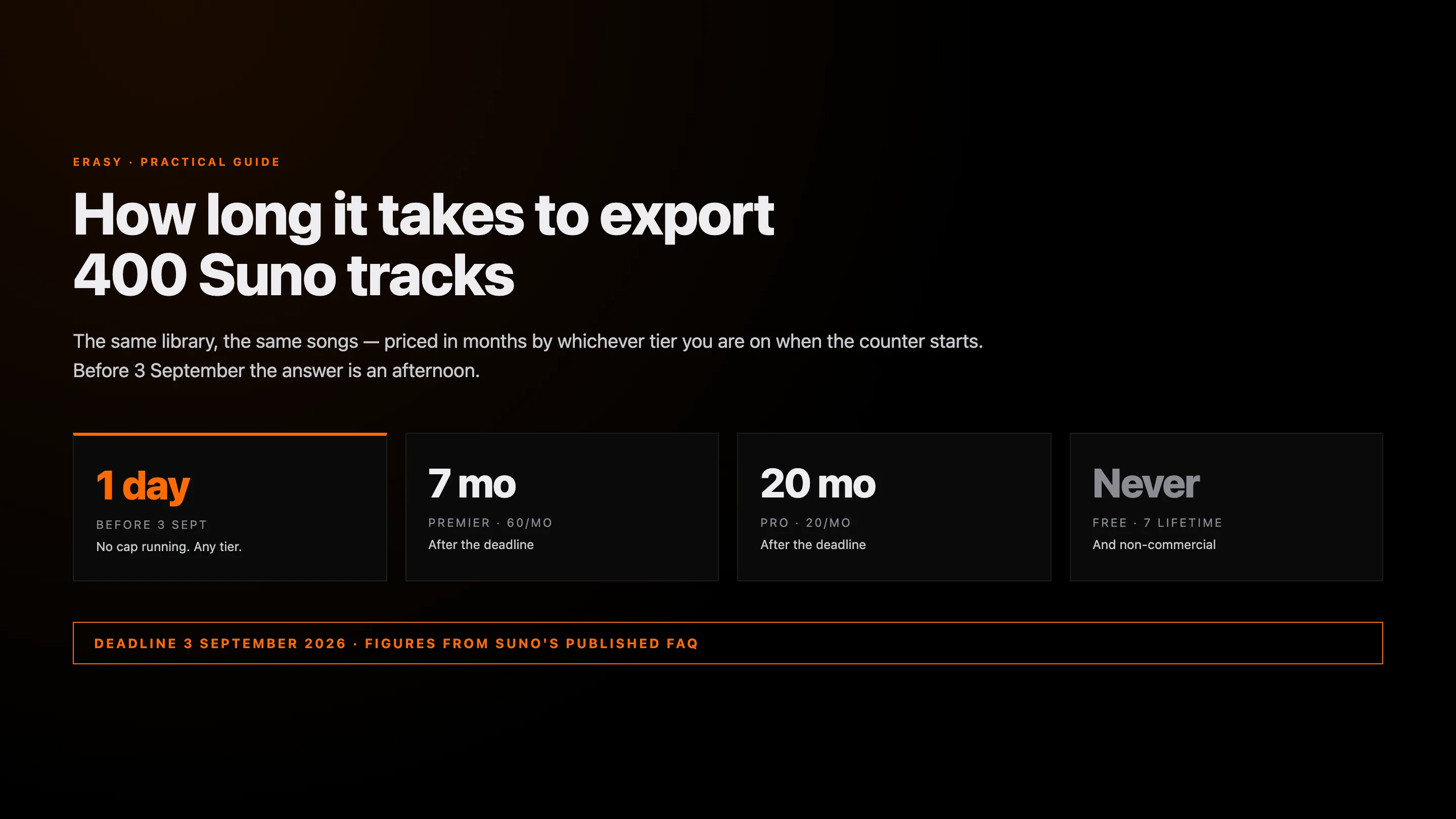
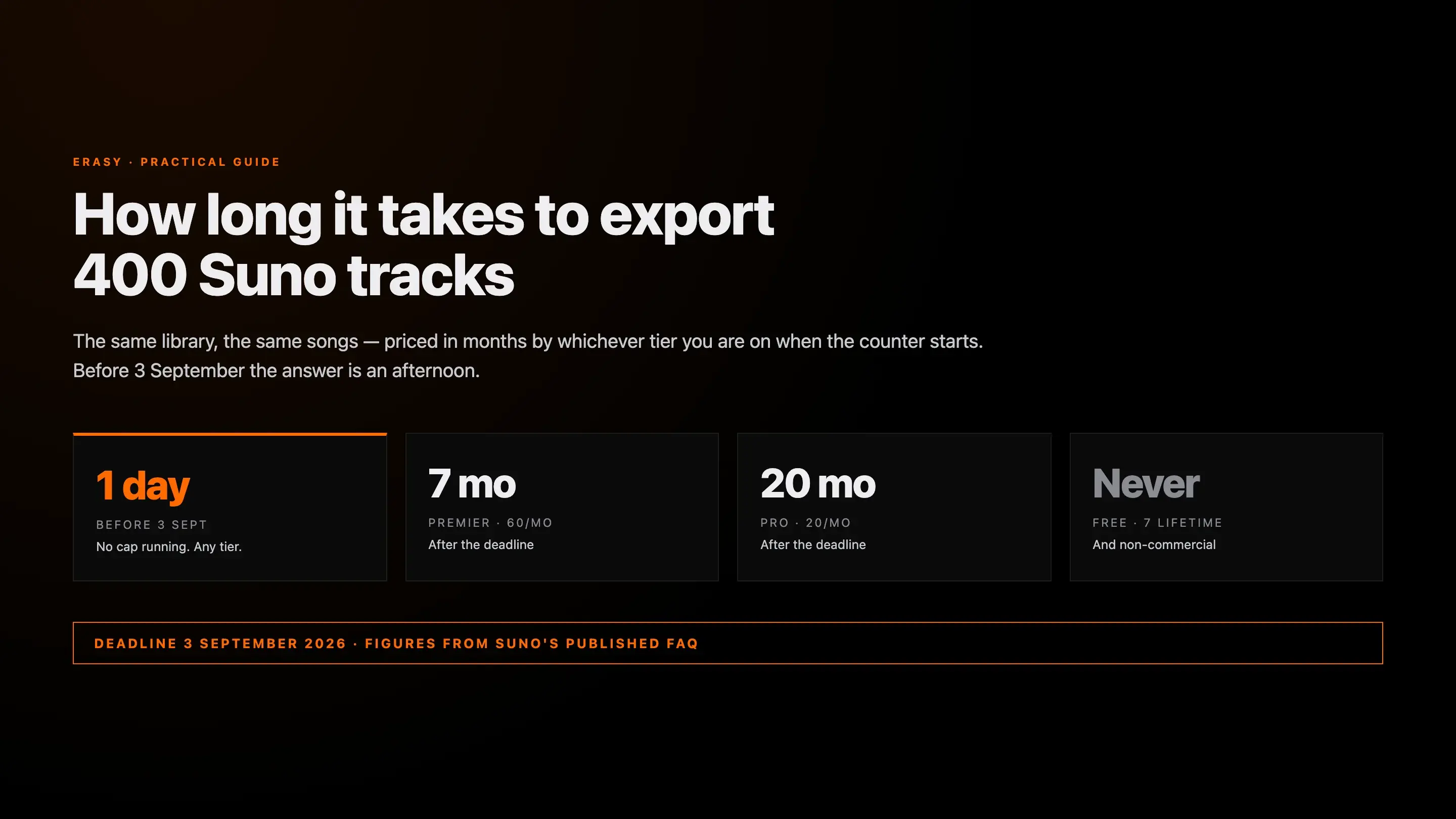
Your back catalogue is not grandfathered. Take a moderately active user with 400 songs — roughly what a year of regular generating produces. On Free they may export seven of them, ever, and not commercially. On Pro at 20 a month, clearing that catalogue takes 20 months. On Premier, just under seven. Before 3 September it takes an afternoon, because no counter is running. That is the entire urgency, and we covered the policy itself in full in our review of Suno's download limits.
No counter is running until 3 September
One playlist link. One ZIP. No login handed over.
Undetectr's Suno library import takes a public playlist URL and returns your whole catalogue as a single ZIP — included with the €39 one-time Lifetime plan, alongside the cleanup that gets those files past distributor screening afterwards.
The four routes, compared
All four of these genuinely work. We are not going to pretend three of them are broken so the fourth looks better — they differ on setup, risk and time, and for some people the free routes are the right call.
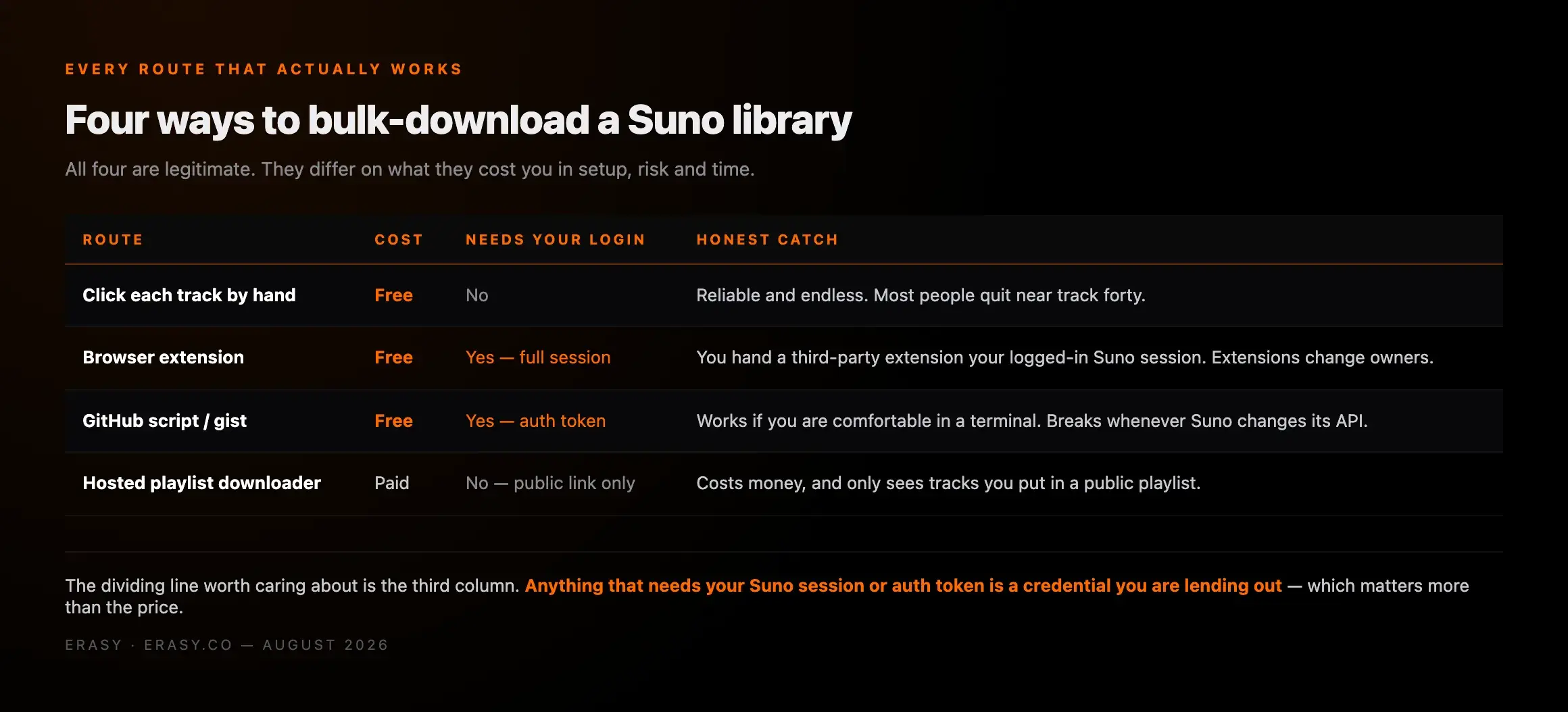
| Route | Cost | Needs your login | Best for |
|---|---|---|---|
| By hand | Free | No | Under ~30 tracks |
| Browser extension | Free | Yes — full session | Large libraries, if you trust the extension |
| Script / GitHub gist | Free | Yes — auth token | Terminal-comfortable users |
| Hosted playlist downloader | Paid | No — public link only | Whole catalogue, no credential shared |
The column worth reading twice is the third one. Price is the obvious axis and it is the least important. What separates these routes is whether you have to lend somebody your Suno account to use them.
1. By hand
Open each track in your library, hit download, choose the format, save. It is free, it needs no third party, and it is completely reliable.
Realistically it runs ten to fifteen seconds a track once you account for the format choice and the save dialog, so 400 songs is north of ninety minutes of uninterrupted clicking. Nobody does ninety minutes of uninterrupted clicking. What actually happens is that people stop around track forty, and the tracks they never reach are disproportionately the older ones they had forgotten were good. If your library is under about thirty songs, though, stop reading here — this is the correct answer and it costs nothing.
2. Browser extensions
Several exist on the Chrome Web Store and they do the job: the extension runs inside your logged-in Suno session, walks the library, and downloads what it can see. Free, reasonably fast, no terminal required.
The trade is access. An extension with permission to read your Suno session is an extension that can read your Suno session — and browser extensions change hands. The well-documented pattern across the extension ecosystem is that a useful, popular, entirely honest extension gets acquired, and the new owner ships an update the existing user base auto-installs. That is not a reason to never use one; it is a reason to check who publishes it, when it was last updated, and to remove it once the export is done rather than leaving it installed indefinitely.
3. Scripts and GitHub gists
There are community scripts that drive Suno's API directly. You supply an auth token pulled from your browser session, the script enumerates your songs, and it downloads them — often with more control than anything else on this list, including video files and metadata.
Two honest caveats. The first is that this route assumes you are comfortable reading a script before you run it, and if you are not, then "paste your auth token into this" is exactly the instruction you should be most suspicious of anywhere else on the internet. The second is fragility: these break whenever Suno changes an endpoint, and a gist that worked in March may simply error out today. For a developer this is the most powerful option available. For everyone else it is a support burden with no support.
4. Hosted playlist downloader
The route we use and recommend, with the reasoning stated plainly so you can disagree with it. A hosted downloader takes a public playlist URL and returns the tracks as a single ZIP. It never sees your Suno login, because it does not need one — a public playlist is public.
That is the entire argument for it. You are not installing anything with session access, not pasting an auth token anywhere, and not depending on a script that breaks on Suno's next deploy. You are pointing a tool at a link you deliberately made public, and taking your own music down. The cost is that it is paid, and that it only sees what you put in the playlist.
What we liked
- ✓No Suno login, session access or auth token is ever handed over
- ✓Works from a public playlist link, so nothing is installed in your browser
- ✓Whole library returns as one ZIP rather than several hundred saves
- ✓Included with Undetectr's €39 one-time Lifetime plan alongside the cleanup tooling
Where it stops
- —Paid, where extensions and scripts are free
- —Only sees tracks you actually added to the playlist — miss one and it is not in the ZIP
- —Requires making a playlist temporarily public, which some people will not want to do
- —MP3 output from the CDN, so it is not a substitute for pulling WAV masters of your keepers
The five-minute version
Whichever hosted tool you use, the shape is the same. There is no step six.
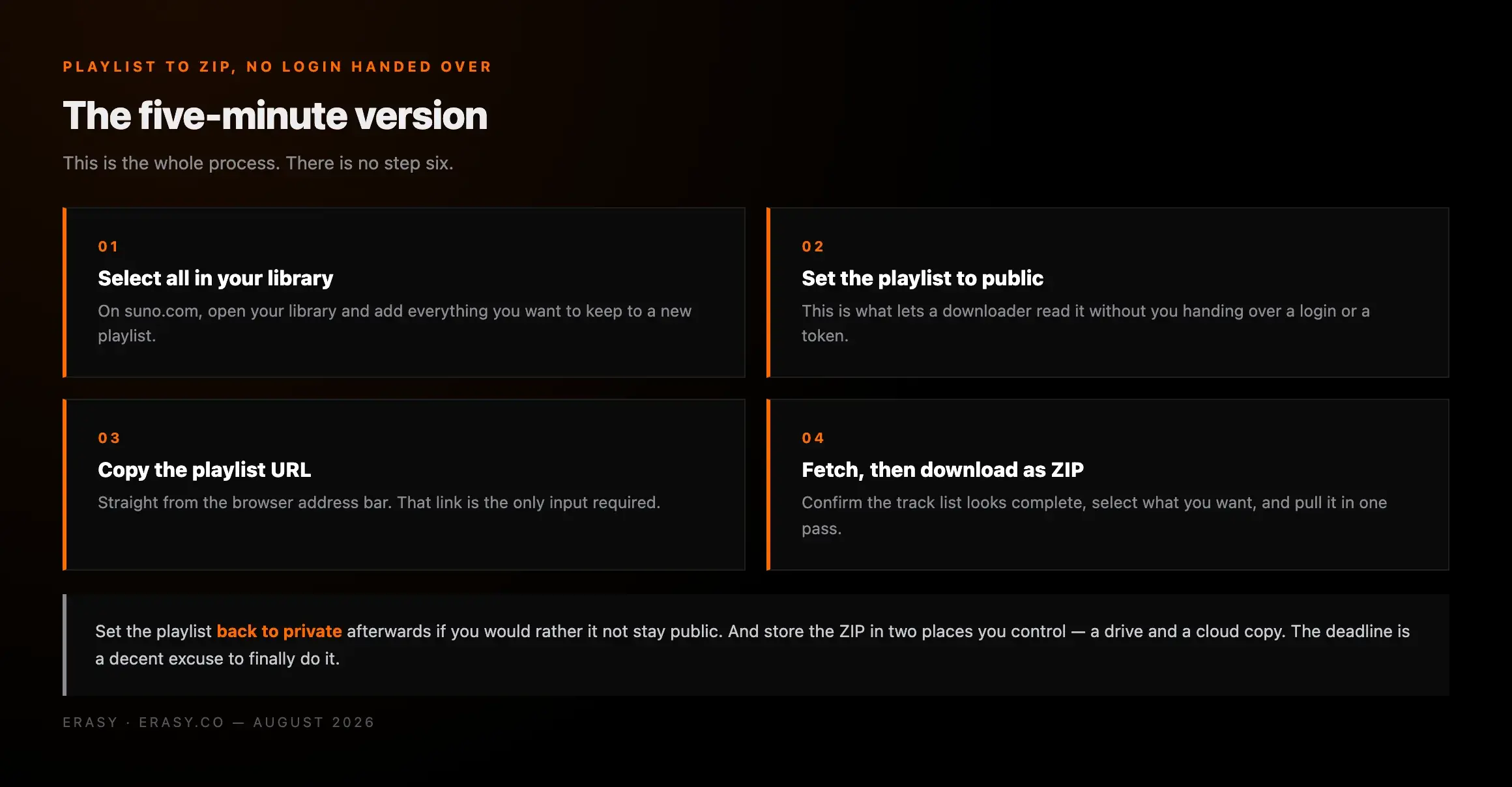
Open your Suno library and add what you want to keep to a new playlist. This is the step where people under-select — err towards taking too much, because the counter starts on 3 September either way.
This is what lets a downloader read it without a login or a token. You can set it back to private the moment the ZIP has finished.
Straight from the browser address bar. That link is the only input the tool needs from you.
Confirm the track count matches what you expected before you commit — this is where you catch a playlist that silently missed thirty songs.
Bulk export is your safety net, not your master archive. Anything with a future as a release deserves a WAV pulled by hand.
A local drive and a cloud backup. Ordinary archival discipline, and this deadline is a decent excuse to finally do it.
What actually burns a download after 3 September
If you miss the deadline it is worth knowing that the fine print is considerably kinder than the headline number, and almost no coverage carried it.
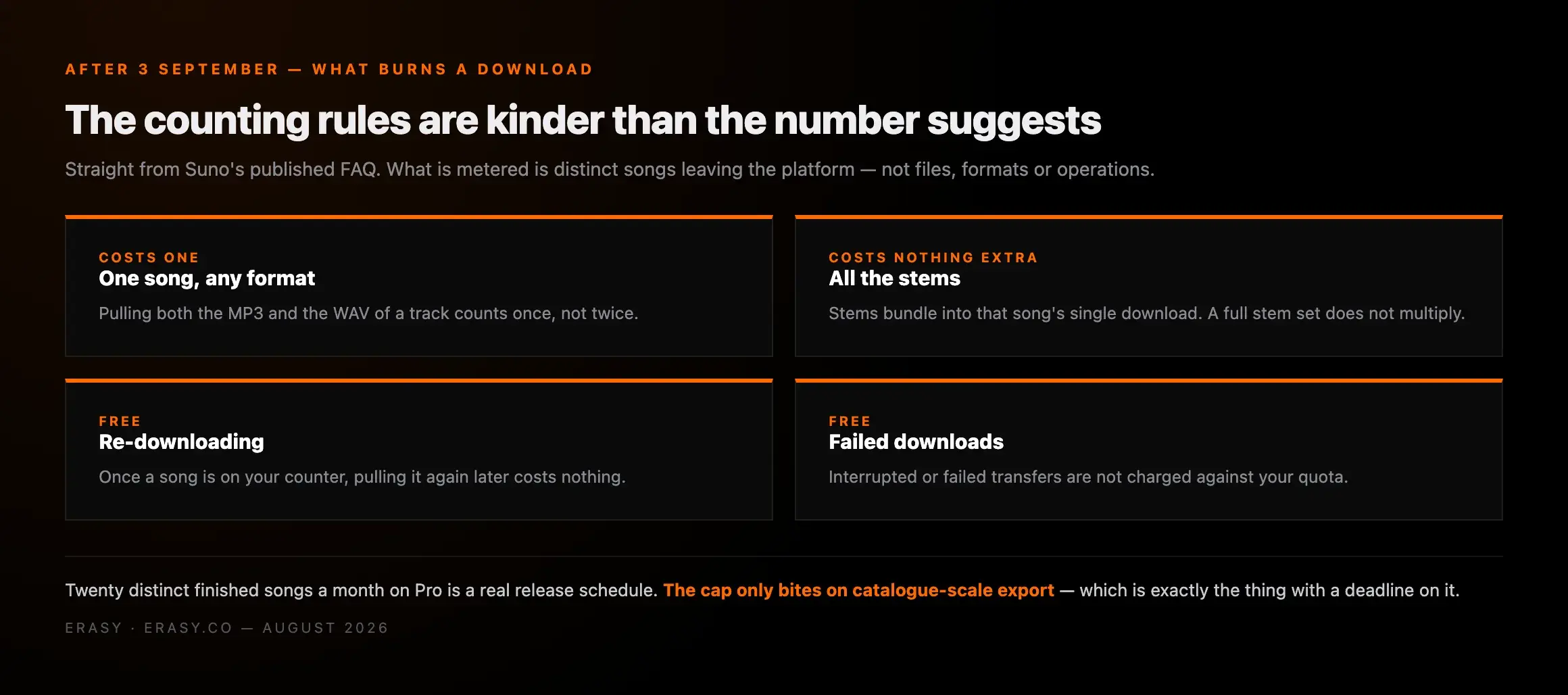
One song counts as one download regardless of format, so pulling both the MP3 and the WAV costs one. Downloading the same song twice does not count twice. All stems from a song are part of that song's single download. Failed or interrupted downloads do not count at all. What Suno is metering is distinct songs leaving the platform — not files, not formats, not operations.
Read together, that means 20 a month on Pro is a genuine release schedule rather than a crippling limit. The cap bites on catalogue-scale export, which is precisely the thing with a deadline on it.
MP3, WAV, and what you actually keep
A point that gets lost in the rush to grab everything: a bulk export and a master archive are different things, and you want both.
Most bulk routes hand you MP3, because that is what comes off the CDN. That is completely fine as a safety net — it preserves the take, and the take is the thing you cannot regenerate. But MP3 is lossy, and every subsequent process compounds whatever the first encode discarded. If a track is going to be mastered, cleaned or distributed, you want the WAV.
So the sensible split is: bulk-export everything as insurance, then pull WAV and stems by hand for the handful you actually intend to do something with. Stems are the highest-value export of the lot because they are the hardest thing to reconstruct later — and after 3 September they bundle into the same single download, so they cost nothing extra. More on format choice in our guide to getting Suno tracks out as MP3.
Is any of this allowed?
Worth answering directly, because the phrase "bulk downloader" makes people nervous and it should not.
You are downloading music you generated, on a plan that grants you the rights to it. That is the ordinary intended use of the product. Before 3 September there is no cap of any kind, so bulk export uses no quota and breaks no rule — it is a faster way to do something you are already entitled to do. We are not going to dress it up as anything cleverer than that, and we will say the corollary too: after 3 September, Suno's policy is Suno's policy, and a bulk tool is not a way around the counter.
The one thing we would actively steer you away from is opening extra accounts to farm downloads once the cap starts. The same 6 August announcement introduced tiered enforcement running from warnings through temporary suspensions to permanent bans. Risking the library you are trying to protect, in order to dodge a limit you can legitimately get ahead of this week, is a bad trade.
The gate that comes after export
Getting the files onto your own drive solves storage. It does not solve release. Anything you intend to put through a distributor still has to clear automated AI screening at intake — and that screening runs once, at submission, before a single listener hears anything. A flagged track does not come back with a warning. It does not go live, which means it never earns.
That is a signal-level problem rather than a does-it-sound-good problem, and it got sharper this month: the same announcement that introduced the download cap also committed Suno to audio watermarking and fingerprinting, rolling out on no published date. We set out what is actually confirmed about that in our piece on Suno's new watermark, and the removal mechanics in our comparison of six removers.
Lifetime · one-time €39
Export the catalogue this week. Then clean whatever you release.
One plan covers both halves: the bulk Suno playlist import that turns a library into a single ZIP, and signal-level processing that removes generation artifacts, embedded watermarks, C2PA metadata and noise-floor patterns before a distributor sees the file.
Which one should you actually use
Under about thirty tracks: do it by hand. It is free, it is reliable, and the tooling is not worth the setup.
Comfortable in a terminal and willing to read a script before running it: the community scripts give you the most control of anything here, including video and metadata, and they cost nothing.
Everyone else with a real catalogue and four days on the clock: use a hosted playlist downloader, because it is the only route that gets the whole library out without you handing a credential to anybody. Undetectr's Suno import is the one we use — public playlist in, ZIP out, and it comes with the cleanup tooling you will want for anything headed to a distributor afterwards.
Whichever you pick, pick it this week. On 3 September the question stops being which tool is fastest and starts being how many months your catalogue takes.
Keep reading
- Suno download limits review: what changes on 3 September 2026
- Suno's new watermark: what lands, when, and what to do first
- How to download Suno tracks as MP3
- Best Suno watermark removers 2026, ranked
- How to distribute AI music without getting flagged
- How to sell Suno music: generation to sold in ~15 minutes
Frequently asked questions

Cara Whelan — Policy Editor, Erasy
Cara covers platform policy for Erasy — pricing changes, terms updates and the rules that decide what you can actually do with the music you generate. They work from primary announcements and FAQs rather than the coverage of them, and date every figure so you know when it was last checked.
Can I bulk download in Suno?+
Is there a downloader for Suno music?+
How do I download songs from Suno AI for free?+
How do I export a song from Suno?+
Does downloading in bulk break Suno's terms?+
Will I lose my songs after 3 September?+
How long does it take to download a whole Suno library?+
What format should I download from Suno?+
Disclosure: Erasy is an independent guide to AI music cleanup. We have listed the free routes alongside the paid one and said where each is the better choice, because a comparison that only recommends the paid option is not a comparison. Undetectr is the hosted tool we use and link to. Download limits, tiers and counting rules verified against Suno's own announcement and help centre. Figures current as of 30 August 2026.