AI Music
Suno Lyrics on Spotify: Why Yours Don't Show (2026)
The release is live, the artwork looks right, and the lyrics panel is empty. You typed the words into the upload form — or you thought you did — and three weeks later Spotify still shows nothing. Getting Suno lyrics on Spotify is the one release step where doing the obvious thing achieves nothing at all, because the obvious thing sends your words to the wrong company.
Spotify does not take lyrics from your distributor. Apple Music does, but only if they arrive five days before your release date. Three of the six distributors we checked send no lyrics of their own, and the one that delivers furthest charges for the half that scrolls in time. And every one of those routes screens what you send: DistroKid publishes a rejection list, updated on 1 October 2026, that a Suno lyric sheet breaks in half a dozen places before you reach the second verse.
So we read it all at source on 16 October 2026 — Spotify's artist documentation, Apple's delivery specification for lyrics, and the lyrics help pages of DistroKid, TuneCore, CD Baby, LANDR, RouteNote and Amuse — and put the formatting rules side by side with what actually comes out of Suno. The result is a ten-minute job you can do once, correctly, instead of three rounds of silence.
The short version
- Spotify's lyrics come from Musixmatch, not your distributor. Spotify's own artist page says “get verified on Musixmatch to add, edit, and sync your lyrics on Spotify for free”, and that “the free tier plan is all you need”. Japan is served by PetitLyrics instead.
- Apple Music is a deadline, not a dashboard. Apple's delivery spec says lyrics “must be delivered 5 days prior to your release date” by your distributor — and once Apple has verified them, “your redelivered lyrics will not be updated”.
- Distributors differ more than anyone admits. TuneCore “only distributes lyrics directly to iTunes/Apple Music”; RouteNote “doesn't currently support uploading lyrics”; CD Baby sends you to Musixmatch; DistroKid delivers plain lyrics free and charges for synced.
- A pasted Suno lyric sheet is a rejection. Bracketed section tags, “x2” repeats, trailing commas and digits for small numbers are all on DistroKid's published rejection list. Strip them before you submit, not after.
- Lyrics are finishing work, not promotion. They make a track that already has listeners better. They will not find you any.
Where Spotify's lyrics come from
The single fact that explains most empty lyrics panels: the words in your distributor's upload form and the words in Spotify's player travel through different companies. Spotify's own artist support page is unambiguous about the route — “Get verified on Musixmatch to add, edit, and sync your lyrics on Spotify for free”, with the note that “lyrics for listeners in Japan are handled by PetitLyrics”. Listeners cannot help: “You can't add lyrics, but you can view them on Spotify.”
Apple Music works the opposite way round. Apple's own delivery documentation tells distributors and encoding houses to send the “official lyrics” with the release itself, which is why your distributor has a lyrics field at all. Both routes are real; neither covers the other; and no single submission reaches both.
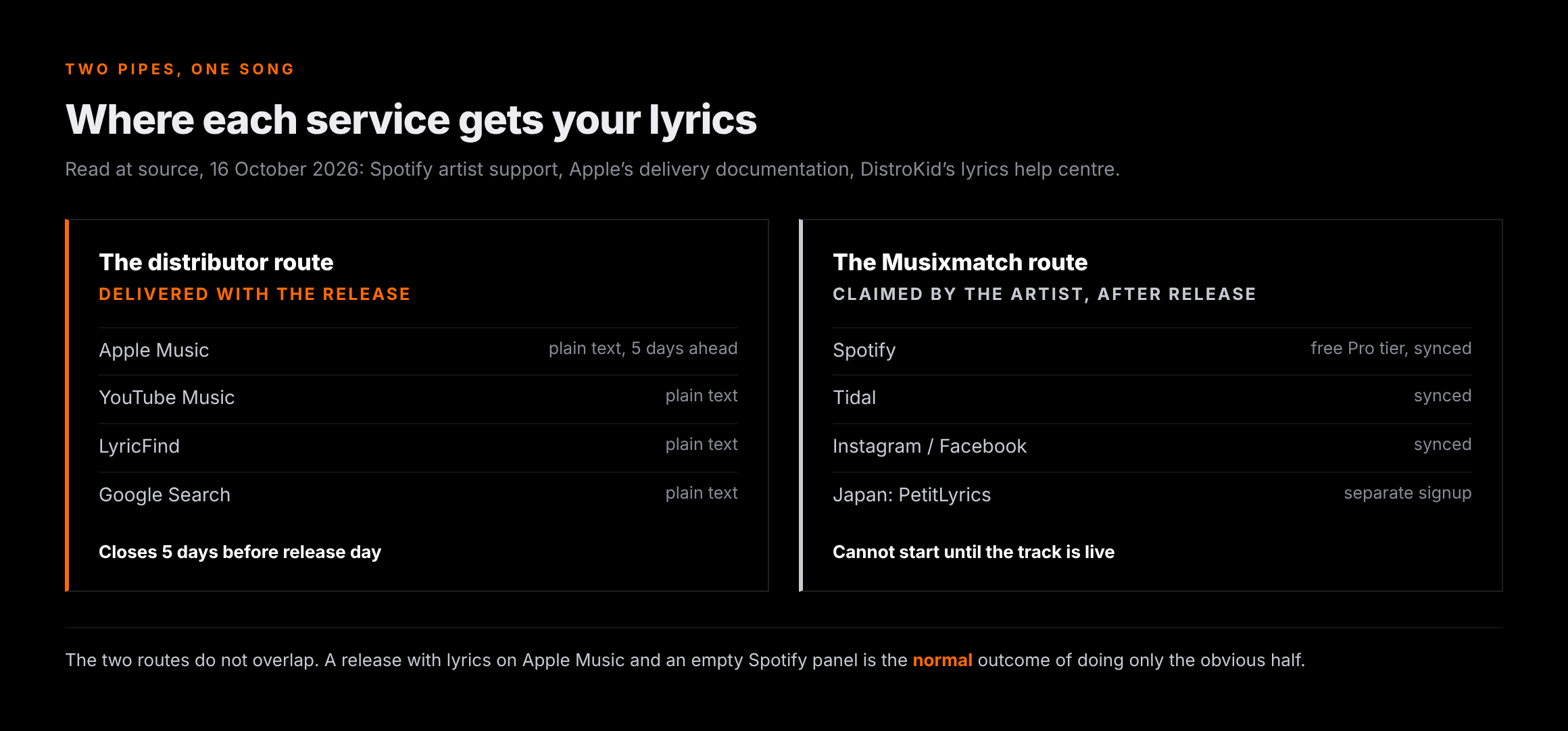
| Where it shows | Who supplies the lyrics | How you submit |
|---|---|---|
| Spotify | Musixmatch (PetitLyrics for listeners in Japan) — Spotify's own artist page | Musixmatch Pro, free tier; or a distributor add-on that feeds Musixmatch |
| Apple Music | Delivered with the release by the distributor, per Apple's own spec | Your distributor's lyrics field, before release |
| YouTube Music | Distributor delivery — DistroKid names it as a plain-lyrics destination | Your distributor |
| Tidal | Synced lyrics via a Musixmatch-powered route; DistroKid's Lyric Blaster names Tidal | Paid distributor add-on, or Musixmatch |
| Instagram / Facebook | Musixmatch — the route TuneCore and DistroKid both point at | Musixmatch, or a distributor add-on |
| Google Search / LyricFind | Plain lyrics from the distributor — DistroKid lists both | Your distributor |
Two routes that do different jobs
The second thing nobody separates cleanly is plain versus synced. DistroKid's definition is the clearest published one: plain lyrics are “the plain text of your lyrics”, while synced lyrics are “timed to your music” so they scroll line by line. They are not two settings of one feature. They go to different services, on different plans, through different partners.
Plain lyrics are the cheap half — DistroKid says delivery of plain lyrics “is free for all DistroKid plans” and sends them to Apple Music, YouTube Music, LyricFind and Google Search results. Synced lyrics are the half people actually picture when they imagine lyrics on Spotify, and they are the half that costs money or time: either a paid distributor add-on, or your own evening in the Musixmatch editor, where the work is timestamping each line by hand.
Worth knowing who Musixmatch is, because an AI release meets the company twice. Suno's own responsibility post says it works with “Audible Magic, Musixmatch and other third party technology providers” to check uploaded audio and lyrics for unauthorised use of other artists' material — that is a screen on what goes into Suno. The lyrics catalogue that decides whether your words appear on Spotify is the same company at the other end of the pipe. Two unrelated relationships, one vendor, and no published Musixmatch policy on AI-generated lyrics that we could find in its public documentation as of 16 October 2026.
What your distributor will and won't send
This is the table no ranking page has. We read all six lyrics help pages on 16 October 2026 — four of them had been updated in the preceding five weeks, which tells you how often this moves. The spread is wide enough that “ask your distributor” is useless advice: three of the six will tell you they do not do it themselves.
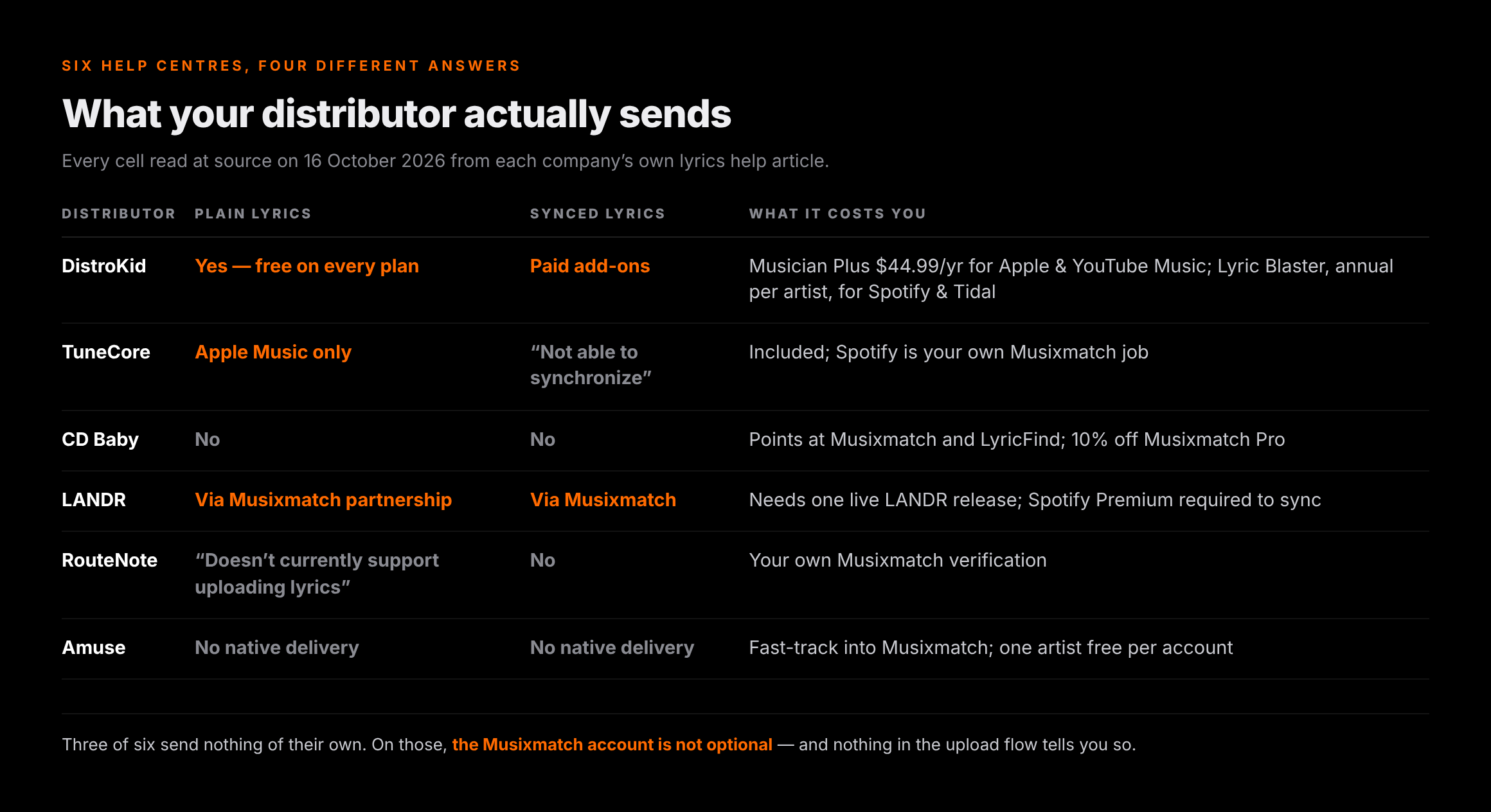
| Distributor | Delivers lyrics? | Where | What it costs |
|---|---|---|---|
| DistroKid | Yes — plain lyrics free on every plan | Apple Music, YouTube Music, LyricFind, Google Search | Synced to Apple Music and YouTube Music needs Musician Plus ($44.99/yr) or Ultimate ($89.99/yr); synced to Spotify, Tidal, Instagram and Facebook needs Lyric Blaster, an annual per-artist add-on (price not shown on the pricing page) |
| TuneCore | Plain only | “At this time, TuneCore only distributes lyrics directly to iTunes/Apple Music”, and “we are not able to synchronize the lyrics” | Included; Spotify and Instagram are your own Musixmatch job |
| CD Baby | No | — | Recommends Musixmatch and LyricFind; CD Baby artists “can also receive 10% off” Musixmatch Pro |
| LANDR | Yes — through a Musixmatch partnership | “Spotify, Apple Music, and Instagram” | Needs at least one live LANDR release; “a Spotify Premium account is required if you'd like to add and sync lyrics on Spotify” |
| RouteNote | No — “RouteNote doesn't currently support uploading lyrics with your release” | — | Free, but it is your own Musixmatch verification |
| Amuse | No native delivery — a fast-track into Musixmatch instead | Musixmatch's partners | One artist verified free per Musixmatch account; more need Musixmatch Pro (AMUSE20 for 20% off). Without it, Amuse says non-subscribers “may wait up to 30 days” |
Two practical readings. First, if you are on CD Baby, RouteNote or Amuse, the Musixmatch account is not optional and nobody will prompt you to make one. Second, DistroKid's route has an order of operations buried in it: synced lyrics “can only be submitted for tracks with approved plain lyrics”, so a plain-lyrics rejection does not just delay the text — it blocks the scrolling version behind it.
Apple Music is a deadline, not a dashboard
The Spotify route can be done at any point in a track's life. The Apple route cannot, and this is the single most expensive thing on this page to learn late. Apple's delivery documentation states that “lyrics metadata must be delivered 5 days prior to your release date”, and that once Apple has checked them, “if the lyrics have been verified by Apple, your redelivered lyrics will not be updated” — corrections go through a support request instead of a re-upload.
For a Suno release that matters more than it sounds, because the usual AI-music release pattern is to upload the moment the track is finished and pick the earliest date the distributor allows. Do that and the lyric window is already shut. It also stacks with the review queues: the wait before a release goes live is its own timetable, which we broke down in release stuck in review, and lyrics have to clear their own review inside it.
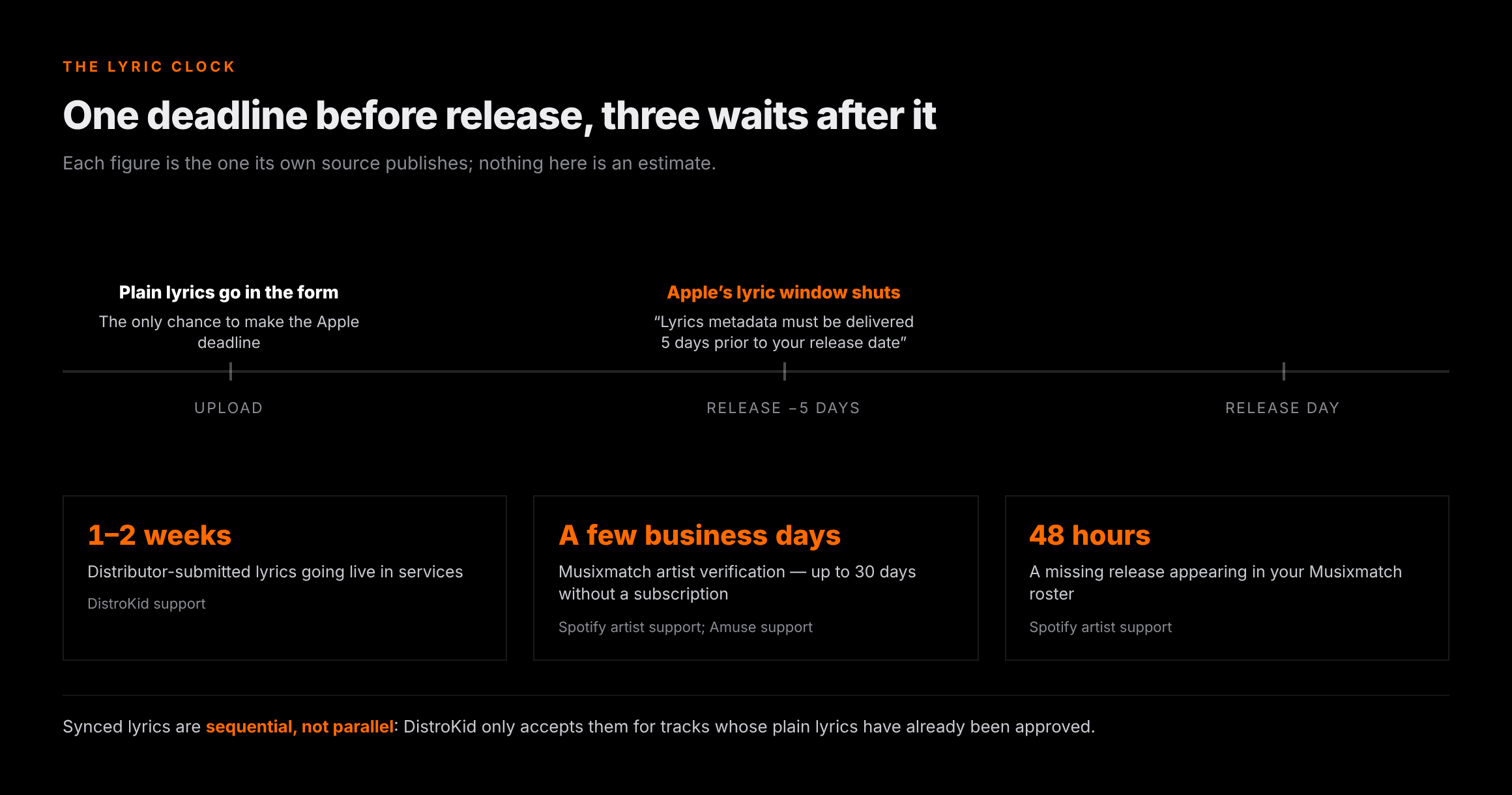
| Step | How long it takes | Who says so |
|---|---|---|
| Apple lyric delivery deadline | 5 days before the release date | Apple's delivery documentation |
| Musixmatch artist verification | “Within a few business days”; Amuse says non-subscribers “may wait up to 30 days”, or “a minute or two” on its fast-track | Spotify artist support; Amuse support |
| A release missing from your Musixmatch roster | “Up to 48 hours to appear” after you add it | Spotify artist support |
| Lyrics edits reaching Spotify | “A few days” | Spotify artist support |
| Distributor-submitted lyrics going live | “Around 1-2 weeks … to go live in streaming services” | DistroKid support |
| Synced lyrics after plain lyrics | Only once plain lyrics are approved — sequential, not parallel | DistroKid support |
Why Suno lyrics get rejected
Here is the part that is specific to this site's readers, and the reason a second submission is so common. Lyrics are screened before they are delivered, and DistroKid publishes the criteria in an article it updated on 1 October 2026. They are not arbitrary house style — DistroKid points at Apple Music's lyric guidelines as the full list — and a Suno lyric sheet, pasted in as it comes, breaks several of them at once.
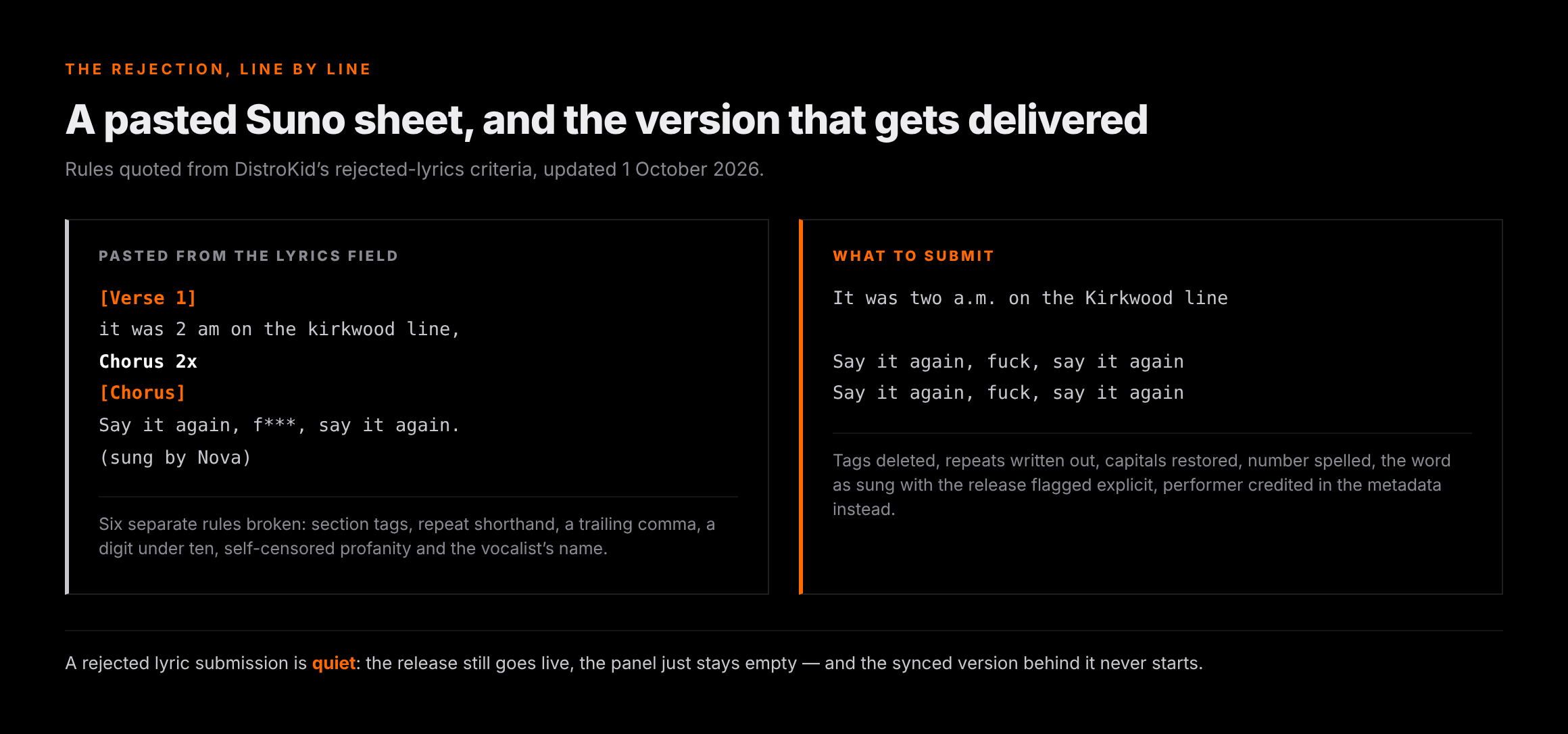
The bracketed section tags are the obvious one. Whether you wrote them or Suno generated them, the convention that the whole prompting culture is built on puts [Verse 2], [Chorus] and [Outro] in the lyrics field — and Suno's own help centre documents none of that vocabulary, so there is nothing on the Suno side telling you it is prompt syntax rather than lyrics. The delivery side is explicit: “do not include extra text (ex: ‘intro,’ ‘chorus,’ social media links)”.
| What comes out of Suno | The published rule it breaks | What to send instead |
|---|---|---|
| [Verse 1], [Chorus], [Bridge], [Outro] | “Do not include extra text (ex: 'intro,' 'chorus,' social media links)” | Delete the tags; mark sections with a single blank line |
| “(x2)”, “Chorus 2x”, repeat markers | “Write out all repeated lines. Do not write 'Chorus 2x'” | Type the repeated lines out in full |
| Lines ending in commas or full stops | “Do not use punctuation at the end of a line, except for exclamation or question marks” | Strip trailing punctuation; keep ? and ! |
| Lowercase line openings from a prompt draft | “Begin each line with a capital letter” | Capitalise every line |
| “2 AM”, “3 days” | “Do not enter numerical characters for numbers between 1-10” | “Two a.m.”, “three days” |
| Self-censored profanity (“f***”) | “Do not censor explicit words unless the words are dropped/bleeped in the audio recording” | The word as sung — and set the explicit flag on the release |
| A persona or voice name in the sheet | “Do not include the vocalist's name” | Credit the performer in the metadata, not the lyrics |
| Blank lines between every couplet | “Only include line breaks … between sections, like verses or choruses” | One blank line per section boundary, none inside |
None of that is hard. It is five minutes in a text editor. What makes it expensive is finding out six weeks later, because a rejected lyric submission is quiet — it does not hold the release, it just never appears, and the synced version behind it never starts.
The accuracy rule AI vocals break
Apple's spec carries one more rule that lands differently on an AI-generated vocal than on a human one: “Lyrics must be accurate and match audio.” On a track you recorded, the lyric sheet and the performance match by construction, because someone sang off the page. On a Suno render they match by luck.
The model swallows a word, repeats a line you wrote once, invents an ad-lib in the last chorus, or sings something close to but not quite your fourth line. We cover why the vocal layer does that — and which of it is fixable — in the v6 vocal prompt guide. For lyrics delivery there is only one safe rule: transcribe from the render you are releasing, not from the prompt you typed. Play the master, follow the sheet, and fix every place they diverge.
Two edge cases worth having in advance. An instrumental has no lyrics to submit, and submitting the generated “lyrics” of a track with no intelligible vocal is a mismatch by definition. And cover versions are excluded outright on at least one route: DistroKid states that “it is not possible to deliver lyrics for cover songs”, which catches more AI releases than you would expect — see AI cover songs for where that line falls.
Disclosing that AI wrote the words
Submitting lyrics and disclosing how they were made are separate systems, and it is worth holding them apart. The disclosure one is now routine: DistroKid's AI Credits article (updated 6 October 2026) lists “AI-generated lyrics (not written by a human)” as one of three things to credit, alongside AI-generated audio and AI-generated compositions, and says the information is shown to listeners by Spotify, Apple Music and YouTube. It also draws the line in the other direction: you do not need AI credits for pitch correction, auto-tune or AI-assisted mixing and mastering.
Nothing we read says a credit affects whether your lyrics display. They are different pipes with different owners, and we are not going to imply a link neither company has stated. What the credit does affect is what a listener sees in the credits panel, which we went through in the Spotify AI music policy breakdown.
One ownership note, since the lyric field is where it gets confusing. Suno's help centre says that “regardless of which version of Suno you use, you retain ownership and rights to any original lyrics you input into Suno” — your words stay yours. If the model wrote them instead, the honest answer to the AI-lyrics credit is yes, and the publishing side of that is a separate registration job we covered in MLC royalties for AI music.
Before the upload, not after the rejection
Lyrics are metadata. Screening listens to the audio.
Undetectr processes an AI-generated master for the generation artifacts and model signatures that distributors' automated intake screening reacts to. Be clear about the limits: it does not submit your lyrics, it does not change how Spotify or Apple Music labels or credits a release, and it has no effect on whether a lyrics panel fills in. It is a file job, done before you upload.
Disclosure: Erasy is an independent guide and Undetectr is the tool we recommend and link to; we may earn a commission if you subscribe.
What lyrics are worth, and what they are not
Be honest about the size of the win. A filled lyrics panel makes a track more usable for the people already playing it: they can sing along, they can read the line they misheard, the words become searchable text attached to the recording. That is finishing work, and it is worth the ten minutes.
It is not promotion. Nothing in any of the documentation above promises a single extra listener, and the wall in AI music has never been distribution or metadata — it is that nobody is listening yet. We put numbers on that in 1,000 streams versus one sale, and the arithmetic has not improved since.
Which is the argument for routes that do not depend on a feed noticing you. A paid sync placement — a track licensed into a show, a game, an ad — is decided by a person reading a brief, and a properly documented track with accurate lyrics and clean credits is easier to say yes to than a bare WAV. Selling direct to the listeners you do have sits beside it. Neither needs an algorithm's permission, and both reward exactly the kind of tidy release admin this page is about.
The ten-minute lyric pass
Do this once, in this order, before you touch any upload form. Every step below exists because skipping it costs a round trip of one to three weeks.
Play the exact master you are releasing and correct the sheet against it. The prompt text is a draft; the audio is the record.
Delete every bracketed tag, write out repeats in full, remove trailing punctuation, capitalise each line, spell out numbers one to ten.
One blank line between sections, none inside them. No extra spaces at the start or end of a line, one sentence per line.
Plain lyrics in the upload form, at least five days before release day so Apple's window is open. On DistroKid this also unlocks synced later.
Free tier, add your artist with the Spotify artist URL, then add and sync the song. Allow a few business days for verification.
Apple and YouTube Music from the distributor route; Spotify, Tidal and Instagram from the Musixmatch one. A silent miss is the normal failure.
The one-line version
Clean the sheet, send it to the distributor before the five-day window shuts, and claim Musixmatch yourself for Spotify. The lyrics will not make the song travel — but an empty panel on a track somebody loved enough to look up is a small, avoidable piece of missing work.
Related reading on Erasy
Frequently asked questions

Eddie Mathews — Editor, Erasy
Eddie reads the help-centre article and the delivery specification rather than the roundup, and marks the difference between what a company has documented and what a tutorial has assumed. Where the public record does not settle a question, this site says so.
Why don't my Suno song's lyrics show on Spotify?+
Does it cost anything to add lyrics to Spotify?+
How long after release do lyrics appear?+
Can I paste my Suno lyrics straight in?+
Do I have to disclose that AI wrote the lyrics?+
Can I get lyrics on a cover song?+
Does adding lyrics help a track get discovered?+
Read at source on 16 October 2026: Spotify's artist support article on managing lyrics (Musixmatch route, free tier, PetitLyrics in Japan, 48-hour roster delay, “a few business days” verification); Apple's partner delivery documentation on submitting lyrics (the five-day deadline, the accuracy and formatting rules, TTML time-sync, and the rule that verified lyrics are not updated by redelivery); DistroKid's help centre on plain versus synced lyrics, where lyrics show up, adding lyrics, Lyric Blaster, correcting rejected lyrics (updated 1 October 2026) and AI Credits (updated 6 October 2026), plus its public pricing page for plan prices; TuneCore's Uploading Lyrics article; CD Baby's partner-sites lyrics article; LANDR's lyrics article; RouteNote's lyrics knowledge-base article; Amuse's Musixmatch fast-track article; and Suno's help centre on using your own lyrics plus its responsibility post naming Audible Magic and Musixmatch as screening providers. Prices are the list prices shown on 16 October 2026 and are billed annually. Where a company does not publish a figure — Lyric Blaster's price, a Musixmatch policy on AI-generated lyrics — this page says so rather than estimating. That a Suno lyric sheet typically arrives with bracketed section tags is a statement about the prompting convention the community uses, not something Suno documents; its help centre carries no guidance on the vocabulary either way.