AI Music
Suno Song Endings: How to Fix an Abrupt Cut-Off in 2026
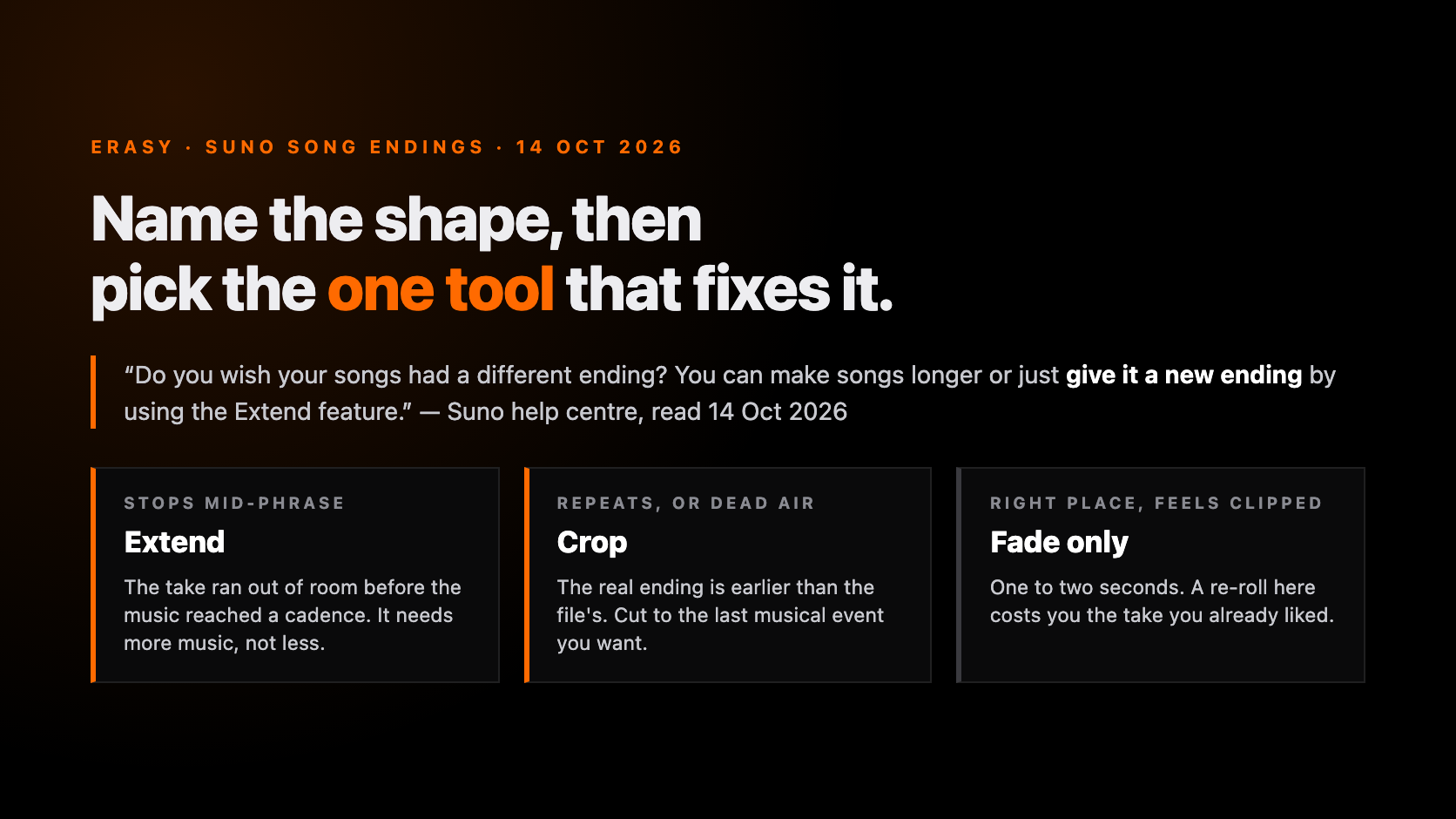
The track is good. The last four seconds are not — it stops mid-phrase, or the final chorus loops a third time and fades into nothing, or there are two seconds of hiss after the music has finished. A Suno song ending is the most common reason a finished-sounding generation is not finished, and it is the last thing most people fix because it feels like a re-roll problem.
It is not. There are four fixes inside Suno, they do different jobs, and picking wrong costs you a download rather than a few credits — because a crop and an extend each create a new song, and Suno counts downloads per song. Four pages rank for this query and all four stop at the Suno interface: none mentions the download accounting, none mentions what the ending does once the file is on a streaming service, and all four predate the clip fade curves Suno shipped on 8 October 2026.
So we read Suno's release notes and seven of its help-centre articles at source on 14 October 2026 — Extend, Crop, the Song Editor, song length, download counting and Studio export — plus Spotify's stream-counting page, and went looking for the distributor rule everyone implies. There is no distributor rule. That absence is in here too.
The short version
- Extend is Suno's documented answer, in its own words. Its help article opens “Do you wish your songs had a different ending?” and says you can “make songs longer or just give it a new ending by using the Extend feature”. Get Whole Song then “stitches” it onto the original.
- Fixing the ending costs a second download. A crop “is added to your Library and Workspace” as a new song, and “one song counts as one download” while re-downloading the same song is free. Two documented rules, one consequence nobody has written down.
- Fades stopped being straight lines on 8 October 2026. Suno: “Until now, those fades were linear. Now, you can shape the curve by dragging the node on the fade icon.” Every ranking guide sends you to an external DAW for this.
- No store or distributor publishes a rule about your ending. We looked. The only published number anywhere near it is Spotify's: a stream counts after 30 seconds, so a 28-second track earns nothing no matter who plays it.
Why Suno endings fail, and the three shapes they take
A generation does not plan backwards from a finish. It has a length to fill, and Suno documents that length plainly: “Today, Suno can generate up to 8 minutes of music in a single generation across v6, v6-wild, and v6-mini.” A take still in the middle of a phrase when it reaches the end of its room does not compress a cadence to fit — it stops. One mechanism, four symptoms, and they want different tools.
Naming the shape first is the whole trick, because the costly mistake is reaching for Extend when the song already ended and kept going. Extend creates; it cannot remove.
| What you hear | The shape | What caused it | First tool |
|---|---|---|---|
| Music stops mid-bar, mid-word or mid-cymbal | Hard cut-off | The take reached its length before the arrangement reached a cadence | Extend — the song needs more music, not less |
| Final chorus repeats two or three times, then trails away | Endless outro | The model had room left and filled it by repeating the strongest section | Crop — the real ending is earlier than the file's |
| Music finishes, then one to three seconds of hiss, room or nothing | Dead air | The render continued past the last musical event | Crop, then a short fade over the join |
| Ending is correct but feels clipped rather than final | Abrupt but accurate | No decay — the last note is cut before its tail | Fade Out alone; do not re-generate |
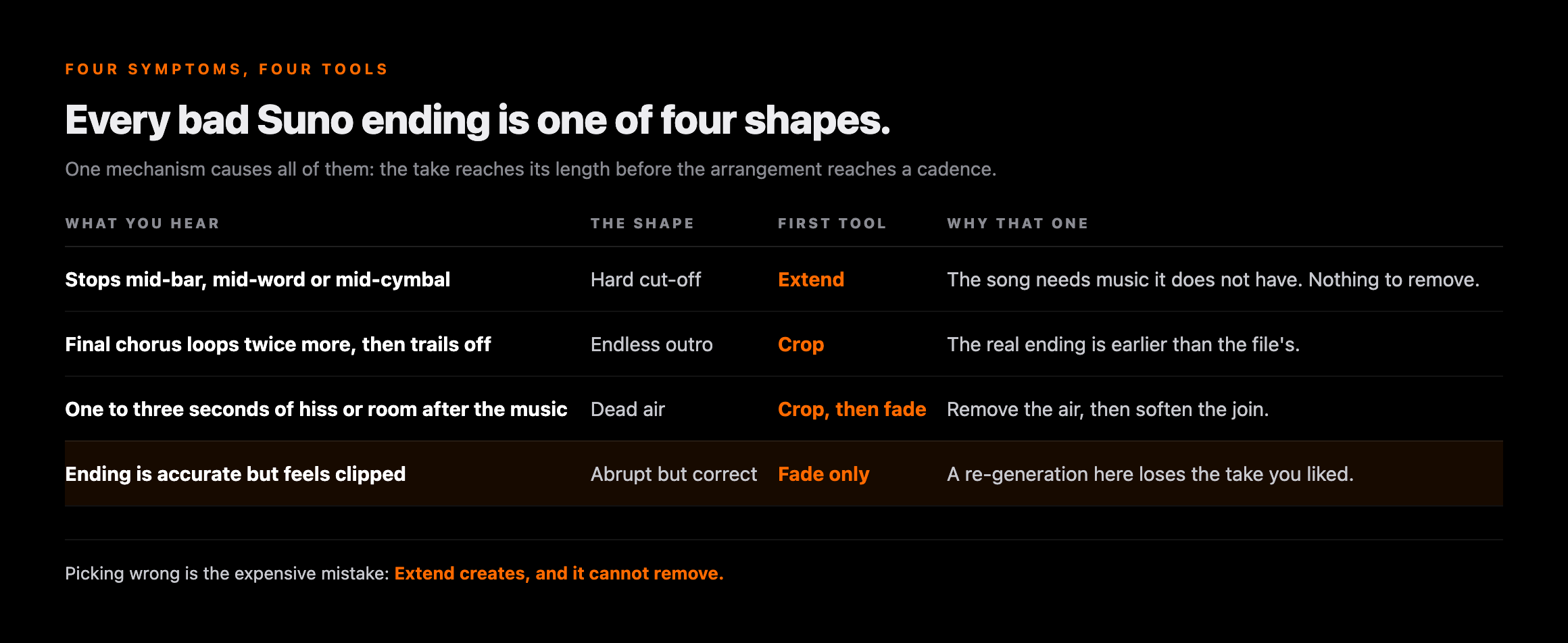
The fourth row is the one people get wrong in the other direction. If the cut is in the right place and simply feels sharp, that is a two-second fade, not a new generation — and a re-roll will cost you the take you already liked. We make the same argument about chasing artifacts with regenerations in why v6 can sound muffled: the cheapest fix is usually downstream of the model, not another trip through it.
The four fixes inside Suno, and what each one actually changes
Suno has four routes to a different ending and its help centre documents them in four separate places, which is why no single guide lines them up. Here they are side by side, with the plan requirement each article actually states rather than the one guides assume.
| Route | What it does to the ending | Plan, as documented | Where it lives |
|---|---|---|---|
| Extend | Generates new music from a point you choose, then Get Whole Song “stitches” it on | No plan requirement stated in the article | Triple-dot → Remix/Edit → Extend |
| Crop Song | Removes a selected region of the waveform; the result is a new song | “Pro and Premier users can now try Crop” | Triple-dot → Remix/Edit → Crop Song, desktop web only |
| Song Editor (crop + fade) | Highlight a region and Remove, plus Fade In and Fade Out icons on the first and last sections | No plan requirement stated in the article | Song Editor, on the song itself |
| Studio | Clip-level trim, timestretch and shaped fade curves; export the full song or a selected time range | Studio is part of Premier | Studio project, desktop browser |
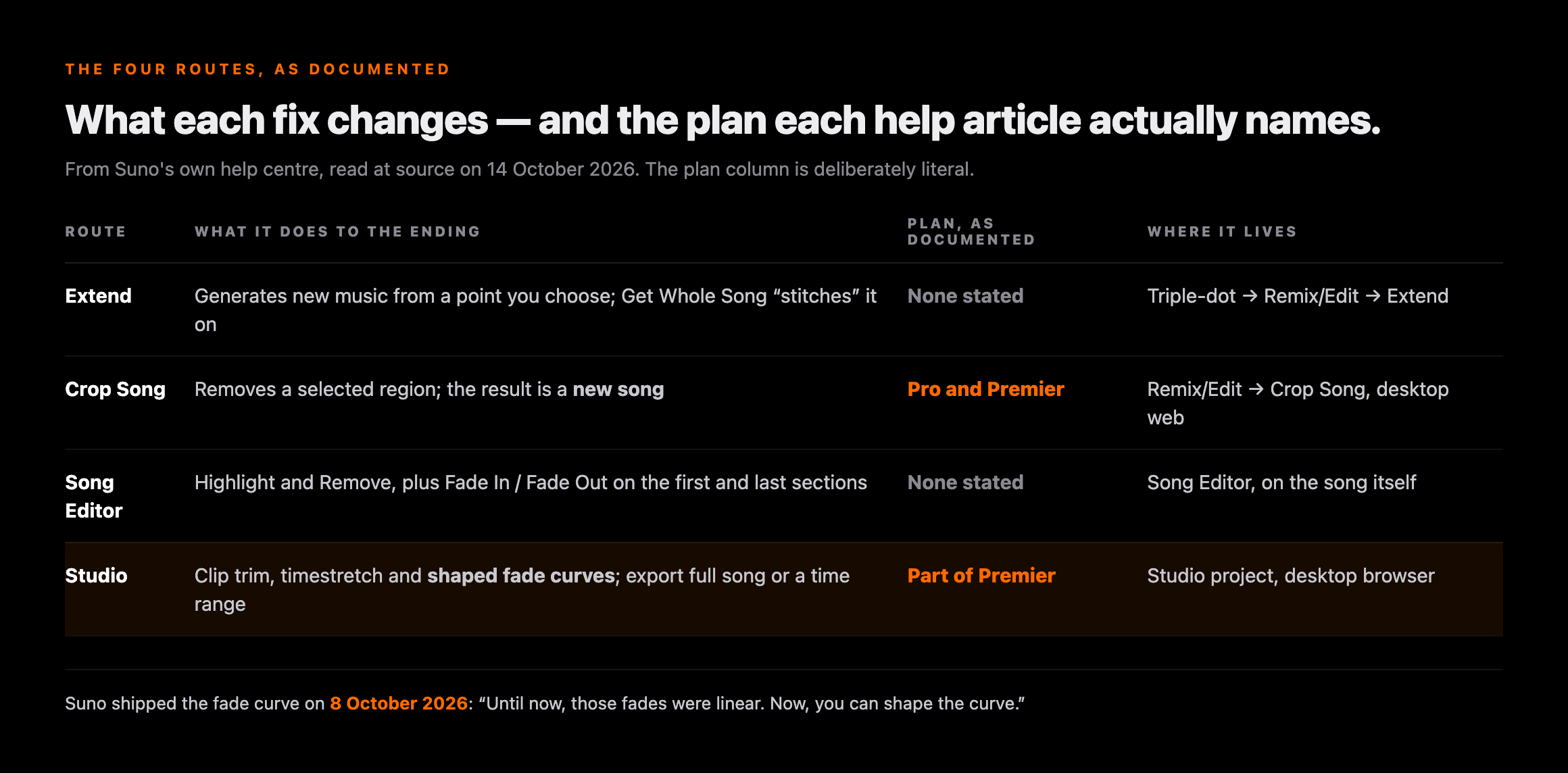
Two things there are worth saying out loud. The plan column is deliberately literal: Suno's crop article names Pro and Premier, and the Song Editor article names no plan at all for its own remove-and-fade controls. We will not turn an absence into a permission — check your own account — but “you need Pro to trim a Suno song” is a claim nobody can source.
And Studio is the only route where the ending is an editing problem rather than a generation problem, and the only one whose export lets you choose what to render: “Full Song”, “Selected Time Range” or “Multitrack”, with “all audio exports from Studio delivered as high-quality WAV files”. A selected time range is a crop, done at export.
Extend: Suno's own answer to a bad ending
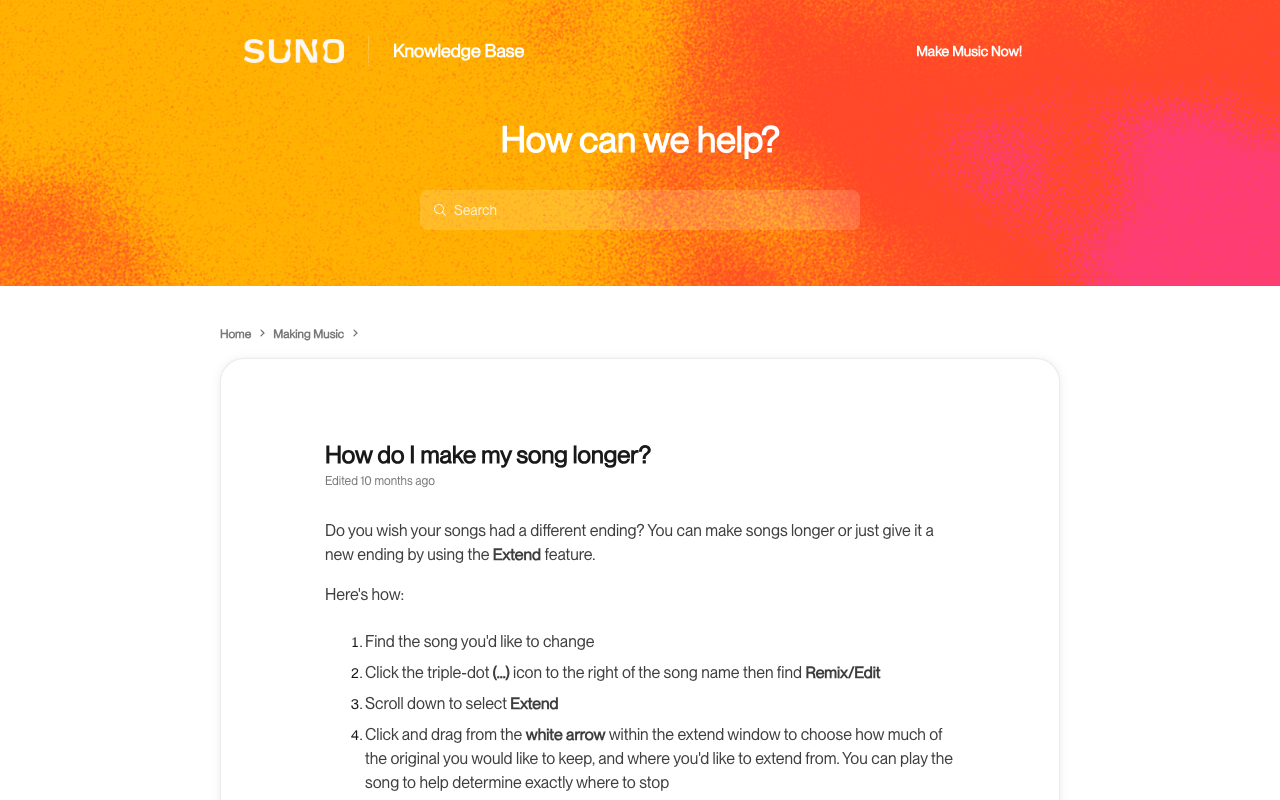
If a guide has ever made you feel that using Extend to fix an ending is a workaround, read Suno's own article on it. The first line is a question — “Do you wish your songs had a different ending?” — and the answer is “You can make songs longer or just give it a new ending by using the Extend feature.” Giving a song a new ending is not a side effect of Extend. It is half of what the feature is documented to be for.
The mechanic that matters is the handle. Suno tells you to “click and drag from the white arrow within the extend window” to set how much of the original you keep and where the new music starts, and suggests playing the song first to decide where to stop. That arrow is the whole decision: drop it before the botched ending and the model never sees the material you are trying to lose. Drop it after, and you have asked for an ending to an ending.
The step people miss
An extension on its own is not your song — it is a continuation sitting next to it. Suno's instruction for finishing the job is to click the triple-dot icon, hover over Create and choose Get Whole Song, which “stitches” the new ending onto the original track. Skip it and you will download a fragment that starts in the middle of your second verse, which is a mistake worth exactly one wasted download.
The Song Editor has a lighter version of the same move: a + icon at the far right of the track, with a Quick Extend option Suno describes as “a seamless continuation”. Use that for four more bars of what is already playing, and the full Extend window, with a written direction, when you want something the song has not done yet — a held final chord, drums dropping out, a last line sung alone.
Crop and fade: the trim that leaves a click, and the fade that hides it
Cropping is the right tool whenever the file contains the ending you want plus material you do not. Suno's crop article is blunt about the use case — “Too much at the beginning or end of your song?” — and the mechanic is a waveform selection you drag across and adjust from either end. In the Song Editor the equivalent is to “highlight a region of the track to remove”.
What no guide tells you is what a tight crop leaves behind. Audio does not stop at the last note; the reverb and room tail keep decaying for anything from a quarter of a second to several seconds. Cut inside that decay and you truncate a waveform mid-cycle, audible as a click or a thud at the moment the file ends — so the crop was correct, the result still sounds broken, and people blame the model and re-roll.
| Situation | Crop | Fade | Both |
|---|---|---|---|
| Song repeats past its real ending | Yes — cut at the end of the last wanted bar | Only if the cut lands inside a decay | Usually |
| One to three seconds of dead air after the music | Yes — that is the whole fix | No, there is nothing to fade | No |
| Ending is in the right place but feels clipped | No — cropping makes it shorter, not softer | Yes, one to two seconds | No |
| Hard cut-off mid-phrase | No — there is nothing to remove | A fade on a mid-phrase cut sounds like a mistake, politely | No — this one needs Extend |
The rule that falls out of that table: crop to the end of a musical event, then add the shortest fade that removes the click — one to two seconds for most material. A long fade is not a finish; it is a way of making a structural problem quieter, and listeners read it that way. If the ending needs ten seconds of fade, the song needs an outro, which means Extend.
Studio's new fade curves are eight days old
On 8 October 2026 Suno shipped a Studio update that no other page on this query mentions, because all of them were written before it. Its release note is specific: “Until now, those fades were linear. Now, you can shape the curve by dragging the node on the fade icon.” That is the difference between a fade that walks the volume down in a straight line and one that holds its level and then falls away, or drops quickly and lingers.
It matters more than it sounds. A linear fade over a decaying reverb tail fights the decay: the tail is already getting quieter, so a straight-line reduction on top of it collapses the sound faster than the ear expects. A curve that stays high and then drops lets the tail do its own work. This is the one job for which guides on this query send you to an external editor, and that trip is now optional.
Also in the 8 October 2026 Studio release note
- Better down-beat detection — “improvements to the detection of beat 1 in new clip creations”, which is what decides whether your cut lands on the beat or just after it.
- Clip timestretch — “shift-click-dragging automatically timestretches a clip”, so a final chord can be held rather than looped.
- Pop-out windows for the wavetable synth, musical typing keyboard and expanded plug-in views.
Studio is part of Premier, so for most people the Song Editor fade is the realistic route. If you are already paying for Studio, the ending work belongs there — and the Remaster pass is a separate question from the arrangement one.
Every fix is a new song, and new songs cost downloads
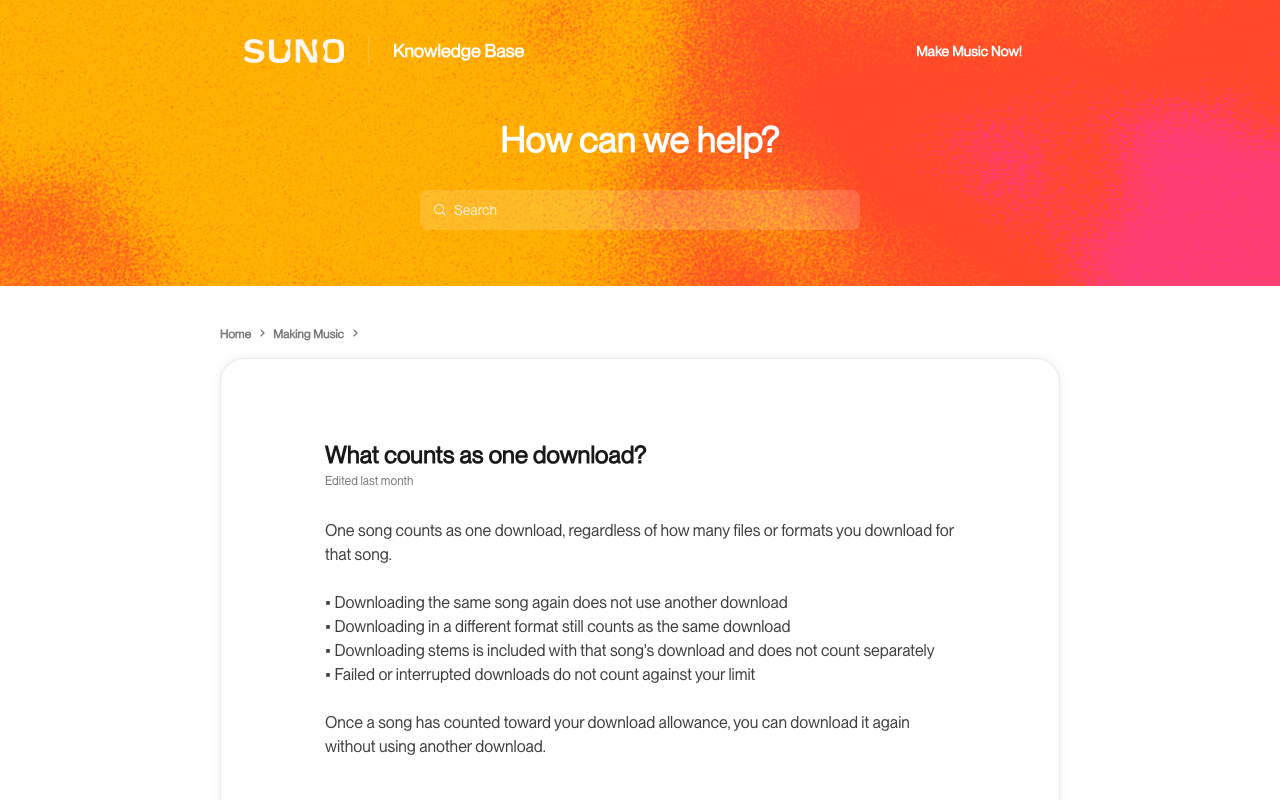
Here is the part that is in nobody's guide, and it comes from joining two Suno rules that live in different articles. The first is in the crop article: the cropped result “is added to your Library and Workspace” — a new song, not a modified one. The second is the download-counting rule: “One song counts as one download, regardless of how many files or formats you download for that song”, and “downloading the same song again does not use another download.”
Put them together and the consequence is clear, though Suno never states it: your original is free to download as often as you like, and the fixed version is a second song against your monthly allowance. That inference is ours — but it changes the order you work in.
| Action | New song in Library? | Download cost | Source |
|---|---|---|---|
| Download the original again, any format | No | Nothing — “does not use another download” | Suno, What counts as one download? |
| Download a song plus its stems | No | One — stems are “included with that song's download” | Suno, same article |
| Crop the song, then download the crop | Yes — “added to your Library and Workspace” | One more (our inference from the two rules) | Suno, How do I crop a song? + the above |
| Extend, Get Whole Song, download the stitched version | Yes | One more (same inference) | Suno, How do I make my song longer? + the above |
| A download that fails or is interrupted | — | Nothing — failed downloads are not counted | Suno, What counts as one download? |
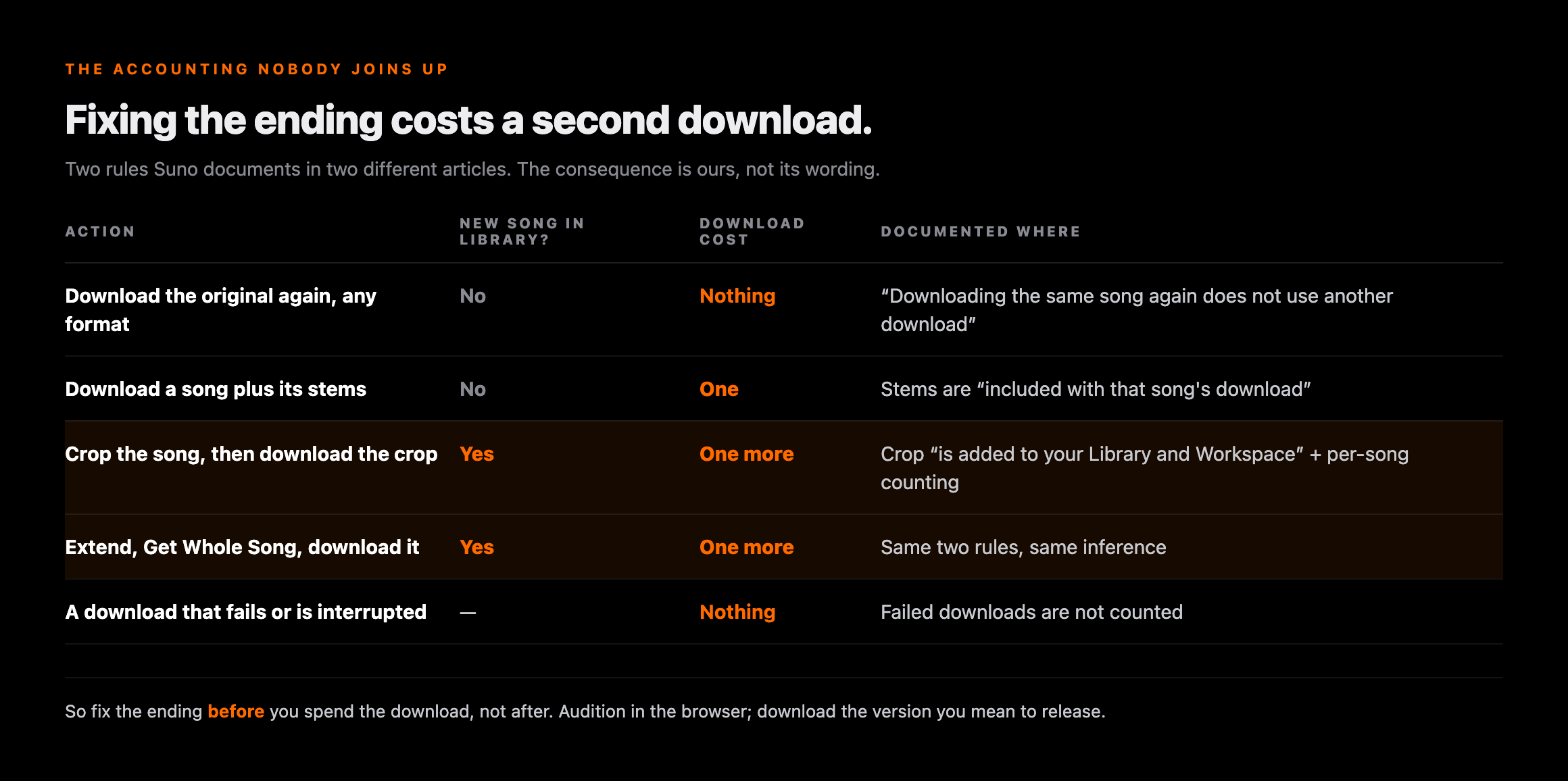
The practical order, then: fix the ending before you spend a download, not after. Audition in the browser, get the version you actually intend to release, and download that once. We go through the allowance itself, what resets and what does not, in Suno's download limits and the refund question in the download-cap refund thread.
What a bad ending costs after you leave Suno
This is where every page on this query stops, so it is worth being careful about what is true. We went looking for the rule the competitor pages gesture at — a distributor or store requirement about trailing silence, dead air or an abrupt finish — and did not find one. Not in DistroKid's help centre, not in CD Baby's, not in Spotify's artist documentation. Rejections in AI music get reported over policy, detection and rights, which is a different subject. So the honest version is that your ending is a craft problem with exactly one published number attached to it, and the number is Spotify's.
| Claim you will read | Status | What is actually documented |
|---|---|---|
| Distributors reject tracks with silence at the end | Unsourced | No such rule appears in DistroKid's or CD Baby's help centres, or Spotify's artist docs |
| A stream only counts after 30 seconds | Documented | Spotify: “Counted when a listener plays your song for at least 30 seconds” |
| Offline plays still count | Documented | Spotify counts them “when the listener goes online (which they must do at least once every 30 days)” |
| Stores normalise loudness, so your fade's level is not the listener's | Documented | Platform normalisation targets, covered separately in our LUFS guide |
| A cut-off ending hurts your algorithmic placement | Unsourced | No platform documents ending quality as a signal; skip behaviour is not published |
The 30-second line has a real edge case in it. A 28-second sketch cannot register a stream however often it is played, so cropping a short track to hide a bad ending is the one version of this fix that costs something measurable. Crop the ending, not the song. And because the level you faded to is not the level anybody hears — platforms normalise — set the fade by ear against the loudness targets rather than against the waveform's height.
Worth separating: the ending is an arrangement question, and the generation artifacts that intake screening reacts to are a file question. Fixing one does nothing for the other — the release checklist runs them in order.
A file job, after the arrangement job
Clear the generation artifacts once the ending is right
Undetectr processes an AI-generated master for the artifacts and model signatures that distributors' automated intake screening reacts to. The limits matter: it will not fix an ending, will not trim dead air, and will not change how Spotify or Apple Music labels or credits a release. It is the step after this one, on the file you have decided to release.
Disclosure: Erasy is an independent guide and Undetectr is the tool we recommend and link to; we may earn a commission if you subscribe.
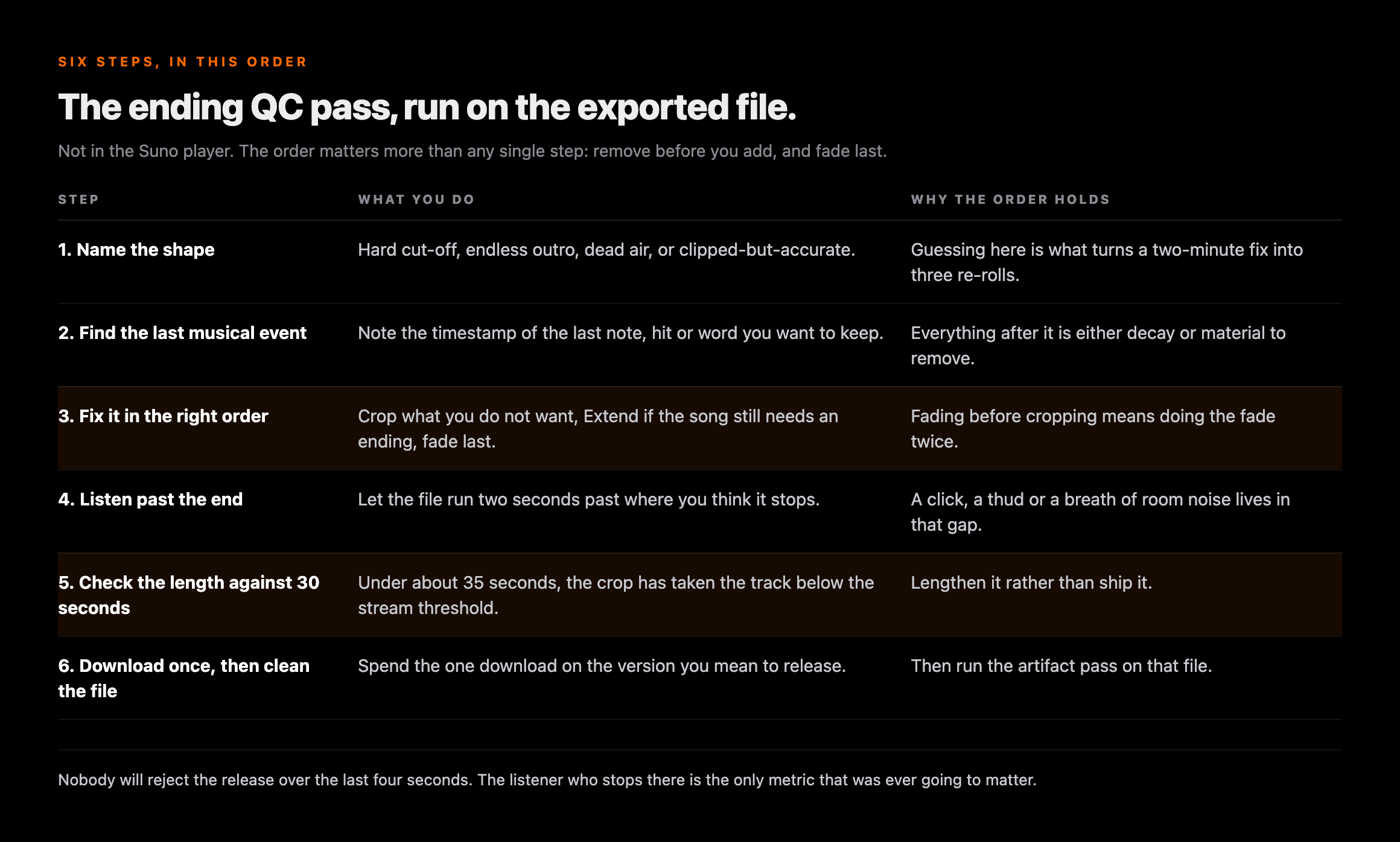
The six-step ending QC pass before you release
Do this on the exported file, not in the Suno player.
Hard cut-off, endless outro, dead air or clipped-but-accurate. Guessing here is what turns a two-minute fix into three re-rolls.
Note the timestamp of the last note, hit or word you want to keep. Everything after it is either decay or material to remove.
Crop what you do not want, Extend if the song still needs an ending, fade last. Fading before cropping means doing the fade twice.
Let the file run two seconds past where you think it stops. A click, a thud or a breath of room noise lives in that gap.
Under about 35 seconds, the crop has taken the track where Spotify will not count a stream. Lengthen it rather than ship it.
Spend the one download on the version you mean to release, then run the artifact pass on that file.
Once the track is genuinely finished
An ending that lands is worth more in a brief than in a feed. A paid sync placement — a track licensed into a show, a game, an ad — is where a decisive finish is an actual requirement, because an editor has to land picture on it. Selling direct sits beside it, and neither depends on a feed noticing you. We put numbers on that gap in 1,000 streams versus one sale.
The one-line version
Name the shape, remove before you add, fade last, and do it before you spend the download. Nobody will reject the release over the last four seconds — but the listener who stops there is the only metric that was ever going to matter.
Related reading on Erasy
- Cleaning AI-generated music for release: the checklist, in order
- Suno Remaster: what it changes and when it is worth a credit
- How to master AI music: loudness, LUFS and a one-pass cleanup
- Suno download limits: what counts, what resets, what does not
- Release stuck in review? The 2026 timeline and what the wait costs
Frequently asked questions

Eddie Mathews — Editor, Erasy
Eddie reads the help-centre article and the release note rather than the roundup, and marks the difference between what a company has documented and what a tutorial has assumed. Where the public record does not settle a question, this site says so.
Why does my Suno song cut off suddenly at the end?+
Does the [Outro] or [End] tag actually work in Suno?+
How do I fade out a Suno song without downloading it?+
Is Crop available on the free Suno plan?+
Does fixing the ending cost me another download?+
Will a distributor reject my track for an abrupt ending or trailing silence?+
How short is too short for a track to be worth releasing?+
Read at source on 14 October 2026: Suno's release notes, including the 8 October 2026 Studio entry quoted for fade curves, down-beat detection and clip timestretch; and seven help-centre articles — How do I make my song longer? (Extend, Get Whole Song), How do I crop a song? (Pro and Premier, new song added to Library and Workspace), How to Use: Song Editor (Fade In and Fade Out icons, highlight-and-remove, Quick Extend), How long will my song be?, What counts as one download?, Exporting from Studio (Full Song, Selected Time Range, Multitrack, WAV) and the Making Music category index, whose 44 articles include none on outro or ending tags — the basis for calling that vocabulary convention rather than documentation. Spotify's 30-second threshold is from its own stream-counting article for artists. That fixing an ending costs a second download is our inference from two separately documented rules; Suno does not state it. The absence of a distributor or store rule on trailing silence is a statement about what we could find — we searched DistroKid's and CD Baby's help centres and Spotify's artist documentation — not proof that none exists. Plan requirements are reported exactly as each article states them, including where an article states none.